
Facebook-f Twitter Svg Instagram Youtube
Geekman logo Geekman logo
  • Best BuyTop 5
    AUDIO

    Best Earbuds β€Ί

    Best Earbuds Under Β 5000 HOT

    Best Earbuds Under Β 3000 HOT

    Best Earbuds Under Β 2000Β 

    Best Earbuds Under Β 1000Β 

    Best Earbuds Under Β 10000

    Best Headphones β€Ί

    Headphones Under 1000

    Headphones Under Β 5000 NEW

    Wired / IEM β€Ί

    Best IEMs Under 2000

    Best Earphones Under 1000

    Best Earphones Under 500

    Wireless Β β€Ί

    Neckbands Under 2000

    Audio Speakers Β β€Ί

    Soundbars Under 10000

    Soundbars Under 5000

    Bluetooth Speakers Under 2000

    LAPTOPS

    Best Laptops β€Ί

    Best Laptops Β Under Β 30000 HOT

    Best Laptops Under 35000 HOT

    Best Laptops Under 40000

    Best Laptops Under 50000

    Best Laptops Under 60000

    Best laptops Under Β 80000

    Laptops Under Β 25000

    Laptops Under Β 20000

    Best Gaming Laptops β€Ί

    Gaming Laptops Under 50000

    Gaming Laptops Under 60000

    Gaming Laptops Under 70000

    Gaming Laptops Under 80000

    Gaming Laptops Under 1 Lakh

    Β 

    PHONE & ACCESSORIES

    Best Smartphonesβ€Ί

    Phones Under 7000

    Phones Under 10000

    Phones Under 15000

    Phones Under 20000

    Phones Under 25000

    Phones Under 30000

    Phones Under 50000

    Phone Accessoriesβ€Ί

    Best Power Banks In India

    Power Banks Under 2000

    Power Banks Under 1000

    Power Banks Under 500

    Best SmartWatchesβ€Ί

    Best Smartwatches In India

    Smartwatches Under 10000

    Smartwatches Under 5000

    Smartwatches Under 3000

    Smartwatches Under 2000

    Β 

    PC & GAMING

    Mouse β€Ί

    Gaming Mouse Under 5000

    Gaming Mouse Under 3000

    Gaming Mouse Under 2000

    Gaming Mouse Under 1000

    Gaming Mouse Under 500

    Keyboardβ€Ί

    Gaming Keyboards Under 5000

    Gaming Keyboards Under 2000

    Gaming Keyboards Under 1000

    Gamingβ€Ί

    Best Gaming Chairs In India

    Gaming monitors under 20000

    Gaming monitors under 10000

    Gaming Controllers Under 2000

    Gaming Keyboards Under 1000

    Β 

    OTHERS

    Personal Care β€Ί

    Trimmers Under 1000

    Trimmers Under 1500

    Smart Devices β€Ί

    Smart Speakers Under 5000

    Best WiFi 6 routers

    Best UPS For WiFi Routers

    Best WiFi Range Extenders

    Cameras β€Ί

    Sports And Action Cameras Under 10000

    Β 

    Β 

    HOME APPLIANCES

    Best Water Purifiers In India

    Best Robot Vacuum Cleaners

    Best Air Fryers Under 5000

    Best Water Purifiers Under 10000

    Best Refrigerators Under 20000

    Best Air Purifiers In India

    Β 

    TRENDING BUY GUIDES
    AC Buying Guide India
    AC Buying Guide India 2026: Read Before Buying AC in India!
    Water Purifier Buying Guide
    Water Purifier Buying Guide India 2026 β€” What No One Tells You Before Buying
  • Reviews
  • Best Of
  • Entertainment
  • Gaming
  • News
  • Video
  • Geekman Unbox
Reading: How to Check Who Viewed Instagram Highlights (2024)
Share
  • πŸ”₯ Trending:
  • Best Earbuds Under 5000
  • Best Gaming Laptop
  • AC Buying Guide
  • Earbuds Under 3000
Font ResizerAa
GeekmanGeekman
Search
  • Best BuyTop 5
  • Reviews
  • Best Of
  • How To & Guides
  • Gaming
  • News
  • Entertainment
  • Top 5
  • Video
  • Geekman Unbox
Follow US
  • About Us
  • Contact Us
  • Privacy Policy
  • Advertise With Geekman
  • Career
  • Press Kit
Β© 2025 geekman.in. All Rights Reserved.

Home » How to Check Who Viewed Instagram Highlights (2024)

How To & Guides

How to Check Who Viewed Instagram Highlights (2024)

Last updated: 20/04/2024
By
Mayur Dudharejiya
ByMayur Dudharejiya
Mayur Dudharejiya is known as the 'Geekman' on Youtube. He is the Admin and Executive Editor of Geekman. When he's not writing or making videos, then...
Follow:
12.5K Views
Share
2 Min Read

Posting stories on Instagram is something that every IG user does once in a while. Stories are enhanced with stickers, filters, collages, and even the ability to add music. While users can post stories, they don’t stay permanent on their followers’ feeds. However, with story highlights, you can keep memories intact on your profile permanently. 

You might be curious about how to check who viewed Instagram highlights. Worry not cause we will tell you how to check your Instagram highlight viewers. Without any delay, let’s explore these methods.


Steps to check Instagram Highlights viewers on Android

To check who has seen your Instagram highlights on Android, follow the given steps:

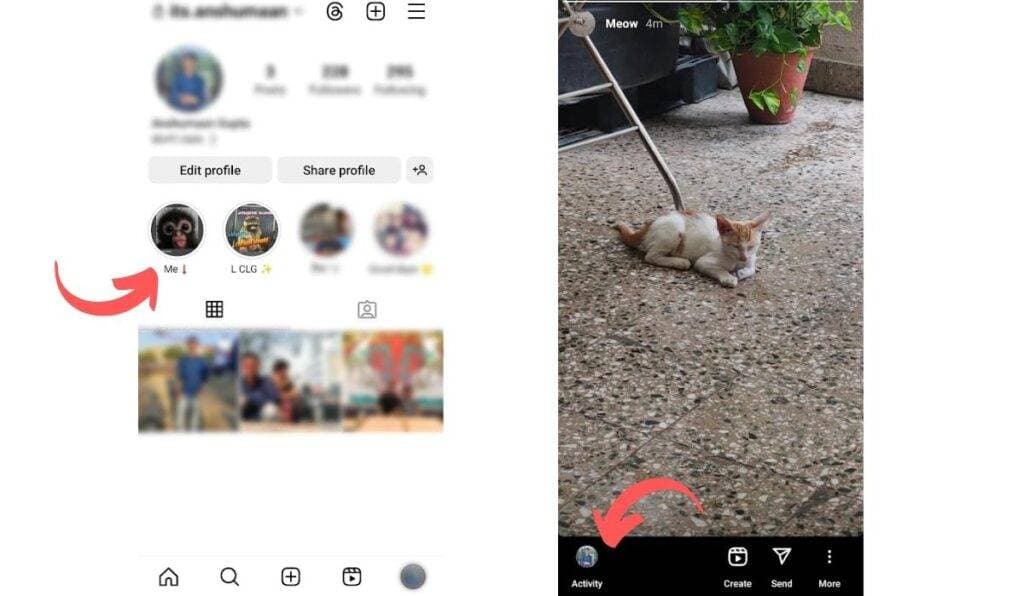
Step 1: Open up the Instagram app on your Android and go to your profile.

Step 2: Now, look for the circle icons at the top of your profile representing your Highlights.
Check Instagram Highlights viewers 1

Step 3: Tap on it, and select the Highlight you want to check.

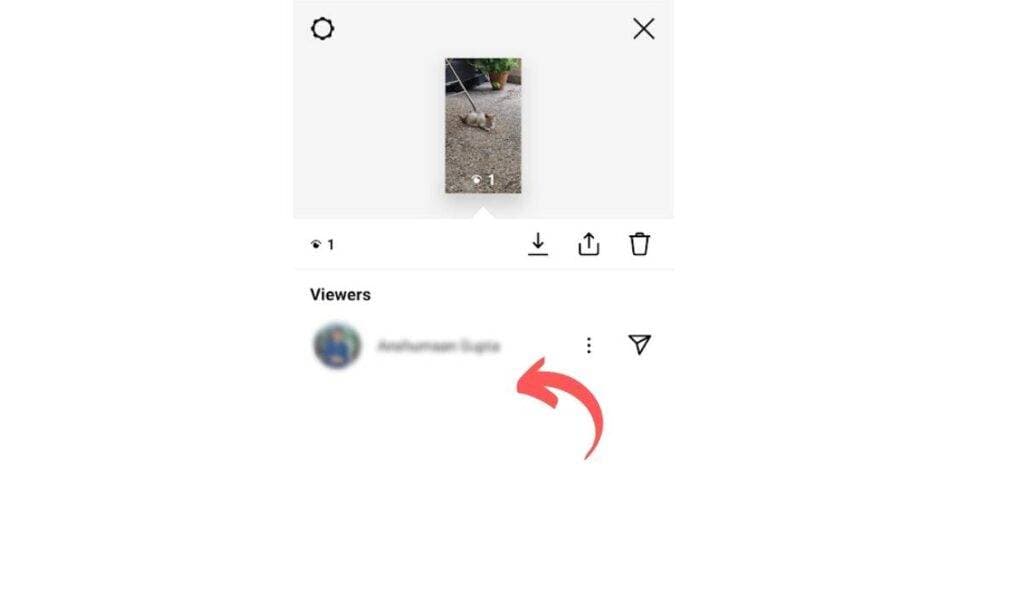
Step 4: Swipe up on the screen to see who has viewed your Highlight.

Step 5: You’ll find a list of people who have viewed your Highlight, the number of views, and their usernames.
Check Instagram Highlights viewers 2

Important Note: This method only works if someone has viewed your Highlight story within the first 48 hours of posting it.


Steps to check Instagram Highlights viewers on iPhone

Here’s how you can check who has seen your Instagram highlights on your iPhone:

Step 1: Open the Instagram app and navigate to your profile by tapping the profile icon at the bottom right corner of the screen.

Step 2: Look for the circle icon below the edit profile representing your Highlights.

Step 3: Select the one you want to check from the list of Highlights.

Check Instagram Highlights viewers 1

Step 4: Now, swipe up on the screen to view the list of people who have viewed your Highlight.

Step 5: You’ll see the number of views and a list of usernames of those who viewed it.

Check Instagram Highlights viewers 2

Remember, just like on Android, you won’t be able to see the viewers of the Highlight story after 48 hours of posting it.


Steps to check Instagram Highlights viewers on PC

If you want to check your IG highlights viewers from PC, then follow the steps below:Β 

Step 1: Go to Instagram and log in with your account.

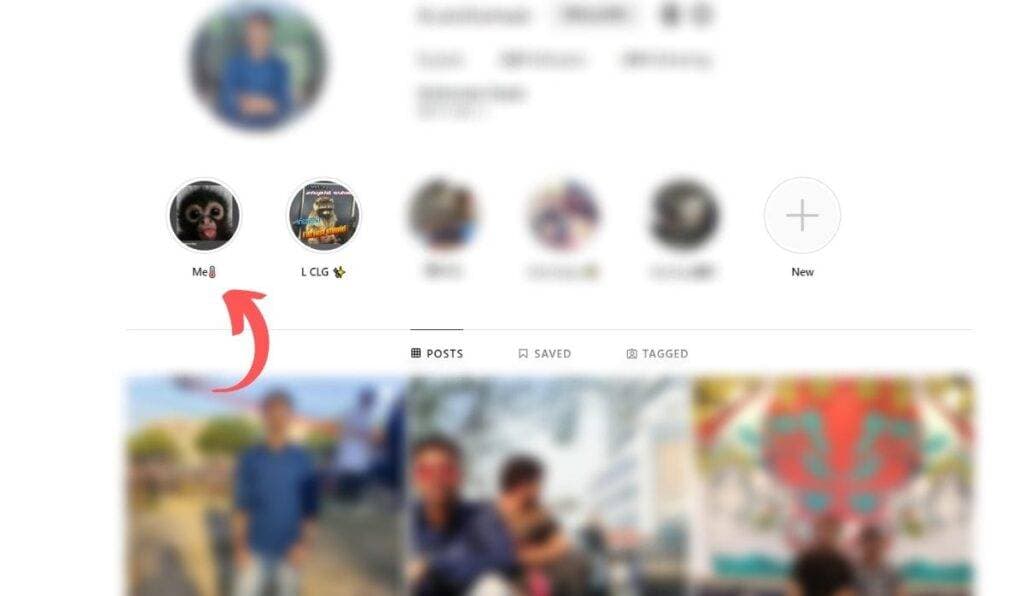
Step 2: Click on your profile pic on the top right to open your profile.

Step 3: Look for the circle icon at the top that represents your Highlights and choose the Highlight you want to check.
Check Instagram Highlights viewers on PC 1

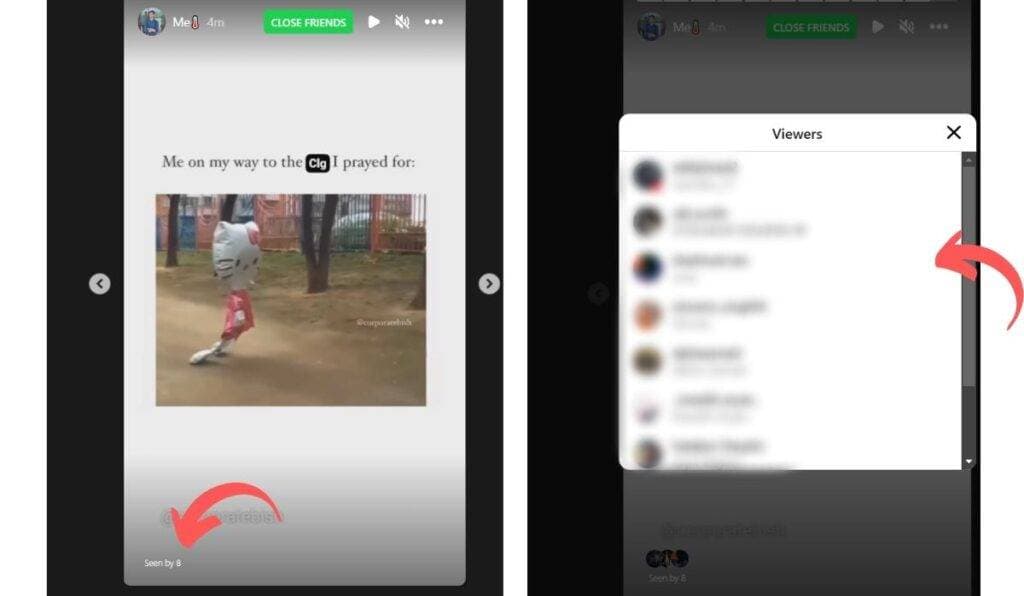
Step 4: You can see your Instagram highlight’s activity in the bottom left corner.

Step 5: Tap on it to see how many views your Instagram highlights have received and who viewed them.
Check Instagram Highlights viewers on PC 2

If you don’t see any seen by option,  it means it’s been more than 48 hours, so you won’t be able to see the Instagram highlight viewers.


Wrapping Up

Now that you know how to check who viewed Instagram highlights, you can keep an eye on the viewers. However, it’s important to note that after some time period, there is no official means to determine who viewed your Instagram highlight. After 48 hours of your story publishing, the platform does not provide the option to view the number of viewers for Instagram Highlights.Β 
Also, Using third-party applications to access unavailable features is against the platform’s terms of service. Violating this policy can lead to suspending or terminating your Instagram account. To know more about Instagram stories, you can check out How to Save Instagram Story With Music.
Also Read:
  • How To Hide Chats On Instagram
  • 10 Legal And Free Music Download Sites
  • How To Create And Use An Instagram Avatar

πŸ”₯ Good News - 70–50% OFF

We’re selling our Review units atΒ unbelievable discounts (70–80% OFF). πŸ‘‰ Don’t miss out – unbox.geekman.in
Check Offers

Share This Article
Facebook Pinterest Whatsapp Whatsapp LinkedIn Telegram
Share
What do you think?
Love1
Surprise0
Happy0
Sad0
Angry0
Cry0
ByMayur Dudharejiya
Follow:
Mayur Dudharejiya is known as the 'Geekman' on Youtube. He is the Admin and Executive Editor of Geekman. When he's not writing or making videos, then maybe he is working on a new Idea.
Leave a Comment Leave a Comment

Leave a Reply Cancel reply

Your email address will not be published. Required fields are marked *

Follow Us

2.5KLike
1.5KFollow
11KFollow
51KSubscribe

Geekman Trend

Is the Ninja Blast the best portable blender in India?

Mayur Dudharejiya
15/06/2026

OPPO Enco Air 5 Pro Review: Good, But Not the Old Magic

Mayur Dudharejiya
02/06/2026

ROSESELSA EARFREE i5 Review: I Found IEM-Grade Sound in a β‚Ή5,499 TWS

Mayur Dudharejiya
16/05/2026

Godrej AC Review 2026 : Best AC For Indian Homes, 5 Years Full Warranty

Mayur Dudharejiya
10/05/2026

Lloyd AC Review – Best Affordable AC in India

Anjali Bhatt
04/05/2026
Geekman Unbox Banner

You Might also Like

How To Update Drivers On Windows 10
How To & Guides

How To Update Drivers On Windows 10, easiest way

3 Min Read
Check If Your Windows 10 PC & Laptop Will Get a Free Windows 11 Update
How To & Guides

How To Check If Your Windows 10 PC and Laptop Will Get a Free Windows 11 Update

3 Min Read
Whatsapp For Two-Factor Authentication instagram
How To & Guides

How To Use Whatsapp For Two-Factor Authentication On Instagram?

2 Min Read
LemonDuck 2
How To & GuidesNews

LemonDuck Malware: What Is It, and Why It’s Being Considered So Dangerous?

3 Min Read
Previous Next
Geekman mobile logo Geekman mobile logo

Geekman is the best source for the latest tech news, launches,
reviews, Gadgets unboxing & comparison.

Contact@geekman.in

Quick Link

  • About Us
  • Contact Us
  • Privacy Policy
  • Advertise With Geekman
  • Career
  • Press Kit
Advertise With Geekman
2.5KFollowersLike
1.5KFollowersFollow
11.3KFollowersFollow
43KSubscribersSubscribe

Β© 2024 Geekman.in. All Rights Reserved.

Welcome Back!

Sign in to your account

Username or Email Address
Password

Lost your password?

Watch on YouTube