


Short answer: buy the ASUS Chromebook CM1405 at ₹17,990. It has the best screen, battery and ports at this price. Take the CM1505 for a 15.6 inch screen and the Acer C725 for a small, light laptop.
Geekman has covered consumer tech for over 10 years, and this ranking is built the way our buying guides always are: research first, then a hard look at the numbers. For every model we compared official specs, chip and memory, screen, ports, battery, price, warranty and service reach, and checked live prices on Amazon and Flipkart.
One thing to know before you read on. In October 2026 I could not find a new branded Windows laptop with 8GB of RAM under ₹20,000 on Amazon. Every pick below is a Chromebook, and refurbished listings are left out.
Find your laptop under 20000 in 3 quick taps
Short answer: buy the ASUS Chromebook CM1405. It has the best screen, battery and ports at this price. Take the CM1505 for a 15.6 inch screen, the Acer C725 for a small light laptop and the HP 11MK G9 EE for a young child. Turn on JavaScript to use the Finder.
What ₹20,000 buys in 2026
What you get for ₹18,000 to ₹20,000
Memory costs more in 2026, and that has pushed new Windows laptops with 8GB of RAM above ₹20,000. What you can buy new from a known brand are ChromeOS laptops. They are fast at web work, simple to maintain and do not need an antivirus, but they do not run Windows programs. If you need Windows, read my laptops under 30000 guide. If you can add ₹5,000, see laptops under 25000 for 128GB models, and best Chromebooks in India for the full ChromeOS picture.
The ranking
How I ranked these laptops
Each laptop gets a score out of 10 for performance (40%), value (40%) and service (20%). Performance looks at the chip, memory, storage, screen and ports. Value is price against what you get. Service looks at warranty, brand reach and how easy it is to get help.
See the scores
| # | Laptop | Perf. | Value | Service | Overall |
|---|---|---|---|---|---|
| 1 | ASUS Chromebook CM1405 (Kompanio 540, 4GB, 64GB) | 6.2 | 7.6 | 7.0 | 6.9 |
| 2 | ASUS Chromebook CM1505 (Kompanio 540, 4GB, 64GB, 15.6 inch) | 5.8 | 7.0 | 7.0 | 6.5 |
| 3 | Acer Chromebook C725 (Kompanio 540, 11.6 inch) | 5.4 | 7.2 | 7.0 | 6.4 |
| 4 | Acer Chromebook CO731 (Celeron N4500, 11.6 inch) | 4.8 | 6.4 | 7.0 | 5.9 |
| 5 | HP Chromebook 11MK G9 EE (MediaTek MT8183, 4GB, 32GB) | 3.8 | 6.6 | 6.5 | 5.5 |
Scores weigh performance 40%, value 40% and service 20%. They come from official specs, listing details and live prices on 24 October 2026.
Quick picks
| Pick | Laptop | Best for |
|---|---|---|
| Best Overall | ASUS Chromebook CM1405 (Kompanio 540, 4GB, 64GB) | The best screen, battery and ports in this price band, at ₹17,990 |
| Best Big Screen | ASUS Chromebook CM1505 (Kompanio 540, 4GB, 64GB, 15.6 inch) | A 15.6 inch Full HD screen and a bigger 50 Wh battery for ₹19,990 |
| Best Compact | Acer Chromebook C725 (Kompanio 540, 11.6 inch) | A small 1.2 kg Chromebook with Wi-Fi 6E and a Full HD camera for ₹18,490 |
| Best For Light Use | Acer Chromebook CO731 (Celeron N4500, 11.6 inch) | An Intel Celeron N4500 Chromebook at 1.2 kg for ₹18,990, for basic tasks only |
| Best For Schools | HP Chromebook 11MK G9 EE (MediaTek MT8183, 4GB, 32GB) | A rugged education Chromebook from HP at ₹17,980 |
Tap a name to jump to its review. Live prices are in the buy box under each review. Prices are as seen on 24 October 2026 and bank offers can change them.
Match it to your use
Which laptop for what you do
The right pick depends on how it will be used. This is how I would match them.
School and college
ASUS CM1405. Full HD screen and a 42 Wh battery.
Big screen
ASUS CM1505 with a 15.6 inch panel.
Carry every day
Acer C725 at 1.2 kg with Wi-Fi 6E.
Young kids
HP 11MK G9 EE with an education build.
The reviews
Best laptops under 20000: 5 picks
Best Overall
1. ASUS Chromebook CM1405 (Kompanio 540, 4GB, 64GB)
6.9 Overall
6.2 Performance
7.6 Value
7.0 Service
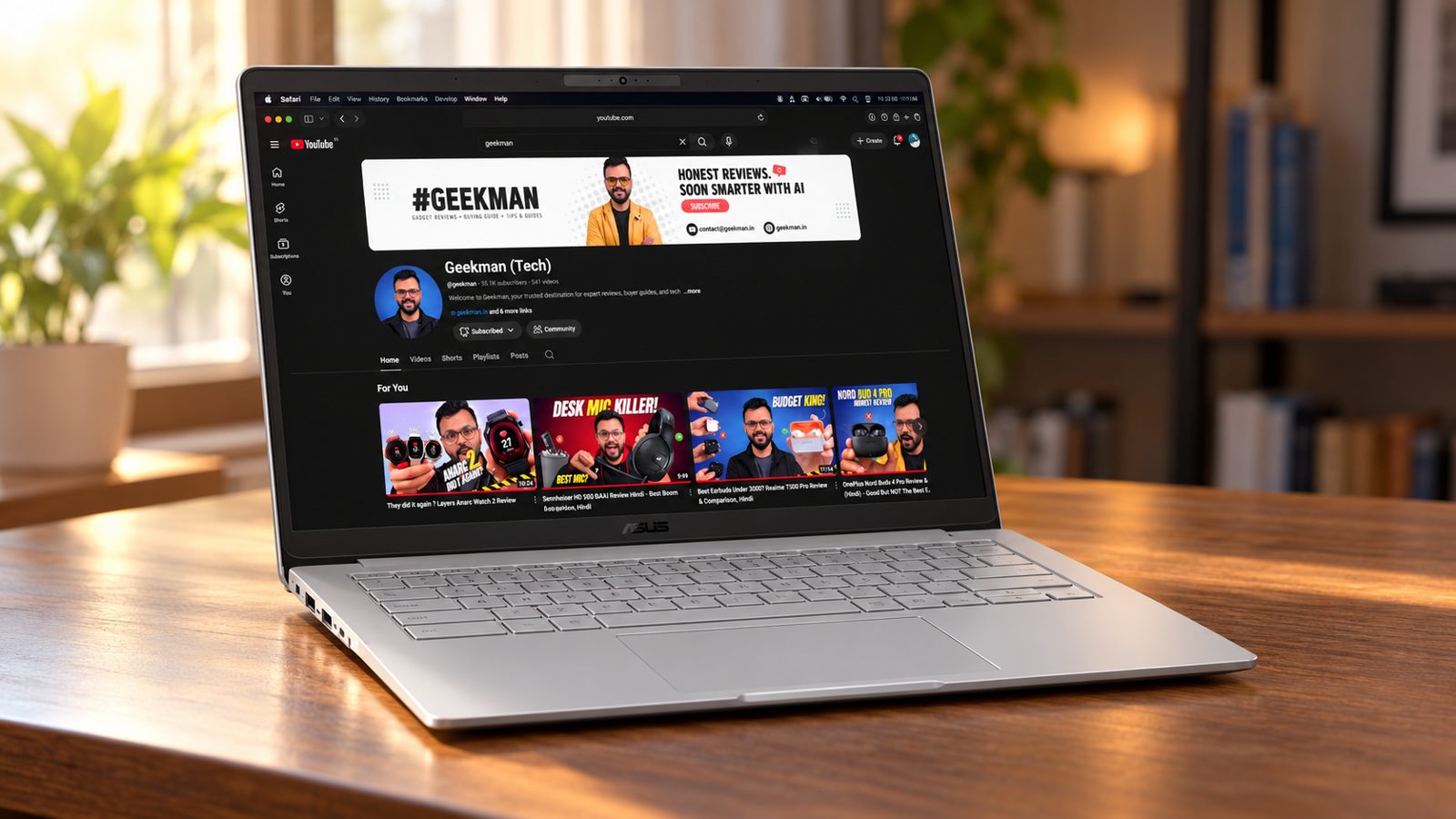
Kompanio 540, 8 cores · 4GB RAM, 64GB · 14 inch Full HD, 300 nits · 42 Wh battery · 1.37 kg
Best for
✓ Students on ChromeOS for notes, classes and browsing
✓ Parents buying a first laptop for a child
✓ Anyone who wants a proper Full HD screen on a tight budget
Not ideal for
– People who need Windows or Photoshop
– Anyone who wants to keep many local files
– Buyers who want 8GB of RAM
Verdict: The one I would buy at this budget. The screen and port selection are better than the rivals, and ₹17,990 is the lowest price in the group.


ASUS Chromebook CM1405 (2026), Smartchoice, MediaTek Kompanio 540 Processor, 4GB RAM, 64GB SSD, FHD, 14"(35.5 cm), 60Hz, Chrome OS, Pure Grey, 1.37 Kg, CM1405CM4A-S60034, Thin & Light Laptop
 Limited time deal
 Up to 10% instant discount on select HDFC Bank cards +1
- Up to 10% instant discount on select HDFC Bank cards
- No Cost EMI on select cards
Pros and cons
What we like
+ Full HD 300 nit screen at ₹17,990
+ 2 USB-C, USB-A and HDMI
+ 42 Wh battery and 1.37 kg
What we don’t like
– Only 4GB of RAM
– 64GB storage fills quickly
– ChromeOS only
Full review
At ₹17,990 the ASUS CM1405 is the cheapest laptop here and also the best equipped. It has a 14 inch Full HD screen at 300 nits, a 42 Wh battery and both USB-C and USB-A ports, which the cheaper 11 inch Chromebooks cannot match. It runs ChromeOS, so it is a browser and Android app machine and not a Windows laptop.
Everyday speed. The MediaTek Kompanio 540 has 8 cores and is built for ChromeOS. Gmail, Google Docs, Meet, video streaming and a handful of tabs run smoothly. With 4GB of RAM, expect to close tabs if you open 15 or more at once. That is the main limit of every laptop in this price band.
Screen and body. The 14 inch panel is Full HD at 300 nits, which is clearly sharper and brighter than the 1366 by 768 screens on the Acer CO731 and HP 11. It weighs 1.37 kg, light enough for a school bag.
Ports and battery. You get two USB-C ports, one USB-A and an HDMI output according to the listing, so you can plug a monitor or a pen drive in without a dongle. The battery is 42 Wh, which is a healthy size for a ChromeOS machine of this class.
The catch. Storage is 64GB, and ChromeOS itself takes a chunk, so keep files in Google Drive or on a microSD or USB drive. If you want more room, the 128GB version costs ₹5,000 more.
Price. Amazon lists it at ₹17,990 on 24 October 2026.
ASUS Chromebook CM1405 (Kompanio 540, 4GB, 64GB) vs the competition. It costs ₹2,000 less than the CM1505 and has a smaller 14 inch screen and a lighter body, while the CM1505 adds a bigger panel and a 1080p camera.
Key specs
| CPU | MediaTek Kompanio 540, 8 cores |
| Memory | 4GB |
| Storage | 64GB |
| Display | 14 inch Full HD, 300 nits |
| OS | ChromeOS |
| Battery and weight | 42 Wh, 1.37 kg |
| Ports | 2 USB-C, USB-A, HDMI |
| Warranty | Check the listing for the exact period |
Best Big Screen
2. ASUS Chromebook CM1505 (Kompanio 540, 4GB, 64GB, 15.6 inch)
6.5 Overall
5.8 Performance
7.0 Value
7.0 Service
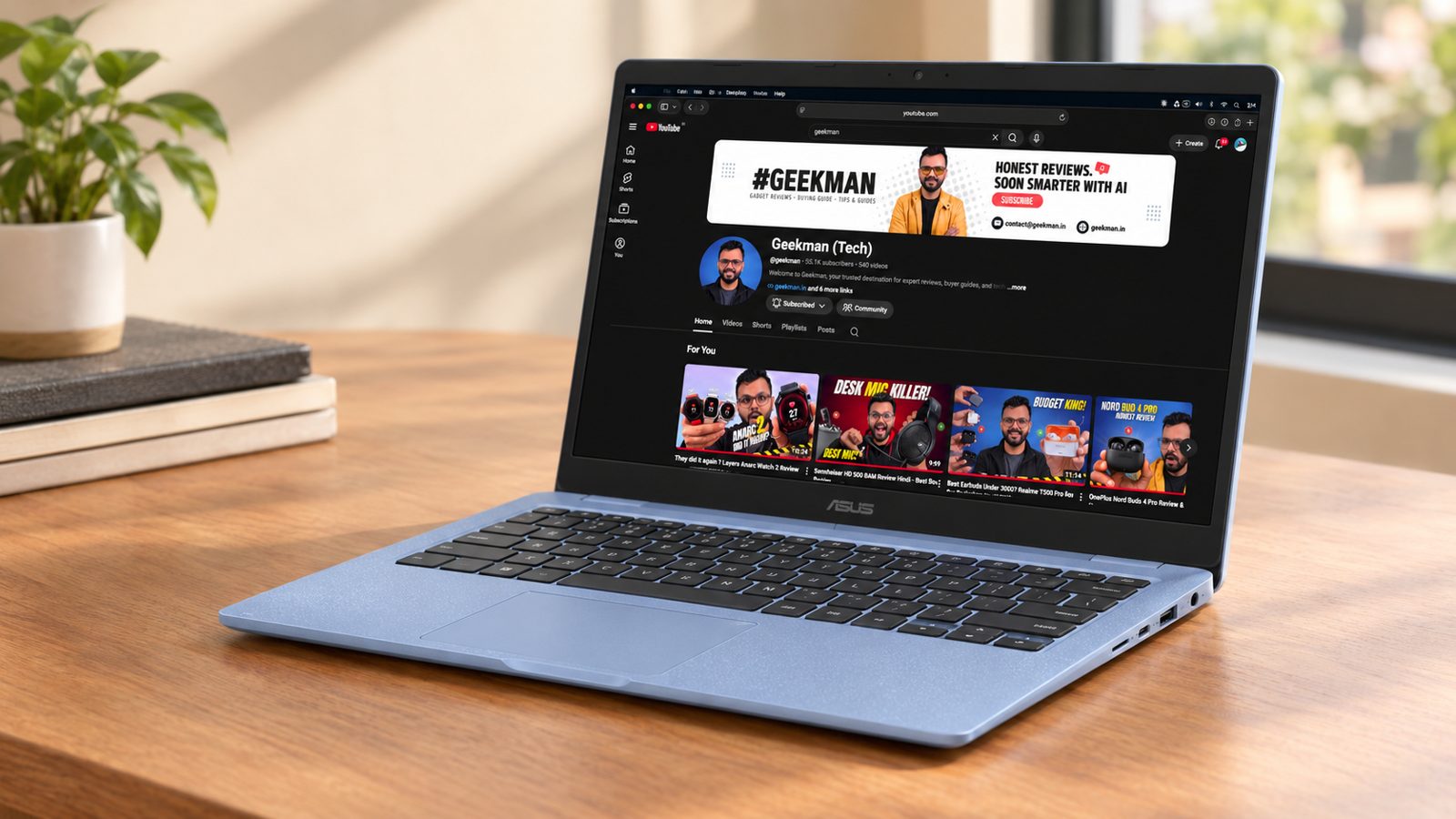
Kompanio 540, 8 cores · 4GB RAM, 64GB · 15.6 inch Full HD, 300 nits · 50 Wh battery · 1.49 kg
Best for
✓ People who want a bigger screen for study or video calls
✓ Families sharing one laptop at home
✓ Anyone who prefers a 1080p camera
Not ideal for
– Buyers who carry the laptop in a small bag
– People who need Windows software
– Anyone who wants the cheapest option
Verdict: The same core hardware as the CM1405 with a bigger screen and battery. Worth it only if you really want the 15.6 inch panel.
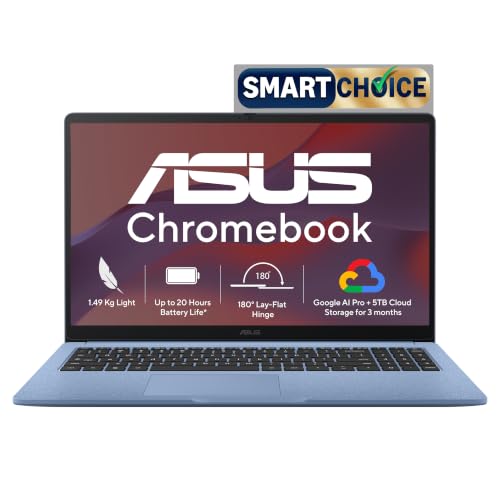
ASUS Chromebook CM1505 (2026), Smartchoice, MediaTek Kompanio 540 Processor, 4GB RAM, 64GB SSD, FHD, 15.6"(39.6 cm), 60Hz, Chrome OS, Fabric Blue, 1.49 Kg, CM1505CM4A-S70080, Thin & Light Laptop
Limited time deal Up to 10% instant discount on select HDFC Bank cards +1
- Up to 10% instant discount on select HDFC Bank cards
- No Cost EMI on select cards
Pros and cons
What we like
+ 15.6 inch Full HD screen
+ 50 Wh battery
+ 1080p camera
What we don’t like
– Same 4GB and 64GB as the cheaper model
– Heavier at 1.49 kg
– ChromeOS only
Full review
The CM1505 is the bigger sibling of the CM1405. It uses the same Kompanio 540 chip, 4GB of RAM and 64GB of storage, but adds a 15.6 inch Full HD screen, a 50 Wh battery and a 1080p camera. It costs ₹2,000 more, and the extra size is the whole reason to pick it.
Everyday speed. Performance is the same as the CM1405, because the chip and memory are identical. That means it is quick for browsing, Google Workspace and online classes and slows down with a very large number of tabs.
Screen and body. The 15.6 inch panel is Full HD at 300 nits, which is easier on the eyes for long reading or video calls. The body is 1.49 kg, only 120 grams heavier than the CM1405.
Camera and battery. The listing mentions a 1080p camera, which is better than the 720p cameras on most budget Chromebooks, and a 50 Wh battery. The bigger battery should help, but the screen is also larger, so expect similar real life use to the CM1405.
The catch. It is the same 4GB and 64GB as the cheaper model. You pay for size, not power. If you carry a laptop every day, the 14 inch CM1405 is easier to live with.
Price. Amazon lists it at ₹19,990 on 24 October 2026.
ASUS Chromebook CM1505 (Kompanio 540, 4GB, 64GB, 15.6 inch) vs the competition. It costs ₹2,000 more than the CM1405 for a bigger screen, a bigger battery and a better camera, with no gain in speed.
Key specs
| CPU | MediaTek Kompanio 540, 8 cores |
| Memory | 4GB |
| Storage | 64GB |
| Display | 15.6 inch Full HD, 300 nits |
| OS | ChromeOS |
| Battery and weight | 50 Wh, 1.49 kg |
| Camera | 1080p |
| Warranty | Check the listing for the exact period |
Best Compact
3. Acer Chromebook C725 (Kompanio 540, 11.6 inch)
6.4 Overall
5.4 Performance
7.2 Value
7.0 Service
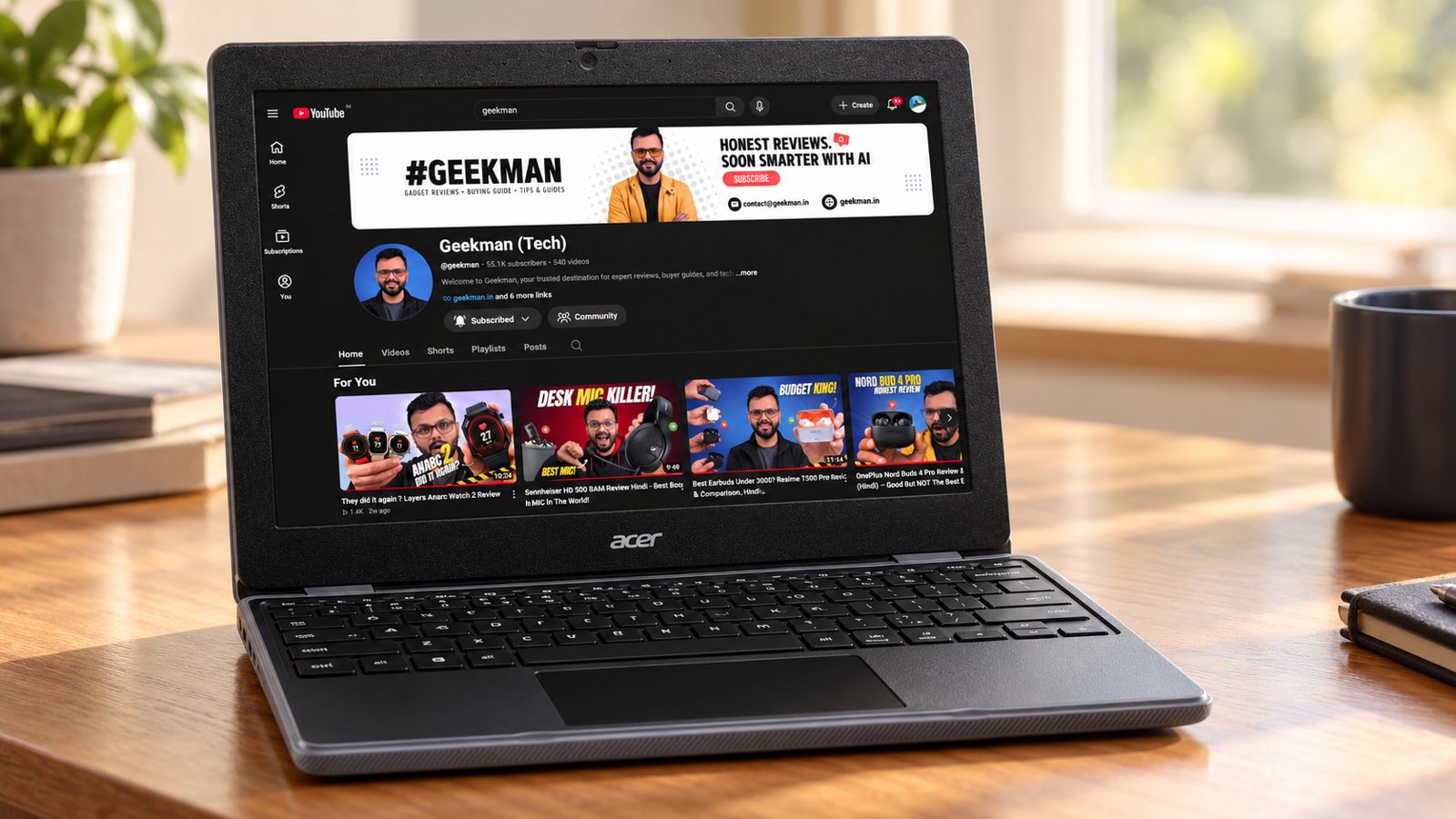
Kompanio 540, 8 cores · 11.6 inch screen · Wi-Fi 6E · Full HD camera · 1.2 kg
Best for
✓ Younger students who carry a laptop every day
✓ People who want fast Wi-Fi for cloud work
✓ Anyone who wants the lightest laptop here
Not ideal for
– People who want a Full HD screen
– Anyone who types for hours
– Buyers who want a large display
Verdict: A small and light Chromebook with a modern chip and Wi-Fi 6E. The compact screen is the trade off.

Acer Chromebook, MediaTek Kompanio 540 Octa-Core Processor, 4GB RAM, 64GB eMMC, Full HD, 11.6"/27.94cm Display, Chrome OS, Black, 1.2 KG, C725, Arm Mali G57 Graphics, WiFi 6E Laptop
Great Indian Festival Up to 10% instant discount on select HDFC Bank cards +1
- Up to 10% instant discount on select HDFC Bank cards
- No Cost EMI on select cards
Pros and cons
What we like
+ 1.2 kg and compact
+ Wi-Fi 6E
+ Full HD camera
What we don’t like
– Small 11.6 inch screen
– Battery size looks very small in the listing
– ChromeOS only
Full review
The Acer C725 is the small laptop in this group. It has the same 8 core Kompanio 540 chip as the ASUS models in an 11.6 inch, 1.2 kg body, with Wi-Fi 6E and a Full HD camera. It costs ₹500 more than the CM1405 but gives up screen size and, as far as the listing shows, battery size.
Everyday speed. The chip is the same Kompanio 540 as the ASUS models, so everyday speed is similar. Check the RAM and storage on the listing before you order, because Acer sells several configurations of this model line.
Screen and body. The 11.6 inch panel suits a school bag and a small desk. At 1.2 kg it is the lightest laptop in this guide, tied with the CO731.
Connectivity and camera. Wi-Fi 6E is rare at this price and helps on a busy home network. The listing also mentions a USB Full HD camera, which is clearer than the usual 720p webcam.
The catch. The listing shows a battery of about 15 Wh, which looks very small, so treat battery life as unproven and verify it on the product page before you buy. A small screen also means less room for split screen work.
Price. Amazon lists it at ₹18,490 on 24 October 2026.
Acer Chromebook C725 (Kompanio 540, 11.6 inch) vs the competition. It weighs 170 grams less than the CM1405 and has Wi-Fi 6E, but the CM1405 has a bigger Full HD screen and a bigger battery.
Key specs
| CPU | MediaTek Kompanio 540, 8 cores |
| Display | 11.6 inch |
| OS | ChromeOS |
| Weight | 1.2 kg |
| Wireless | Wi-Fi 6E |
| Camera | USB Full HD |
| Battery | Listing shows a small battery, verify before buying |
| Warranty | Check the listing for the exact period |
Best For Light Use
4. Acer Chromebook CO731 (Celeron N4500, 11.6 inch)
5.9 Overall
4.8 Performance
6.4 Value
7.0 Service
Celeron N4500, 2 cores · 11.6 inch HD · Wi-Fi 5 · 1.2 kg
Best for
✓ Light users who only browse and watch videos
✓ Households that already trust Intel based laptops
✓ Buyers who want a backup laptop for kids
Not ideal for
– Anyone who wants a sharp screen
– People who multitask with many tabs
– Buyers who care about value
Verdict: It works for basic use, but the C725 and CM1405 give you more for the same money.

Acer Chromebook, Intel Celeron- N4500 Processor, 4GB LPDDR4 RAM, 64GB eMMC, 29.46cm /11.6" inch HD Display, Chrome OS, Intel UHD Graphics,WiFi 5, Black, 1.2 KG, CO731, Thin & Light Laptop
Up to 10% instant discount on select HDFC Bank cards +1
- Up to 10% instant discount on select HDFC Bank cards
- No Cost EMI on select cards
Pros and cons
What we like
+ Light at 1.2 kg
+ Intel Celeron platform
+ Wide Acer service reach
What we don’t like
– 2 core chip
– HD 1366 by 768 screen
– Poor value next to the ASUS models
Full review
The CO731 uses an Intel Celeron N4500 with 2 cores and a 1366 by 768 screen. It is a basic Chromebook and costs ₹18,990, which is ₹1,000 more than the ASUS CM1405 and about the same as the Acer C725. It is the weakest value here, so only buy it if you specifically want an Intel Chromebook.
Everyday speed. The Celeron N4500 has 2 cores. ChromeOS is light, so web browsing, video streaming and Google Docs work fine, but it feels slower than the 8 core Kompanio chips when you open many tabs or run Android apps.
Screen and body. The 11.6 inch screen is HD at 1366 by 768, which looks soft for reading. The body weighs 1.2 kg.
Connectivity. The listing shows Wi-Fi 5, not the Wi-Fi 6E on the C725. It is fine for most homes.
The catch. It costs more than the CM1405 and has a weaker chip and screen. The only real argument for it is the Intel platform and Acer service.
Price. Amazon lists it at ₹18,990 on 24 October 2026.
Acer Chromebook CO731 (Celeron N4500, 11.6 inch) vs the competition. It costs ₹500 more than the Acer C725 and has a 2 core Celeron and Wi-Fi 5 instead of a Kompanio 540 and Wi-Fi 6E.
Key specs
| CPU | Intel Celeron N4500, 2 cores |
| Display | 11.6 inch HD 1366×768 |
| OS | ChromeOS |
| Weight | 1.2 kg |
| Wireless | Wi-Fi 5 |
| Warranty | Check the listing for the exact period |
Best For Schools
5. HP Chromebook 11MK G9 EE (MediaTek MT8183, 4GB, 32GB)
5.5 Overall
3.8 Performance
6.6 Value
6.5 Service
MediaTek MT8183 · 4GB RAM, 32GB · 11.6 inch · Education build
Best for
✓ Young children who will drop it
✓ Schools and parents who want a durable Chromebook
✓ Very light browsing and online classes
Not ideal for
– Anyone who wants speed
– People who want a good screen
– Buyers who need storage
Verdict: A school oriented machine. It is slow and the specs are old, so buy it only for a child who needs a tough laptop.

HP G-Series MediaTek MT8183 - (4 GB/32 GB EMMC Storage/Chrome OS) 11MK G9 EE Chromebook Laptop
Lowest price
Up to 10% instant discount on select HDFC Bank cards +1
- Up to 10% instant discount on select HDFC Bank cards
- No Cost EMI on select cards

Pros and cons
What we like
+ Education build
+ Light and compact
+ HP brand and service
What we don’t like
– Oldest chip and 32GB storage
– Low resolution screen
– Weak value
Full review
The HP 11MK G9 EE is built for classrooms. It has a MediaTek MT8183 chip, 4GB of RAM and 32GB of storage, which is the lowest storage in this guide. It costs ₹17,980, almost the same as the better ASUS CM1405, so you pay for HP’s rugged education design and not for speed.
Everyday speed. The MT8183 is an older 8 core chip, and it is slower than the Kompanio 540 in the other Chromebooks here. It handles Google Classroom, Meet and Docs, but it is slow with heavy pages.
Screen and body. The 11.6 inch screen is small and low resolution. The EE (Education Edition) body is designed to take knocks in a school bag, according to HP’s education range.
The catch. 32GB of storage is very small, so use Google Drive. The specs are the oldest in this guide at nearly the highest price.
Price. Amazon lists it at ₹17,980 on 24 October 2026.
HP Chromebook 11MK G9 EE (MediaTek MT8183, 4GB, 32GB) vs the competition. It costs ₹10 less than the CM1405 but has an older chip, half the storage and a worse screen, so only pick it for the rugged build.
Key specs
| CPU | MediaTek MT8183 |
| Memory | 4GB |
| Storage | 32GB |
| Display | 11.6 inch |
| OS | ChromeOS |
| Warranty | Check the listing for the exact period |
Questions other guides skip
The questions most laptop lists leave out
These are questions buyers keep asking about these exact models. I checked each against the Amazon listings on 24 October 2026.
1 · Why are there no Windows laptops in this list?
Because new, branded Windows laptops with 8GB of RAM now start above ₹20,000. The cheaper ones on Amazon are refurbished or old business models, and I cannot confirm their condition or warranty, so I left them out.
2 · Can I run Zoom, Google Meet and Teams?
Yes. Google Meet runs natively, and Zoom and Teams run in the browser or as Android apps. Check that your school or office does not require a Windows only program.
3 · Is the HP 11MK G9 EE worth buying for adults?
Probably not. It has an older chip, 32GB of storage and a small screen, and it costs about the same as the better ASUS CM1405. It makes sense for a child who needs a tough laptop.
4 · Is a Chromebook safe from viruses?
ChromeOS verifies itself at startup and runs apps in sandboxes, so ordinary viruses are rare. You still need to be careful with phishing links and browser extensions.
5 · What if the Chromebook stops getting updates?
Each Chromebook has an automatic update expiration date set by Google. After that date it still works but gets no new features or security patches. Check the date for your exact model before you buy.
What this means for your buying decision
You want the best deal: the ASUS Chromebook CM1405.
You want a bigger screen: the ASUS CM1505 at 15.6 inch.
You want a small, light laptop: the Acer Chromebook C725.
You need Windows: read my laptops under 30000 guide.
You study: read my laptops for students guide.
Compare all 5 laptops at a glance
| Laptop | CPU | RAM and storage | Screen | Weight | Price |
|---|---|---|---|---|---|
| ASUS CM1405 | Kompanio 540, 8 cores | 4GB, 64GB | 14 inch Full HD | 1.37 kg | ₹17,990 |
| ASUS CM1505 | Kompanio 540, 8 cores | 4GB, 64GB | 15.6 inch Full HD | 1.49 kg | ₹19,990 |
| Acer C725 | Kompanio 540, 8 cores | See listing | 11.6 inch | 1.2 kg | ₹18,490 |
| Acer CO731 | Celeron N4500, 2 cores | See listing | 11.6 inch HD | 1.2 kg | ₹18,990 |
| HP 11MK G9 EE | MediaTek MT8183 | 4GB, 32GB | 11.6 inch | See listing | ₹17,980 |
Specs are from the Amazon.in listings in October 2026. Prices were seen on 24 October 2026 and move daily. Verify the exact variant before you buy.
The buying guide
How to choose a laptop under 20000
Chip
Kompanio 540 has 8 cores and beats the 2 core Celeron here.
Memory
All have 4GB. Keep tabs under control.
Screen
Full HD at 300 nits beats 1366 by 768.
Battery
Check Wh, 42 to 50 Wh is good for ChromeOS.
Ports
USB-C plus USB-A saves dongles.
Service
ASUS, Acer and HP all have service centres across India.
1 · Processor
The Kompanio 540 has 8 cores and is designed for ChromeOS. The Celeron N4500 has 2 cores, and the MT8183 is an older chip.
2 · Memory and storage
4GB of RAM is the norm here. Storage is 32 to 64GB, so keep files in Google Drive or on a USB drive.
3 · Screen
Full HD at 300 nits on the ASUS models is clearly better than the HD panels on the Acer CO731 and HP 11.
4 · Battery and weight
The ASUS models list 42 and 50 Wh batteries. The Acer C725 listing shows a very small battery, so verify it.
5 · Ports
Look for at least one USB-C and one USB-A. The CM1405 adds a second USB-C and HDMI.
6 · Warranty and service
Most come with 1 year. Register the laptop on day one and keep the invoice.
Other laptops I looked at
HP 15s Celeron N4500 (Windows, 8GB, 512GB). The Windows option I wanted to include, but Amazon showed it as unavailable on 24 October 2026.
Refurbished and old business laptops. Many listings from Amazon sellers cost ₹20,000 to ₹25,000 with an older Core i5 and 8GB of RAM. I left them out because condition and warranty vary by seller.
Primebook 2 Neo. An Android based laptop listed above ₹20,000. I cover it in the laptops under 25000 guide.
The verdict
Which laptop under 20000 should you buy?
Best overall: ASUS Chromebook CM1405, at ₹17,990. Check price
Best big screen: ASUS Chromebook CM1505, at ₹19,990. Check price
Best compact: Acer Chromebook C725, at ₹18,490. Check price
Best for light use: Acer Chromebook CO731, at ₹18,990. Check price
Best for schools: HP Chromebook 11MK G9 EE, at ₹17,980. Check price
Not sure? Buy the ASUS Chromebook CM1405. It is the cheapest here and the best equipped.
More buying guides from Geekman
Laptops under 20000 FAQ
Which is the best laptop under 20000 in India in 2026?
The ASUS Chromebook CM1405 at ₹17,990 is the best overall pick, with a 14 inch Full HD screen, a 42 Wh battery and a full set of ports. It runs ChromeOS, not Windows, because I could not find a new branded Windows laptop with 8GB of RAM under ₹20,000 on Amazon on 24 October 2026.
Is there a Windows laptop under 20000?
Not a good one from a mainstream brand. The listings under ₹20,000 are mostly refurbished or old business laptops from sellers, and I left them out because the warranty and condition are hard to verify. If you need Windows, see my guide to the best laptops under 30000.
Can a Chromebook replace a laptop for a student?
For school and college work that happens in a browser, such as Google Docs, Meet, video streaming, notes and online classes, yes. It will not run Windows programs like Photoshop, Tally or AutoCAD, so check what your course needs first.
Is 4GB RAM enough on a Chromebook?
It is enough for browsing, classes and documents, and ChromeOS uses memory sparingly. You will see slowdowns with a very large number of tabs or heavy Android apps. All the Chromebooks in this budget have 4GB, so the choice comes down to the chip, screen and battery.
What is the difference between the Kompanio 540 and the Celeron N4500?
The Kompanio 540 has 8 cores and is built for ChromeOS. The Celeron N4500 has 2 cores. For multitasking and Android apps, the Kompanio feels quicker, which is why the ASUS CM1405 and Acer C725 ranked above the CO731.
Does the ASUS CM1405 have a good screen?
Yes for the price. The listing shows a 14 inch Full HD panel at 300 nits, while the Acer CO731 and HP 11MK G9 use 1366 by 768 screens. It is still an office grade panel, so do not expect strong colour accuracy.
Should I pay ₹5,000 more for the 128GB version?
If you store files on the laptop, yes. 64GB fills quickly once ChromeOS and apps are installed. If you use Google Drive or a USB drive, the 64GB model is fine. See my guide to laptops under 25000 for the 128GB models.
Can I install Android apps on these Chromebooks?
ChromeOS supports Google Play apps on most current models, including these, though performance depends on the chip and RAM. Check Google’s list of supported devices for the exact model before you rely on a specific app.
How long will a Chromebook get updates?
Google gives each Chromebook a set number of years of automatic updates, shown on its Auto Update Expiration page for the exact model. Check it for the model you plan to buy, because newer chips usually get longer support.
Is the Acer C725 battery really only 15 Wh?
That is what the Amazon listing shows, and it is far smaller than the 42 Wh and 50 Wh batteries in the ASUS models. I treat battery life as unproven. Confirm the number on Acer’s product page before you order.






Sir computer shikhne ke liye chaiye jisme ms excel aur photoshop shikh saku under 20000 konsa accha hai jaldi reply kare sir plz
Hello sir, your all video are very knowledgeable.
Sir, I want to purchase one laptop under 40k price bracket and my basic need :
1. It should be 13 – 13.5 inch screen.
2. Thin, light, notebook, ultrabook etc..
3. RAM : above 4 GB..
Plz suggest your valuable inputs. Plz..
With warm regards..