

Short answer: buy the MSI Modern 14 if you want the most laptop under ₹45,000, with 16GB of RAM. Buy the Acer TravelLite 2026 if you can spend ₹58,490 and want 16GB and a three year warranty. Buy the Acer TravelLite 14 if you want 16GB and Office included under ₹50,000.
Geekman has covered consumer tech for over 10 years, and this ranking is built the way our buying guides always are: research first, then a hard look at the numbers. For every model we compared official specs, RAM and upgrade options, screen, software included, price, warranty and service reach, and compared current prices across Indian retailers.
What changed in 2026
What ₹50,000 buys a student in 2026
Prices went up this year. A budget that used to get you a Ryzen 5 and 16GB now gets you a Ryzen 3 and 8GB, and no Ryzen 5 with 16GB sells under ₹50,000 at retailers. So I did two things. I picked six laptops under ₹50,000, and one stretch pick just above it that I think is worth the extra money.
Trap one
No Windows on the cheap offer
Some cheap offers ship with DOS only. Read the OS line before you buy.
Read review
Trap two
Soldered RAM
Some laptops fix the RAM at 8GB, so they cannot grow with you.
Read review
Trap three
A dim screen
Many budget screens sit around 250 nits and look washed out outdoors.
Read review
Trap four
Old lists
Lists you read online go out of date fast, so check the exact model today.
Read review
These are the four traps I kept running into. Cheap offers can ship without Windows, some have soldered RAM, many screens are dim, and lists you read online go out of date fast.
Find your student laptop in 3 quick taps
Short answer: the MSI Modern 14 is the best overall, the Acer TravelLite 2026 has the longest warranty and the Acer TravelLite 14 comes with Office. Turn on JavaScript to use the Finder.
The ranking
How I ranked these laptops for students
Each laptop gets a score out of 10 for performance (40%), value (40%) and service (20%). Performance is weighted toward the processor cores, RAM, storage and screen. Value is price against what you get, including Office and upgrade options. Service looks at warranty and how easy it is to get help.
See the scores
| # | Laptop | Perf. | Value | Service | Overall |
|---|---|---|---|---|---|
| 1 | MSI Modern 14 (16GB, 512GB) | 8.2 | 9.4 | 7.0 | 8.4 |
| 2 | Acer TravelLite 2026 (Ryzen 5 7430U, 16GB, 512GB) | 8.4 | 6.8 | 9.0 | 7.9 |
| 3 | Acer Aspire Lite Metal (Ryzen 3 7330U, 8GB, 512GB) | 6.8 | 8.4 | 7.0 | 7.5 |
| 4 | Acer TravelLite 14 (Ryzen 3 5400U, 16GB, 512GB) | 6.6 | 7.8 | 7.0 | 7.2 |
| 5 | HP 15 2026 (Ryzen 3 7335U, 8GB DDR5, 512GB) | 6.6 | 7.2 | 7.5 | 7.0 |
| 6 | Dell Pro 15 (Ryzen 5 7520U, 8GB DDR5, 512GB) | 6.8 | 6.6 | 8.0 | 7.0 |
| 7 | Lenovo IdeaPad Slim 3 (Ryzen 3, 8GB, 512GB, Office 2024) | 6.4 | 6.6 | 8.4 | 6.9 |
Scores weigh performance 40%, value 40% and service 20%. They come from official specs and live prices on 22 October 2026.
Quick picks
| Pick | Laptop | Best for |
|---|---|---|
| Best Overall | MSI Modern 14 (16GB, 512GB) | The most laptop under ₹45,000: 16GB RAM, a 14 inch Full HD screen and 1.4 kg |
| Best Warranty | Acer TravelLite 2026 (Ryzen 5 7430U, 16GB, 512GB) | A 16GB laptop with a three year warranty, if you can stretch past ₹50,000 |
| Best Big Screen | Acer Aspire Lite Metal (Ryzen 3 7330U, 8GB, 512GB) | A 15.6 inch IPS screen, a metal body and RAM you can upgrade |
| Best With Office | Acer TravelLite 14 (Ryzen 3 5400U, 16GB, 512GB) | 16GB of RAM with Office Home and Student 2021 included, under ₹50,000 |
| Best Value Windows 11 Pro | HP 15 2026 (Ryzen 3 7335U, 8GB DDR5, 512GB) | DDR5 RAM that goes up to 32GB, with Windows 11 Pro for ₹46,440 |
| Best Dell Service | Dell Pro 15 (Ryzen 5 7520U, 8GB DDR5, 512GB) | A Dell with a 120Hz screen, a Ryzen 5 and Windows 11 Pro |
| Best Lenovo Service | Lenovo IdeaPad Slim 3 (Ryzen 3, 8GB, 512GB, Office 2024) | Office 2024 included and Lenovo service, but the RAM is fixed at 8GB |
Tap a name to jump to its review. Live prices are in the buy box under each review. Prices are as seen on 22 October 2026 and bank offers can change them.
The reviews
Best laptops for students in India: 7 picks
Best Overall
1. MSI Modern 14 (16GB, 512GB)
8.4 Overall
8.2 Performance
9.4 Value
7.0 Service


Core i5 or Ryzen 5 · 16GB RAM · 512GB SSD · Backlit keyboard · 1.4 kg
Best for
✓ Students who carry the laptop every day
✓ Engineering and coding students on a budget
✓ Anyone who wants 16GB under ₹45,000
Not ideal for
– People who need Office included
– Anyone who wants the newest chip generation
Verdict: The best mix of RAM, speed and weight under ₹45,000.

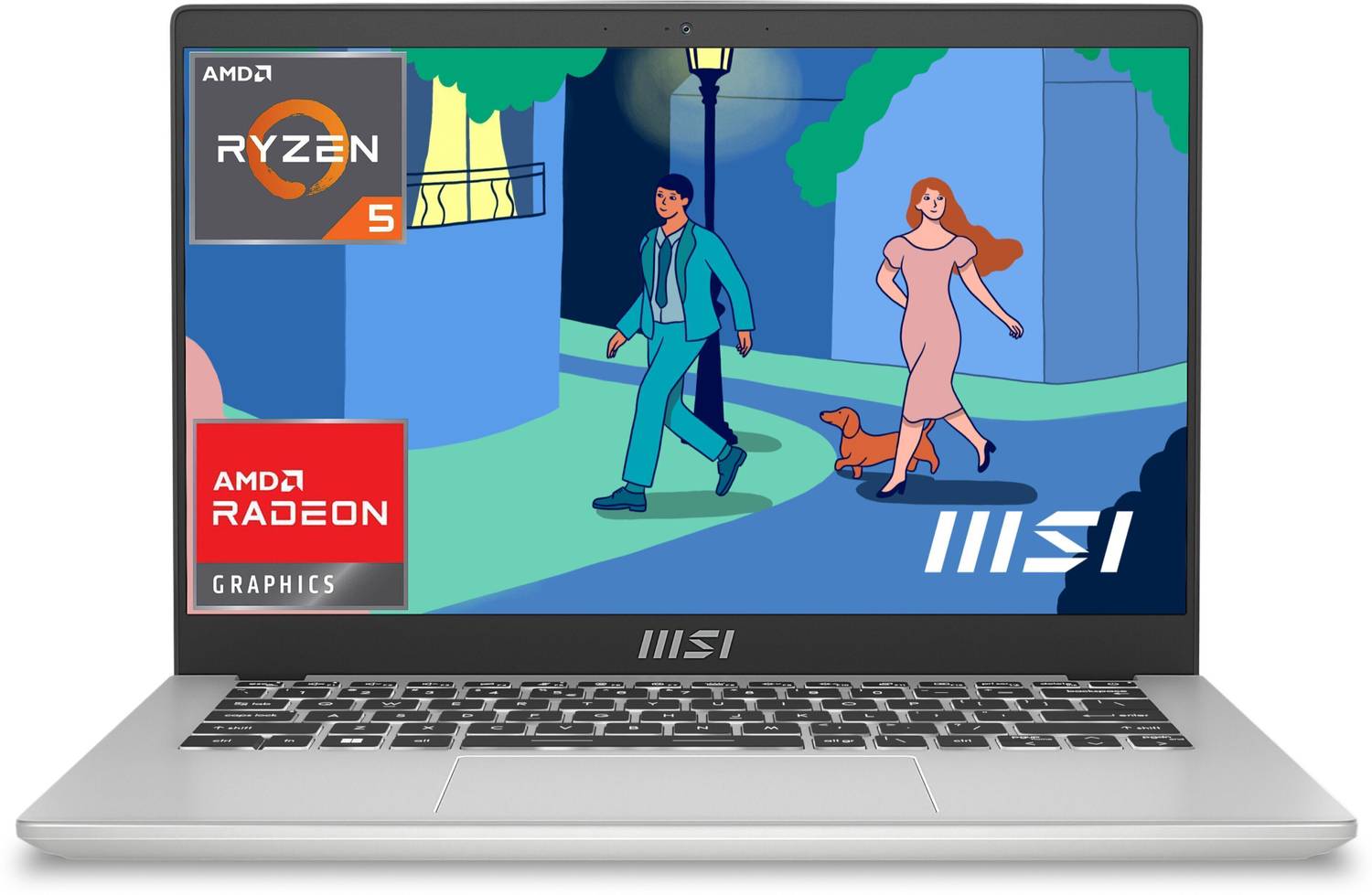
MSI Modern 14 AMD Ryzen 5 Hexa Core 7530U - (16 GB/512 GB SSD/Windows 11 Home) Modern 14 C7M-062IN Thin and Light Laptop

Up to 5% instant discount on Flipkart Axis & Flipkart SBI credit cards Details
- Up to 5% instant discount on Flipkart Axis & Flipkart SBI credit cards
Pros and cons
What we like
+ 16GB RAM at about ₹43,000
+ Backlit keyboard
+ 1.4 kg, 14 inch Full HD
What we don’t like
– 12th generation chip
– No Office
– One year warranty
MSI Modern 14 C7M Ryzen 5 7530U review: the best looking laptop for college
The MSI Modern 14 (C7M, Ryzen 5 7530U, 16GB, 512GB) is the metal bodied student laptop of this list. The Ryzen 5 7530U is a 6 core, 12 thread chip that boosts to 4.5 GHz, and it comes with 16GB of DDR4-3200 memory soldered to the board and a 512GB PCIe Gen 3 SSD, with one empty M.2 slot for more storage. The 14 inch screen is Full HD anti-reflective IPS at 60 Hz with a modest 45 percent NTSC colour range. The lid and keyboard deck are metal, the base is plastic, and MSI tests it to MIL-STD-810G. It weighs 1.4 kg, is 19.35 mm thick and has a 39.3 Wh battery. Ports are HDMI, a USB 3.2 Gen 2 Type-A, a USB 3.2 Gen 2 Type-C with charging, two USB 2.0 and a microSD reader.
My take: this is the laptop to buy if a student wants something that looks good, carries easily and stays fast through four years of college. Six cores and 16GB handle engineering software like AutoCAD LT, Python, Android Studio and lots of Chrome tabs, and the free M.2 slot lets you add storage later. Lab tests show strong PCMark and Geekbench results, and light games like Valorant average over 140 fps on low settings. The weak points are the screen colour and the battery. Think of the MSI as the performance pick among the seven, and the Acer TravelLite 2026 as the practical, port-rich pick. I would pick the MSI for a computer science or design student, and I would pick the TravelLite for a student whose main need is a light bag and a campus Ethernet cable.
MSI Modern 14 battery, running cost and the hostel charging habit
The 39.3 Wh battery is the small part of this laptop. PCMark video playback at 80 percent brightness ran 6 hours 28 minutes, and real use needed a charge after about 5 hours. A full charge uses about 0.039 kWh, which is 31 paise at Rs 8 a unit, or about Rs 110 a year if you charge once a day. That is cheap, but you must carry the charger to every lecture day that runs past lunch. Because the 16GB of memory is soldered, you cannot expand it, so the money you save by skipping a 32GB upgrade is the money you spend if software needs more. Storage can grow, since the second M.2 slot is empty.
Living with the MSI Modern 14: keyboard, ports and sound
The backlit keyboard has 1.5 mm travel and is comfortable for long assignments, though there is no numpad, and the deck flexes slightly under hard typing. The trackpad is accurate with a firm click. Speakers are two 2 W bottom-firing units that sound muddy and are not loud, so use earphones in a library. The webcam is 720p. The screen is bright enough indoors and weak in sunlight, and the 45 percent colour range is fine for study but poor for design. Under a gaming load the CPU reached about 90 degrees, so a cooling pad helps for long sessions. The two USB 2.0 ports are slow for pen drives.
MSI Modern 14 warranty, service and what to check on delivery
MSI India gives a standard one year warranty, and some sellers add an extended plan, so ask for the terms in writing. MSI has fewer service centres than Acer, Lenovo or HP, so check the service address in your city before you order. The Modern 14 name covers several CPUs, including Core i3 and Core i5 versions with the C13M code and Ryzen 5 versions with the C7M code, so match the CPU, RAM and storage on the carton: it must read Ryzen 5 7530U, 16GB and 512GB if you want the specification described here. Check the OS line too, because some Modern 14 units ship with DOS and need a Windows licence.
Who should buy the MSI Modern 14 and where it falls short
It falls short on battery, speakers and the slow USB 2.0 ports. The Acer TravelLite 2026 has a wider port set and more service centres. The Lenovo IdeaPad Slim 3 has a bigger battery and is easier to get serviced. Buy the Modern 14 if you want a sharp, light laptop with real performance for coding and design coursework. Skip it if you need all-day battery without a charger, or if the weak speakers and the dull colour panel will bother you.
Key specs
| CPU | Core i5-1235U or Ryzen 5 7530U, check the version |
| Memory | 16GB, check upgrade options |
| Display | 14 inch Full HD (1920×1080) |
| Storage | 512GB SSD |
| OS | Windows 11 Home, no Office |
| Weight and battery | About 1.4 kg, 3 cell battery |
| Warranty | 1 year onsite |
Best Warranty
2. Acer TravelLite 2026 (Ryzen 5 7430U, 16GB, 512GB)
7.9 Overall
8.4 Performance
6.8 Value
9.0 Service

Ryzen 5 7430U · 16GB RAM · 512GB SSD · 1.34 kg · 3 year warranty
Best for
✓ Students who want one laptop for four years
✓ Coding and design students
✓ Parents who care about warranty
Not ideal for
– Anyone with a hard ₹50,000 limit
Verdict: The one to buy if you can go past ₹50,000. It is the only pick here with 16GB and a three year warranty.
Acer 3 Years Warranty TravelLite (2026) AMD Ryzen 5 Hexa Core 7430U (16 GB/512 GB SSD/Windows 11 Home)
Up to 5% instant discount on Flipkart Axis & Flipkart SBI credit cards Details
- Up to 5% instant discount on Flipkart Axis & Flipkart SBI credit cards
Pros and cons
What we like
+ 16GB RAM, expandable to 32GB per Flipkart
+ 3 year warranty
+ 1.34 kg
What we don’t like
– ₹58,490, above the ₹50,000 line
– Flipkart only
– Check the exact variant
Acer TravelLite TL14-42M Ryzen 5 7430U review: the 14 inch student workhorse
The Acer TravelLite 2026 (TL14-42M, Ryzen 5 7430U, 16GB, 512GB) is Acer’s value business laptop that students buy because it is light and tough. The Ryzen 5 7430U has 6 cores and 12 threads. Acer’s store lists a 14 inch Full HD display, 16GB of memory, a 512GB SSD and a weight of 1.39 kg. The TravelLite range is built for business and school use, with a spill-resistant keyboard and a wide selection of ports on some models. The sibling TravelLite 14 TL04-41M has USB-C, two USB 3.0 ports, HDMI 1.4, an RJ45 Ethernet port, a microSD reader and Bluetooth 5.2, so check the carton for the exact port list. Acer does not print a drop-test rating for this model, so judge the lid and hinge in the shop. Memory is 16GB, and the SSD is 512GB. It is a good fit for a student who wants a computer lab style machine without the weight.
My take: this is the pick for a student who commutes by bus or train and needs a laptop to last four years. It is light enough for a daily bag, the ports mean fewer dongles, and the Ryzen 5 7430U is plenty fast for note taking, coding and research. It gives up polish: the screen is a plain IPS panel, the case is plastic and the speakers are ordinary. The MSI Modern 14 looks better and has a metal deck, while the TravelLite is the sturdier, more practical choice. For a degree programme where the laptop will be dropped in a bag every day, I would pick this one. The 16GB of memory is the reason I would choose it over the 8GB laptops in this list, because Chrome, Teams and a code editor open together will use more than 8GB on Windows 11. The Ryzen 5 7430U is a mid-range chip, so it handles Python, Java and small data sets, but it is not for video editing or 3D design.
Acer TravelLite running cost and battery
Acer does not print a watt-hour figure on all TravelLite pages, and the sibling TL04-41M is quoted at up to 8.5 hours. A battery in the 40 to 50 Wh range costs about 35 paise to fill at Rs 8 a unit, so a year of daily charging is Rs 130 or less. A realistic expectation is 5 to 7 hours of mixed use. The money angle is longevity: a sensible chassis and a free storage upgrade path usually cost less over four years than a cheaper laptop that needs a hinge or battery repair in year two. Ask whether the SSD and memory can be accessed with the bottom panel, which Acer service staff can confirm for your unit.
Living with the Acer TravelLite: keyboard, ports and the screen
The keyboard is spill-resistant and comfortable, and the trackpad is a basic unit. The Full HD IPS panel is fine for reading and lectures but dim outdoors. If the model has an RJ45 port, you can plug into a hostel Ethernet cable, which beats weak Wi-Fi on a crowded floor. A USB-C port, two USB 3.0 ports and HDMI cover a projector and a pen drive. The webcam is sufficient for online classes. The Ryzen 5 7430U keeps the fan quiet in everyday use, and on a long compile or a Teams call with screen share you will hear it spin up for a minute before it settles. The trackpad has no glass finish, so it feels slightly plastic, and you may want an external mouse in a lab.
Acer TravelLite TL14-42M warranty, service and what to check on delivery
Acer gives a one year warranty in India with onsite service in many cities. Register within 15 days or keep the invoice. Cracked displays are excluded, and some sellers add a two year extension for a small fee, which is worth asking for in writing. On delivery, match the carton for Ryzen 5 7430U, 16GB, 512GB and 14 inch, since TravelLite is also sold with Ryzen 3 and 8GB. Check the OS: some TravelLite units ship with DOS and need a Windows licence. Ask for the model number TL14-42M in the invoice line, because the TravelLite name also covers 15.6 inch and Intel versions. If you are buying for a group of students from one college, ask the seller about a bulk or institutional invoice, which can include onsite service.
Who should buy the Acer TravelLite and where it falls short
It falls short on looks, sound and screen brightness. The MSI Modern 14 is better looking and the Acer Aspire Lite Metal has a bigger screen. Buy the TravelLite if you want the most practical student laptop in the list. It also lacks a dedicated numpad, so accounting students may prefer the 15.6 inch Aspire Lite Metal. Skip it if you want a metal body or loud speakers.
Key specs
| CPU | AMD Ryzen 5 7430U, 6 cores |
| Memory | 16GB, expandable up to 32GB per maker specs |
| Display | 14 inch Full HD |
| Storage | 512GB SSD |
| Weight and battery | About 1.34 kg, 3 cell battery |
| Warranty | 3 years per the offer title |
Best Big Screen
3. Acer Aspire Lite Metal (Ryzen 3 7330U, 8GB, 512GB)
7.5 Overall
6.8 Performance
8.4 Value
7.0 Service


Ryzen 3 7330U · 15.6 inch IPS · 8GB, up to 32GB · 512GB SSD · 1.65 kg
Best for
✓ Students who want a big screen
✓ Anyone who plans to add RAM later
✓ People who type a lot
Not ideal for
– Anyone who needs Office included
– Students who walk a lot
Verdict: The best big screen laptop here, and one of the few where upgrading RAM is clearly allowed.
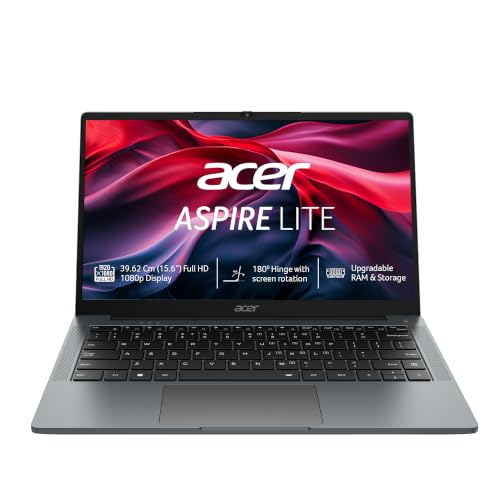
Acer Aspire Lite Metal,AMD Ryzen 3 7330U, 8 GB DDR4 RAM/512 GB SSD, 15.6" FHD IPS Display, Win 11Home, Steel Grey, 1.65 Kg, AL15-42, Backlit Keyboard, Thin & Light Laptop

Up to 6% instant discount on select credit cards +1
- Up to 6% instant discount on select credit cards
- Cashback with Amazon Pay ICICI Bank Credit Cards
Pros and cons
What we like
+ RAM upgradable to 32GB per maker specs
+ 15.6 inch Full HD IPS, backlit keyboard
+ Metal body
What we don’t like
– 4 core chip
– 1.65 kg
– No Office
Acer Aspire Lite Metal AL15-41 Ryzen 3 7330U review: the budget 15.6 inch with an upgrade path
The Acer Aspire Lite Metal (AL15-41, Ryzen 3 7330U, 8GB, 512GB) is the cheap, big screen laptop in this list. The Ryzen 3 7330U is a 4 core chip with integrated Radeon graphics. The AL15-41 platform uses socketed DDR4 memory that Acer says goes to 32GB, a PCIe Gen3 SSD that goes to 1TB, a 15.6 inch Full HD IPS screen, a 36 Wh battery, a 65 W charger and a weight of 1.59 kg. The keyboard is backlit on many versions and has a numpad. Ports are two USB 2.0, one USB 3.2 Gen 1 Type-A, a USB 3.2 Gen 2 Type-C and HDMI. Wi-Fi 6 and Bluetooth 5.1 come standard. Acer sells the same AL15-41 platform with Ryzen 5 and Ryzen 7 chips, 16GB memory and 1TB drives, which is why the name on the carton matters more than the name on the website. The Ryzen 3 7330U has 4 cores and 8 threads, so it is the entry tier of that range.
My take: with 8GB and a Ryzen 3, this laptop is for note taking, browsing, Office and online classes, not for heavy software. The key reason to consider it is that the RAM and SSD are upgradeable, so you can start at 8GB and add a stick later. It is a good family laptop for a student in a commerce, arts or school stream. The Acer TravelLite 2026 and MSI Modern 14 are stronger. If you are an engineering or design student, skip this one. The practical limit is memory: Windows 11 with Chrome, WhatsApp Web and Office already uses about 5 to 6GB, so the free RAM slot matters. If you add a second 8GB stick, you get 16GB and dual channel memory, which also helps the integrated Radeon graphics. For students who only need a typing and research machine, it is a sensible laptop that you can keep improving.
Acer Aspire Lite Metal running cost and upgrade maths
A 36 Wh battery costs about 29 paise per charge at Rs 8 a unit, so annual charging cost is about Rs 70. Battery life is the weak part, so plan for 5 to 6 hours. The money advantage is the upgrade path. Adding a second 8GB stick later is cheaper than replacing the laptop, and the SSD can be swapped for a larger one. Ask the seller to confirm that the RAM slot is free. If you add a 16GB stick later, the cost is a one-time purchase and a screwdriver, and the same applies to a bigger SSD. The 65 W charger is bigger than the one on a Type-C laptop, so budget for a second charger if you keep one in the hostel and one in the college bag.
Living with the Aspire Lite Metal: keyboard, ports and build
The numpad and the backlit keyboard help with assignments and data entry. The two USB 2.0 ports are slow, so use the USB 3.2 port for pen drives. The 15.6 inch screen is bright enough indoors. Despite the Metal name, treat the build as mostly plastic with metal accents, and check the lid and keyboard deck for flex in the shop. At 1.59 kg plus a 65 W charger, it is not the best choice for daily commuting, but it is perfectly fine between a hostel desk and a classroom bag. The screen is a 1920 by 1080 IPS panel that is fine for lectures and video, but it will not suit photo editing. The fan is audible under load and calm in light use. The webcam is HD and good enough for online classes. Wi-Fi 6 and Bluetooth 5.1 mean you can connect to a modern hostel router.
Acer Aspire Lite Metal warranty, service and what to check on delivery
Acer gives one year of warranty, and some bundles include a two year extension. Register within 15 days. On delivery, match the carton for Ryzen 3 7330U, 8GB and 512GB, and check whether Office is included. Update Windows and the Acer Care Center. Acer service is onsite within the provider’s municipal limits with next business day response, but cracked screens and physical damage are excluded. Ask the seller to confirm whether Microsoft Office is a permanent licence or a one year trial, and whether a Windows licence is included, since AL15-41 units are also sold with DOS.
Who should buy the Acer Aspire Lite Metal and where it falls short
It falls short on CPU power and battery. The Lenovo IdeaPad Slim 3 is a close rival. Buy the Aspire Lite Metal if you want a big screen on a low budget. It is also heavier than the 14 inch TravelLite and the MSI, so it is a desk laptop first. Skip it for engineering, design or coding work that needs more cores. Choose it for a first year student on a tight budget who will upgrade the memory later.
Key specs
| CPU | AMD Ryzen 3 7330U, 4 cores |
| Memory | 8GB DDR4, upgradable to 32GB |
| Display | 15.6 inch IPS, Full HD |
| Storage | 512GB PCIe Gen 3 SSD |
| OS | Windows 11 Home, no Office |
| Weight | About 1.65 kg |
Best With Office
4. Acer TravelLite 14 (Ryzen 3 5400U, 16GB, 512GB)
7.2 Overall
6.6 Performance
7.8 Value
7.0 Service


Ryzen 3 5400U · 16GB RAM · 512GB SSD · 14 inch FHD · Office included
Best for
✓ Students who multitask a lot
✓ Anyone who wants Office out of the box
✓ Commerce and arts students
Not ideal for
– Engineering students with heavy software
– Anyone who wants a faster chip
Verdict: The one for people who want 16GB and Office ready on day one. The chip is entry level, so I would not push it hard.

Acer TravelLite TL04-41M 14.0" FHD Laptop, AMD Ryzen 3 5400U, 16GB RAM
Up to 6% instant discount on select credit cards +1
- Up to 6% instant discount on select credit cards
- Cashback with Amazon Pay ICICI Bank Credit Cards
Pros and cons
What we like
+ 16GB RAM under ₹50,000
+ Office Home and Student 2021 included
+ 14 inch Full HD
What we don’t like
– Entry level Ryzen 3 chip
– Check the upgrade limit
– Just under the limit
Acer TravelLite 14 TL04-41M Ryzen 3 5400U review: the older chip with 16GB
The Acer TravelLite 14 (TL04-41M, Ryzen 3 5400U, 16GB, 512GB) is a 14 inch student laptop built on an older platform. The Ryzen 3 5400U is a 4 core, 8 thread Zen 2 chip with Radeon graphics, so it is less powerful than the Ryzen 5 7430U in the Acer TravelLite 2026. What it does have is 16GB of memory, a 512GB SSD, a 14 inch Full HD anti-glare display, a weight of 1.34 kg and a thickness of 19.4 mm. Acer quotes up to 8.5 hours of battery on a 3 cell pack. The port selection is generous: one USB-C, two USB 3.0, HDMI 1.4, an RJ45 Ethernet port, a microSD reader, a headphone jack and Bluetooth 5.2. The keyboard is spill-resistant.
My take: this is a sensible laptop for a student who needs 16GB and Ethernet on a tight budget. The older chip is fine for browsing, documents, online classes and light coding, and 16GB keeps it from slowing down when you add tabs. The weak points are speed on heavy tasks and the age of the platform, so I would not choose it for engineering software or for four years of heavy use if the Acer TravelLite 2026 is within budget. In the 14 inch group, it is the lightest of the seven, at 1.34 kg, which is a real benefit if you carry it all day. That said, a student who only needs a typing and research laptop will not notice the gap in daily use. Opening a PDF, joining a Meet call, writing a report and watching a lecture are all comfortable on four cores with 16GB, and the difference shows up only when you export a large file or compile a big project.
Acer TravelLite 14 battery, running cost and the 16GB advantage
Acer quotes up to 8.5 hours on its 3 cell battery, though Acer does not print the watt-hour figure. A pack in the 40 Wh range costs about 32 paise to fill at Rs 8 a unit, or about Rs 110 a year for daily charging. Plan for 5 to 7 hours of real use. The money advantage is the 16GB of memory: at this price many rivals ship with 8GB, and 16GB can mean an extra year of usefulness. An older Ryzen 3 also uses a little more power per task than a 7000 series chip, so do not expect it to match the newer ones on battery.
Living with the TravelLite 14: ports, keyboard and screen
The RJ45 Ethernet port is the feature that stands out, since hostel and library networks often work better on a cable than on Wi-Fi. The two USB 3.0 ports and USB-C cover pen drives and a mouse. HDMI 1.4 connects a projector. The Full HD anti-glare screen is plain but comfortable for reading. The keyboard is a spill-resistant unit, and the webcam is suitable for classes. It runs quietly in light use. The laptop is plastic, so use a sleeve. At 1.34 kg and 19.4 mm thick it slips into a backpack without drama, and the 14 inch Full HD panel is easier on the eyes than a 1366 by 768 screen at the same size. Wi-Fi works with modern routers and the cable port is a bonus when the signal drops. The trackpad is small, so carry a mouse.
Acer TravelLite 14 TL04-41M warranty, service and what to check on delivery
Acer gives one year of warranty in India, and some sellers include extensions. The box carries warranty documents but Acer does not print the terms on the product sheet, so ask the seller for the warranty terms in writing. Register the laptop within 15 days or keep the invoice. On delivery, match the carton for Ryzen 3 5400U, 16GB and 512GB, since the TL04-41M code is also sold with 8GB and with Ryzen 5 7430U. Check for Windows: some units ship with DOS.
Who should buy the Acer TravelLite 14 and where it falls short
It falls short on CPU age and speed. The Acer TravelLite 2026 is stronger, and the HP 15 2026 has a newer chip. Buy the TravelLite 14 if you want the lightest laptop with 16GB and an Ethernet port. Skip it if you expect to keep the laptop for five years of engineering software, because the 4 core chip will be the first thing that feels old.
Key specs
| CPU | AMD Ryzen 3 5400U, 4 cores |
| Memory | 16GB, check upgrade options |
| Display | 14 inch Full HD, anti glare |
| Storage | 512GB SSD |
| OS | Windows 11 Home with Office Home and Student 2021 |
Best Value Windows 11 Pro
5. HP 15 2026 (Ryzen 3 7335U, 8GB DDR5, 512GB)
7.0 Overall
6.6 Performance
7.2 Value
7.5 Service


Ryzen 3 7335U · 8GB DDR5 · Up to 32GB · Windows 11 Pro · Webcam shutter
Best for
✓ Students who want to upgrade RAM later
✓ Anyone who values HP service
✓ Light office and study use
Not ideal for
– Anyone who works outdoors
– People who need Office included
Verdict: A decent all rounder. Buy the Windows version, not the cheaper DOS one.

HP 15 (2026), AMD Ryzen 3 Quad Core 7335U - (8 GB DDR5/512 GB SSD/AMD Radeon 660M Graphics/Windows 11 Pro) Thin and Light Business Laptop/15.6" FHD/Fingerprint/Silver/Copilot Key/1.5 Kg/MSO 2024
Up to 6% instant discount on select credit cards +1
- Up to 6% instant discount on select credit cards
- Cashback with Amazon Pay ICICI Bank Credit Cards
Pros and cons
What we like
+ DDR5 RAM, up to 32GB per maker specs
+ Windows 11 Pro
+ Webcam privacy shutter
What we don’t like
– 250 nits, 45% NTSC screen
– 4 core chip
– No Office
HP 15 2026 Ryzen 3 7335U review: the plain, familiar 15.6 inch
The HP 15 2026 (Ryzen 3 7335U, 8GB DDR5, 512GB) is the mainstream school laptop that every HP dealer stocks. The family uses a 15.6 inch Full HD anti-glare IPS screen rated 250 nits and about 45 percent NTSC, a 41 Wh three cell battery, a 45 W adapter and a weight near 1.59 kg. HP fits one USB-C port that carries data only, two USB-A ports, HDMI 1.4b, a 720p webcam, dual speakers and Wi-Fi 6 with Bluetooth 5.3. A backlit keyboard with a numpad is common on the series. The Ryzen 3 7335U is a Zen 3+ chip, and the 8GB of DDR5 is the memory fitted in the model sold here. Notebookcheck style tests of the series have found plastic construction, a single M.2 slot, no SD card reader and a weak display, and the Zen 3+ chip is the efficient part of the package. Match the CPU on the carton, because the same 15 series name carries Ryzen 3, Ryzen 5 and Ryzen 7 chips.
My take: the HP 15 is for a student who wants a name they trust, nationwide service and a clean, simple laptop. It runs Office, browsers and online classes well. It is a plain laptop: the plastic body is plain, the screen is average and the single USB-C port does not charge the laptop or drive a monitor. If you plan to connect a second display, this is the wrong model. Against the Lenovo IdeaPad Slim 3, it has a smaller battery and a faster memory type. It is the choice of a family that wants one laptop for three people over four years: a child, a parent and a student can all use it without a learning curve. Service is available in most large and many small cities, which is a real advantage if you live outside a metro. Its weakness is that nothing about it is special. The panel is average, the speakers are average, the body is plastic and the battery is small. If you can find a model with a 720p or 1080p webcam and a backlit keyboard, you get the best version of it.
HP 15 2026 battery, running cost and the charger
The 41 Wh battery costs about 33 paise to fill at Rs 8 a unit, or around Rs 120 a year. The 45 W adapter is compact, but because the USB-C port is data only, you cannot charge from a phone or power bank. Expect about 5 to 7 hours of real use. The DDR5 memory is a plus for speed, though 8GB is the minimum for Windows, so keep the browser tab count down. The saving is in service rather than electricity: with a plain, popular model, spare parts and service engineers are easy to find, and repair quotes tend to be lower than for niche brands. Because the USB-C port is data only, plan on carrying the barrel charger, and consider a second adapter for a hostel room if you stay there for weeks.
Living with the HP 15: keyboard, ports and sound
The keyboard is backlit on most units and has a numpad. The trackpad is average. The screen is bright enough for classrooms and dull outdoors. The series has one M.2 slot and no SD card reader, so storage expansion is limited. Dual speakers are fine for lessons. The camera is 720p. The fan is quiet in light use and audible for a minute during updates or a big spreadsheet. The keyboard travel is comfortable for essays, but the deck flexes a little in the middle. The USB-C port is useful for a pen drive or an external drive, not for charging or video output, so use the HDMI port for a projector. Wi-Fi 6 helps in a busy hostel.
HP 15 2026 warranty, service and what to check on delivery
HP gives one year of limited warranty, and the series has no onsite plan by default. Ask the seller in writing about service in your city. On delivery, match the carton for Ryzen 3 7335U, 8GB and 512GB, and check whether Office is included. Ask whether the seller offers an extended warranty or an onsite upgrade, and keep the invoice with the serial number. Run Windows Update on day one, and install HP Support Assistant to check for firmware updates. Test the keyboard backlight, the speakers and all three ports before the return window ends.
Who should buy the HP 15 and where it falls short
It falls short on the USB-C port and build. The Dell Pro 15 and Lenovo IdeaPad Slim 3 are close. Buy the HP 15 for a trusted name and a simple laptop. Buy it for a school or first year college student and for a family that wants a laptop with good service coverage. Skip it if you need a monitor on USB-C, a brighter screen or a long battery, and look at the IdeaPad Slim 3 or Dell Pro 15 for a similar spec with different trade-offs.
Key specs
| CPU | AMD Ryzen 3 7335U, 4 cores, 8 threads |
| Memory | 8GB DDR5, up to 32GB per maker specs |
| Display | 15.6 inch Full HD, 250 nits, 45% NTSC |
| Storage | 512GB PCIe NVMe SSD |
| OS | Windows 11 Pro |
| Battery | 41 Wh |
Best Dell Service
6. Dell Pro 15 (Ryzen 5 7520U, 8GB DDR5, 512GB)
7.0 Overall
6.8 Performance
6.6 Value
8.0 Service


Ryzen 5 7520U · 8GB DDR5 · 120Hz screen · 512GB SSD · Windows 11 Pro
Best for
✓ Students who like Dell service
✓ Smoother scrolling and typing
✓ People who may sell it later
Not ideal for
– Anyone on a tight budget
– Outdoor use
Verdict: Fine if you trust Dell service. The same money buys more laptop elsewhere in this guide.
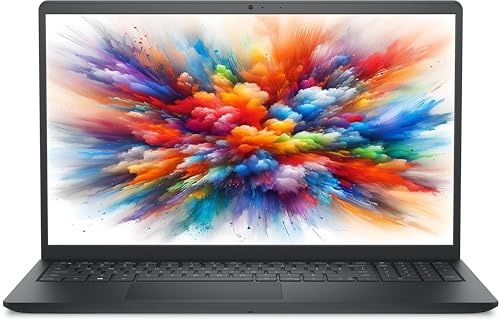
DELL PRO 15 (2025) AMD Ryzen 5 7520U Quad Core - (8 GB DDR5/512 GB SSD/AMD Radeon 610M Graphics/Windows 11 Pro)
Up to 6% instant discount on select credit cards +1
- Up to 6% instant discount on select credit cards
- Cashback with Amazon Pay ICICI Bank Credit Cards
Pros and cons
What we like
+ 120Hz Full HD screen
+ Windows 11 Pro
+ Dell service network
What we don’t like
– 4 core chip for ₹49,870
– 250 nits, 45% NTSC
– Check the RAM upgrade limit
Dell Pro 15 Essential Ryzen 5 7520U review: the office grade laptop for students
The Dell Pro 15 (Essential, Ryzen 5 7520U, 8GB DDR5, 512GB) is Dell’s business class laptop sold to students. The Ryzen 5 7520U is a 4 core, 8 thread Zen 2 chip that runs from 2.8 GHz to 4.3 GHz with Radeon 610M graphics. Memory is 8GB of LPDDR5, which retailers list as soldered, and storage is a 512GB SSD. The 15.6 inch Full HD screen is anti-glare at 250 nits. Dell quotes up to 6 hours of battery and a weight of 1.5 kg. Ports are one USB-C, one USB 3.0, one USB 2.0, HDMI 1.4b and an audio jack. The keyboard is full size, backlit and spill-resistant with a numeric keypad, and it ships with Windows 11 and one year of warranty.
My take: the Dell Pro 15 is a clean, serious looking laptop for a student who wants a professional machine that will also suit a first job. It handles Office, browsers, Teams and light coding without trouble. Its Zen 2 processor is older than the chips in the HP 15 2026 and the Acer TravelLite 2026, and Dell quotes only 6 hours of battery. It also has Wi-Fi 5, which is slow on a crowded hostel network. Independent notes on the family call the Radeon 610M a basic graphics adapter that handles modern games only at low settings and low resolution. That is the honest summary: a competent office laptop and no more. For a commerce, arts or management student who writes, presents and builds spreadsheets, that is exactly enough, and the professional look is a bonus in internships. For an engineering student who runs simulations, it will feel slow within a year.
Dell Pro 15 battery, running cost and the soldered memory
A battery that Dell rates for about 6 hours is on the small side. Charging it costs only 30 to 40 paise per full charge at Rs 8 a unit, so annual cost is about Rs 100 to Rs 130 for daily use. The real cost is the 8GB of soldered memory. You cannot upgrade it, so heavy multitaskers should watch the tab count or look at a 16GB machine such as the Acer TravelLite 2026. The business grade support plans from Dell, including onsite service and accidental damage cover, are paid add-ons that can save money if the laptop is dropped, so ask for the price in writing. Another small saving is the missing bloatware: a business line laptop tends to ship cleaner than a gaming or consumer model, which keeps the SSD free and the startup quick.
Living with the Dell Pro 15: keyboard, ports and the screen
The keyboard is the best part: a full size, backlit, spill-resistant layout with a numpad that feels solid for long essays and spreadsheets. The 250 nit anti-glare screen is acceptable indoors and dim outdoors. Ports are limited to one USB-C, one USB 3.0, one USB 2.0 and HDMI, and there is no card reader, so a pen drive and a mouse take two of your three USB ports. The webcam is basic. The body is plastic but it feels sturdy, and the weight of 1.5 kg is easy to carry. Fan noise is low in daily use.
Dell Pro 15 warranty, service and what to check on delivery
Dell gives one year of warranty in India, and onsite service is a paid upgrade on many consumer models, so check what your seller includes. Dell’s service network is wide, and a business support plan covers the technician visit at your door. On delivery, match the carton for Ryzen 5 7520U, 8GB and 512GB, and confirm that the box is the Pro 15 Essential rather than an older Inspiron. Check whether Windows 11 is activated. Register on the Dell support page with the service tag.
Who should buy the Dell Pro 15 and where it falls short
It falls short on processor age, battery and Wi-Fi 5. The HP 15 2026 has a newer chip but an average keyboard, and the Lenovo IdeaPad Slim 3 has a bigger battery. Buy the Dell Pro 15 if you want a professional keyboard and Dell service. Skip it if you need long battery life or more than 8GB of memory. If you are comparing it with the Lenovo, the real question is keyboard against battery: the Dell types better and the Lenovo lasts longer.
Key specs
| CPU | AMD Ryzen 5 7520U, 4 cores, 8 threads |
| Memory | 8GB DDR5 5500MHz, check upgrade options |
| Display | 15.6 inch Full HD, 120Hz, 250 nits, 45% NTSC |
| Storage | 512GB SSD, expandable to 1TB |
| OS | Windows 11 Pro |
Best Lenovo Service
7. Lenovo IdeaPad Slim 3 (Ryzen 3, 8GB, 512GB, Office 2024)
6.9 Overall
6.4 Performance
6.6 Value
8.4 Service


Ryzen 3 (4C/8T) · 8GB soldered · 512GB SSD · Office 2024 · 1.62 kg
Best for
✓ Students who want Office included
✓ Light study and browsing
✓ Buyers who prefer Lenovo service
Not ideal for
– Anyone who may need more than 8GB
– Keyboard backlight lovers
Verdict: Good for light use today. The soldered 8GB means it cannot grow with you.

Lenovo IdeaPad Slim 3, Ryzen 3 30, 8GB RAM, 512GB SSD, FHD Thin and Light Laptop, 15.6" (39.6cm), Windows 11, Office 2024, Grey, 1.6Kg, 82XQ01VYIN, AMD Radeon 610M Graphics, Laptop
Great Indian Festival Up to 6% instant discount on select credit cards +1
- Up to 6% instant discount on select credit cards
- Cashback with Amazon Pay ICICI Bank Credit Cards
Pros and cons
What we like
+ Office Home 2024 included
+ Lenovo service network
+ TUV low blue light screen
What we don’t like
– 8GB soldered, maximum 8GB
– Not backlit
– Costs the most of the six under ₹50,000
Lenovo IdeaPad Slim 3 Ryzen 3 review: the battery friendly student favourite
The Lenovo IdeaPad Slim 3 (15AMN8 family, Ryzen 3 7320U, 8GB LPDDR5, 512GB, Office 2024) is Lenovo’s high volume student laptop. The 15AMN8 sheet shows a Ryzen 3 7320U with 4 cores at up to 4.1 GHz, 8GB of LPDDR5-5500 memory in a single soldered slot and a 512GB PCIe Gen 4 SSD. The 15.6 inch Full HD screen is anti-glare TN at 250 nits, while some versions use IPS at 300 nits. The battery is 47 Wh with a 65 W charger, the weight is 1.62 kg and Lenovo quotes up to 10 hours in office tests and 12 hours of local video on the family sheet. Ports are one USB-C, HDMI 1.4, an SD card reader and a headphone jack, with USB-A ports on the family sheet. Lenovo adds MIL-STD-810H testing, a 720p webcam and Rapid Charge Boost of about 2 hours of use from 15 minutes. The India code may read 7320U or 7330U, so match the carton.
My take: this is a laptop I would suggest first to a family that has no strong preference. It has the biggest battery in this list, a card reader, a rugged body and a name every service centre knows. It does not do anything brilliantly. The processor is entry level, and the TN screen on some units has narrow viewing angles and is dim. Check the screen type on the carton: an IPS panel is the one to get. For notes, Office, Zoom and light browsing it is fully capable. For engineering, design or video it is not the right tool. Pair it with a basic mouse and a padded sleeve and it will serve a student through a degree. The card reader and the long battery are the two features that make it feel better than its specification suggests, and the rugged testing is a comfort for a laptop that spends its life in a bag.
Lenovo IdeaPad Slim 3 battery life, running cost and Office 2024
The 47 Wh pack is the largest here, and Lenovo’s ratings are up to 10 hours in MobileMark and 12 hours of local 1080p video on the family sheet. Realistic use is 6 to 8 hours of mixed work. One charge costs about 38 paise at Rs 8 a unit, and a year of daily charging is under Rs 140. The Rapid Charge Boost feature is a real time saver on a busy day. The bundled Office 2024 matters for money: a separate Office licence is a real extra cost, so confirm the licence is in the box and activate it on your Microsoft account before the return window ends.
Living with the IdeaPad Slim 3: keyboard, screen and ports
The keyboard is comfortable and the trackpad is plain. The USB-C port handles charging and display output on some versions, and the SD card reader is handy for photographers and for transferring lecture notes. The chassis is PC-ABS plastic with a textured finish that hides fingerprints, and the lid flexes if you press hard. The 720p webcam is basic. The fan is quiet under light loads. Memory on the family is soldered, so 8GB is final. Wi-Fi 5 or Wi-Fi 6 depends on the card fitted, and the Bluetooth version is 5.1 or 5.2, so check the sheet on your carton if you use wireless earbuds all day. The speakers are acceptable for lectures and loud enough for a small room.
Lenovo IdeaPad Slim 3 warranty, service and what to check on delivery
Lenovo gives one year of warranty in India, with consumer support on 1800-419-7555 from Monday to Saturday, 10 to 7. Accidental damage protection and onsite upgrades are optional paid extras. On delivery, match the carton for Ryzen 3, 8GB, 512GB and Office 2024, and check the screen type. Register the product on the Lenovo site. Install Lenovo Vantage for firmware and battery settings. Ask the seller whether the unit is the TN or IPS version and get that in the invoice description, because the two panels look very different. Keep the Office 2024 key and the invoice together in a safe place.
Who should buy the Lenovo IdeaPad Slim 3 and where it falls short
It falls short on processor power and on the plain screen. The HP 15 2026 is a close rival with DDR5, and the Dell Pro 15 has a better keyboard. The Acer Aspire Lite Metal is upgradeable. Buy the IdeaPad Slim 3 if you want battery life, the card reader and Lenovo service at a low price. Skip it if you want a bright, colourful screen, a fast chip or an upgradeable memory slot. Choose it if battery and a name you can get repaired matter more.
Key specs
| CPU | AMD Ryzen 3, 4 cores, 8 threads |
| Memory | 8GB LPDDR5 5500, soldered, maximum 8GB |
| Display | 15.6 inch Full HD, 250 nits, anti glare |
| Storage | 512GB SSD, up to 1TB M.2 2242 |
| OS | Windows 11 Home with Office Home 2024 |
| Weight | About 1.62 kg |
Questions other guides skip
The questions most student laptop guides leave out
These are the questions students and parents keep asking, and the lists I read rarely answer them. Each price was checked on 22 October 2026.
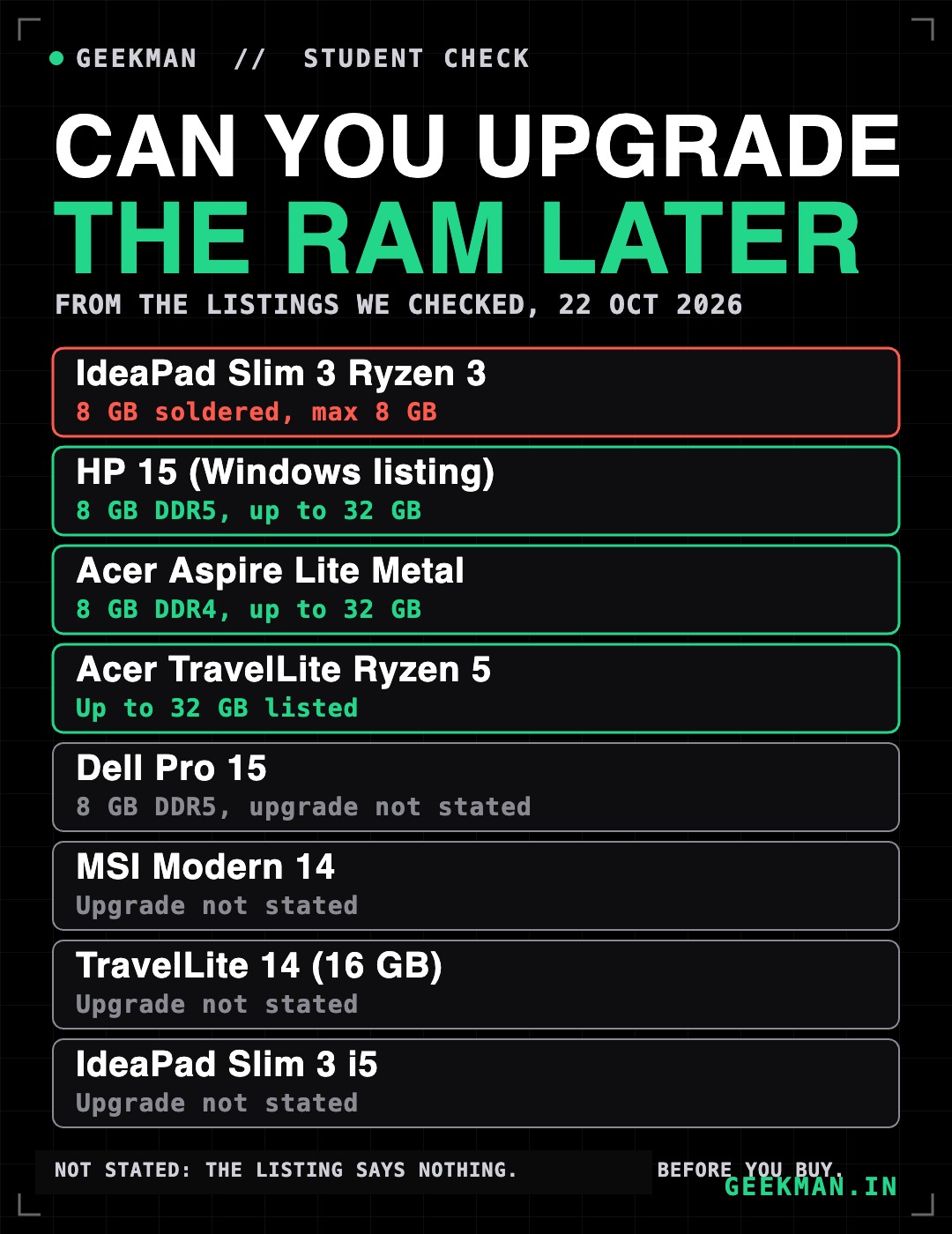
1 · Can I upgrade the RAM later?
It depends on the model. The Acer Aspire Lite Metal is upgradable to 32GB, and the HP 15 Windows and the Acer TravelLite 2026 go up to 32GB. The Lenovo IdeaPad Slim 3 lists 8GB soldered with a maximum of 8GB, so it is stuck. Upgrade limits are not printed for the Dell, MSI and TravelLite 14, so ask the seller or check the maker’s page.
2 · Is 8GB enough for college?
For documents, browsing, video calls and light coding, yes. Windows 11 needs 4GB at minimum, and 8GB leaves room for a handful of apps. My rule of thumb, not a maker’s figure, is that design, heavy programming tools or many open tabs call for 16GB. The MSI Modern 14, the Acer TravelLite 14 and the TravelLite 2026 have it here.
3 · Why does a cheap HP 15 come without Windows?
Some HP 15 offers are sold with DOS, which means no Windows is installed. One Amazon offer at ₹45,300 says exactly that, while the Windows 11 Pro version costs ₹46,440. You save little and then have to install Windows yourself. Always read the OS line.
4 · Is the screen good enough?
The HP 15 and Dell Pro 15 both list 250 nits and 45% NTSC. That is a dim panel with muted colours. It works in a classroom, and it is poor outdoors or for photo work. The Lenovo lists 250 nits too, with TUV low blue light certification.
5 · Is Microsoft Office included?
Only on some. The Lenovo IdeaPad Slim 3 lists Office Home 2024 and the Acer TravelLite 14 lists Office Home and Student 2021. The Acer Aspire Lite Metal lists no preinstalled software. Many colleges give students free Office through a college email, so check that before paying for it.
6 · Are the laptops in other 50k lists still available?
Often not. Two laptops that a September round up of ₹50,000 picks featured, an Acer Ryzen 7 7730U model and a Samsung Galaxy Book4 with a Core i5 and 16GB, now cost ₹63,500 and ₹67,998 at retailers and show as unavailable. A list is only useful if you can still buy what it recommends, so check the buy box.
7 · Same laptop name, different chip: how do I avoid the wrong one?
MSI sells the Modern 14 with different chips and RAM under almost the same name, for example a Ryzen 5 7530U and a Core i5-1235U with 16GB at about ₹43,000 and a version with only 8GB, all on Flipkart. The names look almost the same. Read the processor and RAM in the title, and do not trust the photos or the model line alone.
8 · Which one has the best warranty?
The Acer TravelLite 2026 lists a 3 year warranty in its title. The MSI Modern 14 lists 1 year onsite. Most of the others list one year. Keep the invoice and register the laptop on day one.
What this means for your buying decision
You carry it every day: the MSI Modern 14 at 1.4 kg, or the Acer TravelLite 2026 at 1.34 kg.
You want a big screen and a number pad: the Acer Aspire Lite Metal.
You want 16GB under ₹50,000: the MSI Modern 14, or the Acer TravelLite 14 if you want Office too.
You want Office included: the Lenovo IdeaPad Slim 3 or the Acer TravelLite 14.
You trust Dell or HP service: the Dell Pro 15 or the HP 15 with Windows 11 Pro.
You want one laptop for four years: stretch to the Acer TravelLite 2026 for 16GB and a three year warranty.
You study engineering or design: take 16GB, and read my laptops for video editing guide if you need a stronger screen.
Compare all 7 laptops at a glance
| Laptop | CPU | RAM | Screen | Software | Price |
|---|---|---|---|---|---|
| MSI Modern 14 | Core i5 or Ryzen 5, check version | 16GB, check upgrade options | 14 inch FHD | Windows 11 Home | About ₹43,000 |
| Acer TravelLite 2026 | Ryzen 5 7430U, 6 cores | 16GB, up to 32GB | 14 inch FHD | Windows, 3 year warranty | ₹58,490 |
| Acer Aspire Lite Metal | Ryzen 3 7330U, 4 cores | 8GB, up to 32GB | 15.6 inch IPS FHD | Windows 11 Home | ₹44,990 |
| Acer TravelLite 14 | Ryzen 3 5400U, 4 cores | 16GB, check upgrade options | 14 inch FHD | Windows 11, Office 2021 | ₹49,400 |
| HP 15 2026 | Ryzen 3 7335U, 4 cores | 8GB DDR5, up to 32GB | 15.6 inch FHD, 250 nits | Windows 11 Pro | ₹46,440 |
| Dell Pro 15 | Ryzen 5 7520U, 4 cores | 8GB DDR5, check upgrade options | 15.6 inch FHD, 120Hz | Windows 11 Pro | ₹49,870 |
| Lenovo IdeaPad Slim 3 | Ryzen 3, 4 cores | 8GB soldered | 15.6 inch FHD, 250 nits | Windows 11, Office 2024 | ₹49,990 |
Specs are from official maker specs as of October 2026. Prices were seen on 22 October 2026 and move daily. Verify the exact variant before you buy.
The buying guide
How to choose a laptop for college
Processor
Core i5 or Ryzen 5 over entry chips.
RAM
8GB is the floor. 16GB is safer.
Windows
Read the OS line. Avoid DOS.
Warranty
Check the years and the service reach.
1 · Processor: cores matter more than the name
A Core i5 or Ryzen 5 with 6 or more cores handles tabs, calls and apps better than a Ryzen 3 with 4 cores. Treat Celeron and Athlon laptops as a last resort.
2 · RAM and storage
8GB RAM and a 512GB SSD is the least I would buy in 2026. If you can find 16GB, take it, and the MSI Modern 14 gives you that for about ₹43,000. Ask whether the RAM is upgradable, because some models solder it.
3 · Windows and Office
Read the operating system line. An offer that says DOS has no Windows. Office is a bonus, and your college may give it free.
4 · Weight and size
The 14 inch picks weigh 1.34 kg and 1.4 kg. The 15.6 inch picks weigh 1.62 kg and 1.65 kg. If you walk to class, the 14 inch ones are kinder to your back.
5 · Crossed out prices
Stores show large crossed out prices. Ignore them and check the real price and bank offer at checkout.
6 · Warranty and service
Most list one year. Keep the invoice, register the laptop on day one and find the nearest service centre for your city before you buy.
Other laptops in the lineup
Celeron N4500 laptops (Acer Aspire One and Aspire 3). Cheap, but too slow for a degree.
Lenovo V15 G4 and HP 255 with Athlon chips. Weak processors for the money.
HP Professional 15 (Core 3 100U). The model ships with DOS and no Windows.
ASUS Vivobook Go 14 (₹48,990). It lists only 256GB of storage.
Primebook 2 Max (₹29,989). It runs Android based software, not Windows, so check your college software first.
MacBook Neo (₹71,890). Good, but far above this budget. See my laptops under 80000 guide.
The verdict
Which laptop should a student buy?
Best overall: MSI Modern 14, for 16GB at about ₹43,000. Check price
Best warranty and 16GB: Acer TravelLite 2026, at ₹58,490. Check price
Best big screen: Acer Aspire Lite Metal, at ₹44,990. Check price
Best 16GB with Office: Acer TravelLite 14, at ₹49,400. Check price
Best Windows 11 Pro value: HP 15 2026, at ₹46,440. Check price
Best Dell service: Dell Pro 15, at ₹49,870. Check price
Best Lenovo with Office: IdeaPad Slim 3, at ₹49,990. Check price
Not sure? Buy the MSI Modern 14. If you can go past ₹50,000, buy the Acer TravelLite 2026 and enjoy 16GB and three years of warranty.
More buying guides from Geekman
Best laptops for video editing
Student laptop FAQ
Which is the best laptop for students in India under ₹50,000 in 2026?
The MSI Modern 14 with 16GB of RAM at about ₹43,000 on Flipkart is my top pick. It has a 14 inch Full HD screen, a backlit keyboard and weighs 1.4 kg. If you can spend more, the Acer TravelLite with 16GB and a three year warranty costs ₹58,490.
Is 8GB RAM enough for a college student in 2026?
For browsing, documents, video calls and light coding, 8GB works if you keep tabs under control. Windows 11 itself needs 4GB at minimum. If you do design, programming with heavy tools or keep dozens of tabs open, 16GB is safer, and three laptops in this guide have it.
Can I upgrade the RAM on these laptops later?
It depends on the model. The Acer Aspire Lite Metal is upgradable to 32GB, the HP 15 Windows goes up to 32GB and the Acer TravelLite Ryzen 5 is expandable to 32GB. The Lenovo IdeaPad Slim 3 lists 8GB soldered with a maximum of 8GB. Upgrade limits are not printed for the Dell, the MSI and the TravelLite 14.
What does DOS mean in a laptop offer?
It means the laptop comes without Windows. Some HP 15 offers say DOS and Windows not installed. You then have to buy and install Windows yourself. The HP I picked ships with Windows 11 Pro.
Is Microsoft Office included with these laptops?
Only some of them. The Lenovo IdeaPad Slim 3 lists Office Home 2024 and the Acer TravelLite 14 lists Office Home and Student 2021. The Acer Aspire Lite Metal lists no preinstalled software. Check the product title for the word Office.
Which laptop has the longest warranty?
The Acer TravelLite 2026 with a Ryzen 5 7430U lists a 3 year warranty in its title. The MSI Modern 14 lists one year onsite. Most others list one year. Confirm on the seller page before you pay.
Are 15.6 inch laptops or 14 inch laptops better for college?
A 14 inch laptop is easier to carry. The MSI Modern 14 weighs 1.4 kg and the TravelLite 2026 weighs 1.34 kg. A 15.6 inch laptop gives more screen and often a number pad, but the ones here weigh 1.62 kg and 1.65 kg.
Are the HP 15 and Dell Pro 15 screens good?
Both list 250 nits and 45% NTSC, which means a dim screen with muted colours. It is fine indoors. For photo or video work, or for use outdoors, look for a brighter panel.
Why did you not pick a Celeron or Athlon laptop?
Celeron N4500 and Athlon 7120U laptops sell at ₹35,000 to ₹45,000 but are much slower than the Ryzen chips here. For a degree that lasts three or four years, I would not buy them.
Should I buy a Chromebook or an Android laptop for college?
Only if your coursework is all in the browser. They cost less, but you cannot install Windows software. Check your college software list first.
Do prices change a lot?
Yes. Several laptops that appeared in popular ₹50,000 lists a month ago now cost ₹63,000 to ₹68,000 or show as unavailable. Check the live price in the buy box before you decide.