
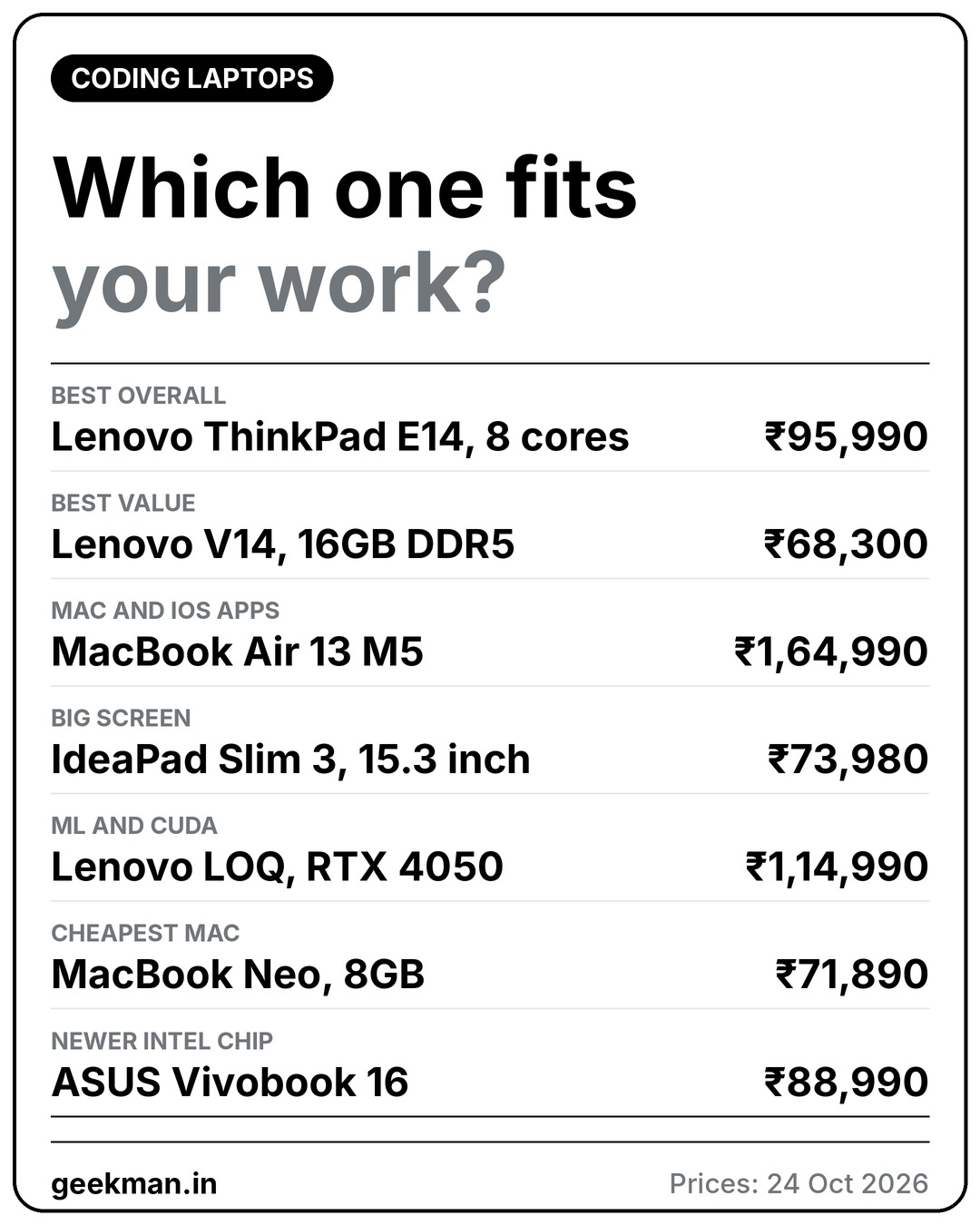
Short answer: buy the Lenovo ThinkPad E14 if you want the best coding laptop. Buy the Lenovo V14 with 16GB if you want the best value. Buy a MacBook Air M5 if you build iPhone and Mac apps.
Geekman has covered consumer tech for over 10 years, and this ranking is built the way our buying guides always are: research first, then a hard look at the numbers. For every model we compared official specs, chip and memory, upgrade room, screen, keyboard, ports, battery, price, warranty and service reach, and checked live prices on Amazon and Flipkart.
Pick in 30 seconds
Which laptop for coding fits you?
If none of these rows sounds like you, read on. The ranking, a guide to what you code and the full reviews follow, and live prices sit under each review.
What coders actually need
What makes a laptop good for coding
Coding is not like gaming or video editing. You rarely need a graphics card. You need enough memory to keep an editor, a browser, a terminal and often Docker or an emulator open together, a processor with plenty of cores for builds, a fast SSD, a keyboard you will not hate and ports so that you can plug in a monitor. In October 2026 memory has also become expensive, so many laptops under ₹60,000 still ship with 8GB. I left those out. Every laptop here has at least 8GB, and all but one have 16GB or more. If you want to spend less, see my laptops under 60000 guide or my laptops under 50000 guide.
The ranking
How I ranked these laptops
Each laptop gets a score out of 10 for performance (40%), value (40%) and service (20%). Performance looks at cores, memory, upgrade room, storage, keyboard, ports and screen. Value is price against what you get. Service looks at warranty and how easy it is to get help.
See the scores
| # | Laptop | Perf. | Value | Service | Overall |
|---|---|---|---|---|---|
| 1 | Lenovo ThinkPad E14 (Ryzen 7 7735HS, 16GB, 512GB) | 8.2 | 6.6 | 8.0 | 7.5 |
| 2 | Lenovo V14 (Core i5-13420H, 16GB DDR5, 512GB) | 7.2 | 7.8 | 7.0 | 7.4 |
| 3 | Apple MacBook Air 13 inch (M5, 16GB, 1TB) | 9.2 | 5.4 | 7.5 | 7.3 |
| 4 | Lenovo IdeaPad Slim 3 15.3 inch (Core i5-13420H, 16GB, 512GB) | 7.6 | 7.2 | 7.0 | 7.3 |
| 5 | Lenovo LOQ Essential (Ryzen 7 7735HS, RTX 4050, 16GB, 512GB) | 8.0 | 6.4 | 6.5 | 7.1 |
| 6 | Apple MacBook Neo (A18 Pro, 8GB, 256GB) | 6.2 | 7.0 | 7.5 | 6.8 |
| 7 | ASUS Vivobook 16 (Core Ultra 5 225H, 16GB, 512GB) | 7.4 | 6.0 | 6.5 | 6.7 |
Scores weigh performance 40%, value 40% and service 20%. They come from official specs, listing details and live prices on 24 October 2026.
Quick picks
| Pick | Laptop | Best for |
|---|---|---|
| Best Overall | Lenovo ThinkPad E14 (Ryzen 7 7735HS, 16GB, 512GB) | The best laptop to code on for most developers, with 8 cores, memory that goes up to 64GB and a keyboard built for long sessions |
| Best Value | Lenovo V14 (Core i5-13420H, 16GB DDR5, 512GB) | The cheapest way to get 16GB of DDR5, 8 cores and a wired network port in a 1.4 kg laptop, for ₹68,300 |
| Best For Mac And iOS Development | Apple MacBook Air 13 inch (M5, 16GB, 1TB) | The only way to build iPhone and Mac apps, with the fastest chip here and up to 18 hours of battery, for ₹1,64,990 |
| Best Big Screen | Lenovo IdeaPad Slim 3 15.3 inch (Core i5-13420H, 16GB, 512GB) | A 15.3 inch 16:10 screen, a metal lid and 16GB with a free memory slot, for ₹73,980 |
| Best For Machine Learning | Lenovo LOQ Essential (Ryzen 7 7735HS, RTX 4050, 16GB, 512GB) | The cheapest sensible way to get an Nvidia RTX 4050 with CUDA for ₹1,14,990 |
| Cheapest Mac, With A Catch | Apple MacBook Neo (A18 Pro, 8GB, 256GB) | The cheapest way into macOS and Xcode, but with only 8GB of memory that cannot be upgraded, for ₹71,890 |
| Best Newer Intel Chip | ASUS Vivobook 16 (Core Ultra 5 225H, 16GB, 512GB) | A 14 core Intel Core Ultra 5 with a 16 inch 16:10 screen and upgradable memory for ₹88,990 |
Tap a name to jump to its review. Live prices are in the buy box under each review. Prices are as seen on 24 October 2026 and bank offers can change them.
Match it to your work
Which laptop for the kind of coding you do
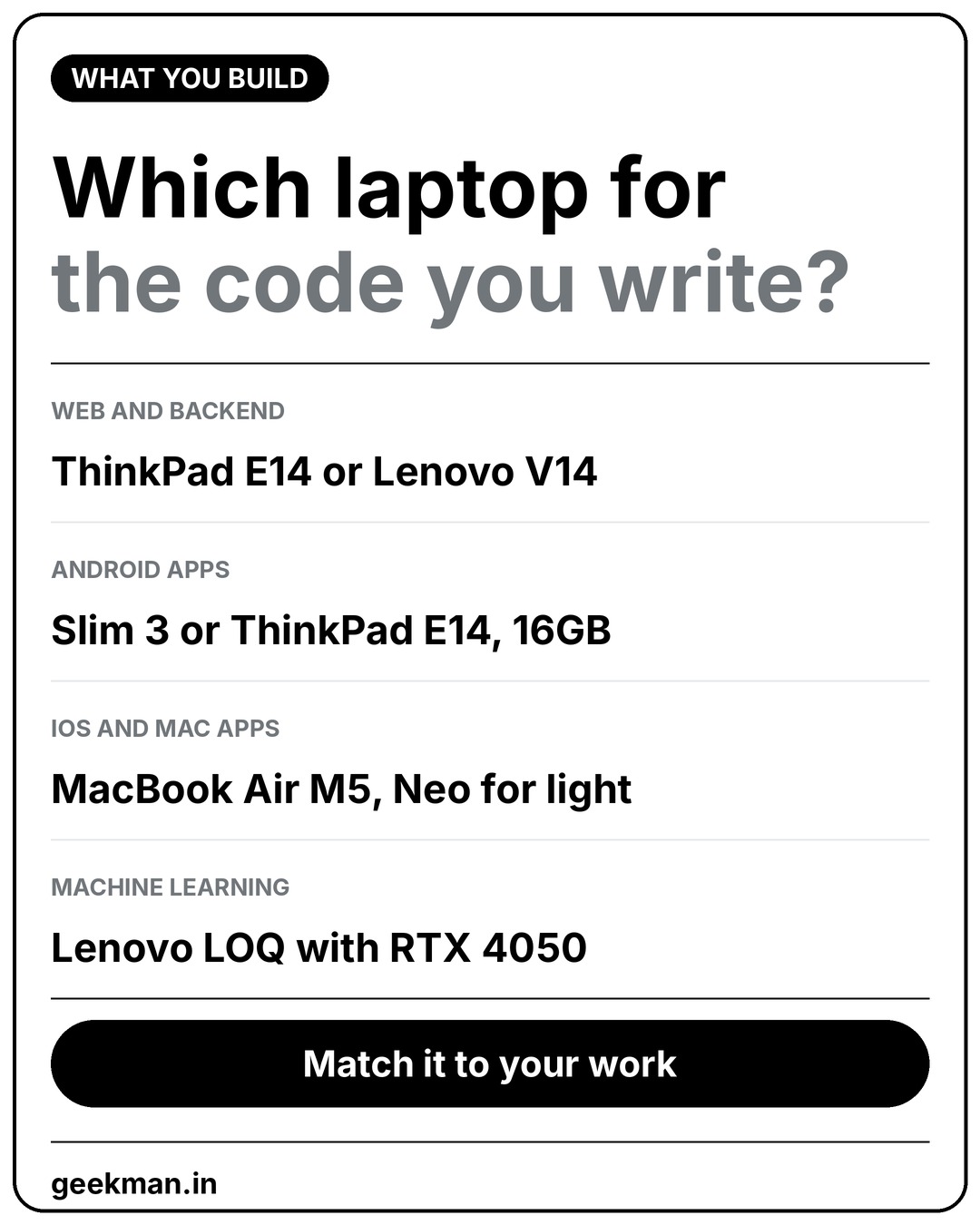
The right laptop depends on what you build more than on your budget. This is how I would match them.
🖥️
Web and backend
ThinkPad E14 or V14. 16GB and 8 cores is plenty.
🔋
Android apps
Slim 3 or ThinkPad E14. Android Studio likes 16GB.
🧠
iOS and Mac apps
MacBook Air M5. Neo for light projects only.
⚡
Machine learning
Lenovo LOQ with RTX 4050 for CUDA.
The reviews
Best laptops for coding: 7 picks
Best Overall
1. Lenovo ThinkPad E14 (Ryzen 7 7735HS, 16GB, 512GB)
7.5 Overall
8.2 Performance
6.6 Value
8.0 Service
Ryzen 7 7735HS with 8 cores, 16GB DDR5 (up to 64GB), 512GB SSD, 14 inch WUXGA, 1.42 kg and a 1 year onsite warranty for ₹95,990.
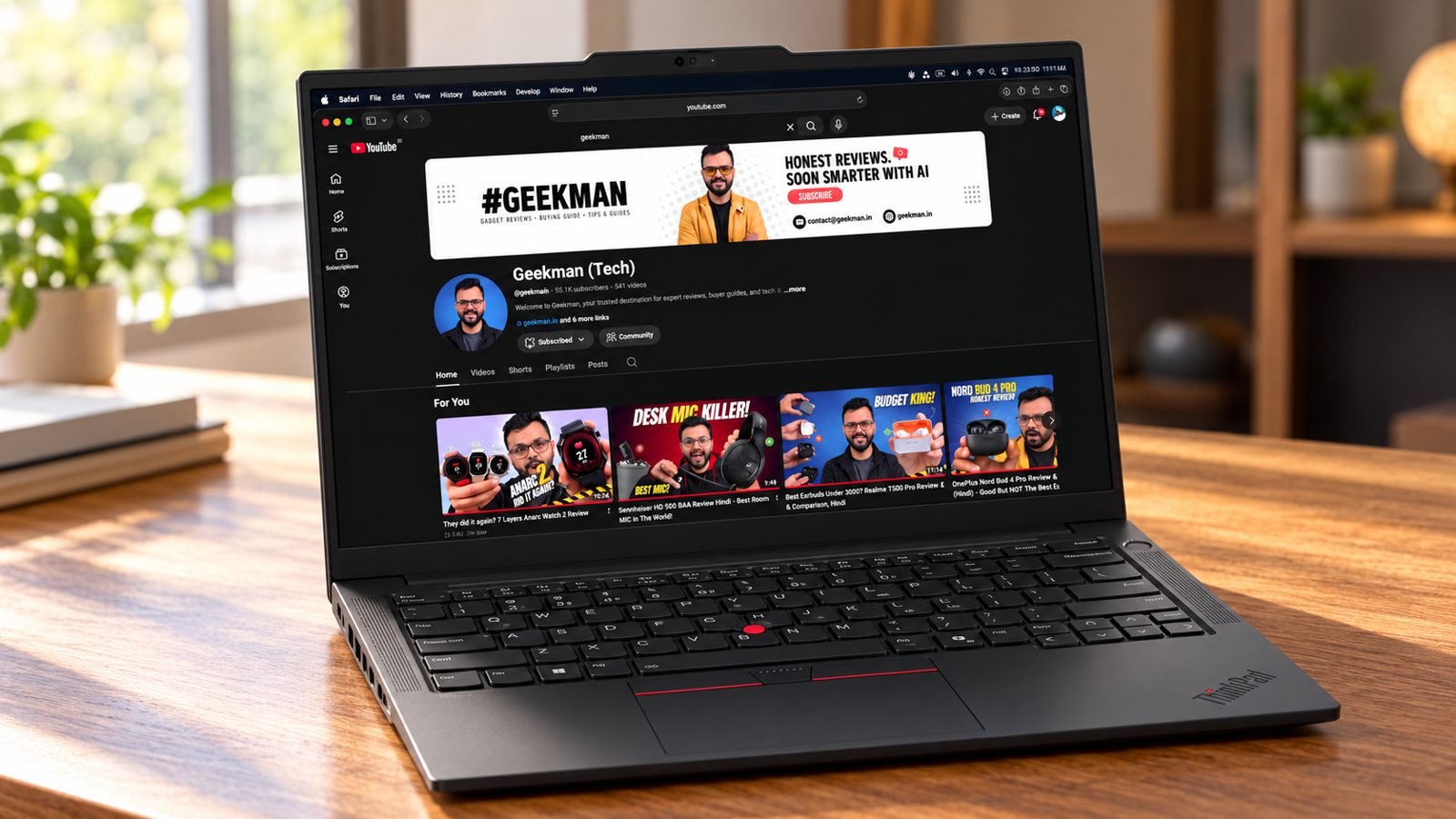
Ryzen 7 7735HS, 8 cores · 16GB DDR5, up to 64GB · 512GB SSD · 14 inch WUXGA IPS · 1.42 kg
Best for
✓ Web, backend and DevOps developers who live in Docker and WSL
✓ Anyone who types for 8 hours a day
✓ People who want RAM and storage they can upgrade
Not ideal for
– Anyone on a tight budget
– Machine learning work that needs an Nvidia graphics card
– People who want a premium looking screen
Verdict: The most complete coding machine here. It has the cores, the upgrade room, the ports and the keyboard, and it is the one I would buy first if the price fits.


Lenovo ThinkPad E14, AMD Ryzen 7 7735HS, 16GB RAM, 512GB SSD, WUXGA IPS 14” (35.56cm), Win 11 Home, Office 2024, Graphite Black, 1.42Kg, 21M3S0QV00, Fingerprint, Backlit, 300 Nits, 1Y Warranty, Laptop
 Mega Festival Deal
 Bank offers on select credit cards + Amazon Pay ICICI card cashback +1
- Bank offers on select credit cards + Amazon Pay ICICI card cashback
- No Cost EMI on select cards
Pros and cons
What we like
+ 8 cores and memory up to 64GB
+ Excellent keyboard and every port
+ 1 year onsite warranty
What we don’t like
– ₹95,990 with integrated graphics
– Ordinary 300 nit screen
– Not for GPU work
Full review
Coding is mostly typing, waiting for builds and keeping a lot of things open at once. The ThinkPad E14 is built for exactly that. It has eight real cores, a 6 row spill resistant keyboard with 1.5 mm of key travel, every port a developer needs and RAM that you can raise to 64GB later. It is not cheap, and the screen is only a decent 300 nit panel, but nothing else on this list gets the work side of coding so right.
Everyday speed. The Ryzen 7 7735HS has 8 cores and 16 threads, with a boost of up to 4.75 GHz. With 16GB of DDR5 memory it runs an IDE, a browser with many tabs, Docker containers and a local database together without trouble. Lenovo lists the memory as expandable to 64GB and the SSD to 1TB, so the laptop will keep up as your projects grow.
Keyboard and screen. The keyboard is backlit, spill resistant and has 1.5 mm of key travel. This is the part developers notice after a month. The 14 inch screen is WUXGA (1920 by 1200) with a 16:10 shape, which shows more lines of code than a 16:9 panel, at 300 nits with an anti glare finish.
Ports and battery. You get two USB-A ports, two USB-C ports that charge and drive a display, HDMI 2.1 and a full size Ethernet port. That means no dongles for a monitor, a wired network or a keyboard. The battery is 57 Wh, and Lenovo says it charges to 80% in an hour with the 65W charger. Expect a working day of light use, less with Docker running.
The catch. It costs ₹95,990, which is a lot for a Ryzen laptop with integrated graphics, and the listing shows a 720p camera. There is no dedicated graphics card, so it is not the tool for training models. I could not confirm a Linux certification for this exact model, so check Lenovo’s Linux page if you plan to wipe Windows.
Price. Amazon lists it at ₹95,990 on 24 October 2026, with Windows 11 Home, Office Home 2024 and 1 year of onsite service.
Lenovo ThinkPad E14 (Ryzen 7 7735HS, 16GB, 512GB) vs the competition. It costs ₹27,690 more than the Lenovo V14 and gives you 8 cores, more ports, a better keyboard and onsite service.
Key specs
| CPU | AMD Ryzen 7 7735HS, 8 cores, 16 threads, up to 4.75 GHz |
| Memory | 16GB DDR5, expandable up to 64GB |
| Display | 14 inch WUXGA 1920×1200 IPS, 300 nits, anti glare |
| Storage | 512GB SSD, expandable up to 1TB |
| OS and software | Windows 11 Home, Office Home 2024 |
| Weight and battery | 1.42 kg, 57 Wh, 65W USB-C charger |
| Ports | 2 USB-A, 2 USB-C with DisplayPort, HDMI 2.1, Ethernet, audio |
| Warranty | 1 year onsite |
Best Value
2. Lenovo V14 (Core i5-13420H, 16GB DDR5, 512GB)
7.4 Overall
7.2 Performance
7.8 Value
7.0 Service
Core i5-13420H with 8 cores, 16GB DDR5-5600 (up to 32GB), 512GB SSD, 14 inch Full HD, Windows 11 Pro and 1.4 kg for ₹68,300.
Core i5-13420H, 8 cores · 16GB DDR5, up to 32GB · 512GB SSD · 14 inch Full HD · 1.4 kg
Best for
✓ Students and juniors who want a capable first coding laptop
✓ People who work from a bag all day
✓ Anyone who wants Windows 11 Pro and Ethernet
Not ideal for
– Anyone who needs a bright, colour accurate screen
– Heavy Docker and emulator users who want 32GB or more
Verdict: A sensible, honest coding laptop. It runs everything a student or a junior developer needs, and the price is kinder than the ThinkPad.

Lenovo V14 Intel Core i5 13th Gen 13420H |16 GB DDR5/512 GB SSD/Windows 11 | Thin and Light Laptop/Intel UHD Graphics/ 14.0" FHD Display/Luna Grey/Copilot Key/1.4 kg/MS Office 2024
Bank offers on select credit cards + Amazon Pay ICICI card cashback +1
- Bank offers on select credit cards + Amazon Pay ICICI card cashback
- No Cost EMI on select cards
Pros and cons
What we like
+ 16GB DDR5 and 8 cores for ₹68,300
+ Ethernet port and Windows 11 Pro
+ 1.4 kg
What we don’t like
– 1 year manufacturing warranty only
– About 6 hours of battery claimed
– Plastic body, average screen
Full review
If ₹95,990 is more than you want to spend, the Lenovo V14 is the one I would look at first. It has the same 8 core Intel chip as many ₹70,000 laptops, 16GB of fast DDR5 memory, a gigabit Ethernet port and Windows 11 Pro. The listing says the memory goes up to 32GB, which gives you room to grow.
Everyday speed. The Core i5-13420H has 8 cores and 12 threads with a boost of 4.6 GHz. With 16GB of DDR5-5600 memory, VS Code, a browser, Node, a Python environment and a few containers run well together. It can feel tight if you run an Android emulator and Docker at the same time.
Screen and body. The 14 inch display is Full HD (1920 by 1080). The listing does not state its brightness, and laptops in this class usually sit near 250 nits, so use it indoors. The body is plastic, 1.99 cm thin and 1.4 kg, which is easy to carry.
Ports and battery. You get a USB-C port with DisplayPort and charging, two USB-A ports, HDMI 1.4b and a full size Ethernet port. The listing claims up to 6 hours of battery, which is modest, so keep the charger in the bag.
The catch. Warranty is 1 year manufacturing, not onsite. The screen and battery are average. The same laptop with 8GB of RAM sells for ₹58,190, and I would not buy that for coding.
Price. Amazon lists the 16GB version at ₹68,300 on 24 October 2026. It ships with Windows 11 Pro and Office 2024 according to the listing.
Lenovo V14 (Core i5-13420H, 16GB DDR5, 512GB) vs the competition. It costs ₹5,680 less than the Slim 3 and has a smaller screen and a plastic body, but it adds a wired network port.
Key specs
| CPU | Intel Core i5-13420H, 8 cores, 12 threads, up to 4.6 GHz |
| Memory | 16GB DDR5-5600, expandable up to 32GB |
| Display | 14 inch Full HD, 1920×1080 |
| Storage | 512GB SSD, upgradable to 1TB |
| OS and software | Windows 11 Pro, Office 2024 |
| Weight and battery | 1.4 kg, up to 6 hours claimed |
| Ports | USB-C with DP 1.2, 2 USB-A, HDMI 1.4b, Ethernet, audio |
| Warranty | 1 year manufacturing |
Best For Mac And iOS Development
3. Apple MacBook Air 13 inch (M5, 16GB, 1TB)
7.3 Overall
9.2 Performance
5.4 Value
7.5 Service
Apple M5 with a 10 core CPU, 16GB unified memory, 1TB SSD, 13.6 inch Liquid Retina at 500 nits, 1.23 kg and up to 18 hours of video for ₹1,64,990.
Apple M5, 10 core CPU · 16GB unified memory · 1TB SSD · 13.6 inch 500 nits · 1.23 kg
Best for
✓ iOS, iPadOS and macOS app developers
✓ People who value battery life, a great screen and silence
✓ Developers who work from cafes and coworking spaces
Not ideal for
– Anyone on a budget
– People who need Windows only tools or Nvidia CUDA
– Anyone who wants to upgrade RAM later
Verdict: The best coding laptop money can buy, and the only one for Apple platform apps. It is also the most expensive thing here by a wide margin.

Apple MacBook Air (M5, 2026) M5 - (16 GB/1 TB SSD/Tahoe) MDHJ4HN/A
Lowest price
Bank offers on select credit cards + Amazon Pay ICICI card cashback +1
- Bank offers on select credit cards + Amazon Pay ICICI card cashback
- No Cost EMI on select cards

Up to 10% off on select HDFC, Axis & SBI cards Details
- Up to 10% off on select HDFC, Axis & SBI cards
Pros and cons
What we like
+ Fastest chip and best screen here
+ Up to 18 hours of battery claimed
+ Required for iOS and Mac apps
What we don’t like
– ₹1,64,990
– Memory and storage cannot be upgraded
– Only two ports
Full review
If you want to publish an app on the App Store, you need a Mac, full stop. Apple’s Xcode does not run on Windows. Beyond that, the MacBook Air M5 is simply a pleasure to code on. It is quiet, it does not slow down when you unplug it, and the battery lasts a working day. You pay for it. This listing is the 16GB and 1TB model at ₹1,64,990.
Everyday speed. The M5 chip has a 10 core CPU (4 performance cores and 6 efficiency cores) and a 16 core Neural Engine, with 153GB/s of memory bandwidth. The memory is unified, so the 16GB is shared across the CPU and GPU. Builds, containers, simulators and browsers run quickly, and the machine has no fan to spin up.
Screen and body. The 13.6 inch Liquid Retina display is 2560 by 1664 at 500 nits with P3 colour. It is the sharpest and brightest screen in this group by a distance. The body weighs 1.23 kg, and there is a MagSafe charging port, two Thunderbolt 4 ports and a headphone jack.
Battery. Apple quotes up to 18 hours of video and up to 15 hours of web browsing from a 53.8 Wh battery. These are best case numbers, but a full working day away from a charger is realistic.
The catch. The price is ₹1,64,990, and you cannot upgrade the memory or storage later. Some tools assume x86 or an Nvidia card, and a few Docker images need extra care on Arm, though most popular ones now ship Arm builds. Two ports is thin if you use many accessories.
Price. Amazon lists this 16GB and 1TB model at ₹1,64,990 on 24 October 2026. Apple’s warranty is one year.
Apple MacBook Air 13 inch (M5, 16GB, 1TB) vs the competition. It costs ₹69,000 more than the ThinkPad E14, and in return you get a much faster chip, a far better screen, a day of battery and Xcode.
Key specs
| CPU | Apple M5, 10 core CPU, 16 core Neural Engine |
| Memory | 16GB unified, not upgradable |
| Display | 13.6 inch Liquid Retina, 2560×1664, 500 nits |
| Storage | 1TB SSD |
| OS | macOS |
| Weight and battery | 1.23 kg, 53.8 Wh, up to 18 hours video claimed |
| Ports | MagSafe 3, 2 Thunderbolt 4, headphone jack |
| Warranty | 1 year Apple limited warranty |
Best Big Screen
4. Lenovo IdeaPad Slim 3 15.3 inch (Core i5-13420H, 16GB, 512GB)
7.3 Overall
7.6 Performance
7.2 Value
7.0 Service
Core i5-13420H with 8 cores, 16GB DDR5 (8GB soldered plus 8GB slot, up to 24GB), 512GB SSD, 15.3 inch WUXGA at 300 nits and 1.59 kg for ₹73,980.
Core i5-13420H, 8 cores · 16GB DDR5, up to 24GB · 512GB SSD · 15.3 inch WUXGA · 1.59 kg
Best for
✓ Developers who want more screen for code and a terminal side by side
✓ People who work at one desk most of the day
✓ Anyone who wants an Office licence included
Not ideal for
– People who commute with the laptop daily
– Anyone who wants more than 24GB of RAM
Verdict: A comfortable desk laptop with room for code and a terminal side by side. It is a bit pricey next to the V14 for the same chip.

Lenovo Intel Core i5 13th Gen 13420H - (16 GB/512 GB SSD/Windows 11 Home) IdeaPad Slim 3 15IRH10 Thin and Light Laptop
Lowest price
Bank offers on select credit cards + Amazon Pay ICICI card cashback +1
- Bank offers on select credit cards + Amazon Pay ICICI card cashback
- No Cost EMI on select cards
Up to 10% off on select HDFC, Axis & SBI cards Details
- Up to 10% off on select HDFC, Axis & SBI cards
Pros and cons
What we like
+ 15.3 inch 16:10 screen at 300 nits
+ Metal top cover and FHD IR camera
+ Free memory slot, up to 24GB
What we don’t like
– No Ethernet port
– Same chip as the cheaper V14
– Memory tops out at 24GB
Full review
This is the IdeaPad Slim 3 with a taller 15.3 inch screen. It uses the same 8 core Core i5-13420H as the V14, but the 16:10 WUXGA display, the metal top cover and a front camera with face login make it feel a step above. One of its two memory modules is soldered and the other is a slot, which is how Lenovo lets you reach 24GB.
Everyday speed. The Core i5-13420H has 8 cores and 12 threads and boosts to 4.6 GHz. The 16GB of DDR5-4800 is made of 8GB soldered and an 8GB module, and Lenovo lists support for up to 24GB in total. For web development, Python, Java and light container work it is smooth.
Screen and body. The 15.3 inch WUXGA IPS panel is 1920 by 1200 at 300 nits with an anti glare coat, and it is 16:10, so you see more lines of code than on a 16:9 laptop. The top cover is metal and the bottom is plastic. The laptop is 16.9 mm thin and weighs 1.59 kg.
Ports and battery. You get two USB-A ports, a USB-C port with charging and DisplayPort, HDMI 1.4 and an SD card reader. There is no Ethernet port. The battery is 50 Wh, and Lenovo claims up to 14.5 hours of local video at 150 nits, which I treat as a best case.
The catch. It costs ₹5,680 more than the V14 with the same chip. The listing shows Windows 11 Home and a 1 year warranty with accidental damage protection in the product images. Memory tops out at 24GB.
Price. Amazon lists it at ₹73,980 on 24 October 2026. Office Home 2024 is included.
Lenovo IdeaPad Slim 3 15.3 inch (Core i5-13420H, 16GB, 512GB) vs the competition. It costs ₹5,680 more than the V14 and gives you a bigger, taller screen and a metal lid, but loses the Ethernet port.
Key specs
| CPU | Intel Core i5-13420H, 8 cores, 12 threads |
| Memory | 16GB DDR5-4800 (8GB soldered plus 8GB slot), up to 24GB |
| Display | 15.3 inch WUXGA IPS, 1920×1200, 300 nits, anti glare |
| Storage | 512GB SSD, upgradable to 1TB |
| OS and software | Windows 11 Home, Office Home 2024 |
| Weight and battery | 1.59 kg, 50 Wh |
| Ports | 2 USB-A, USB-C with DP 1.2, HDMI 1.4, SD reader, audio |
| Camera | FHD IR with privacy shutter |
Best For Machine Learning
5. Lenovo LOQ Essential (Ryzen 7 7735HS, RTX 4050, 16GB, 512GB)
7.1 Overall
8.0 Performance
6.4 Value
6.5 Service
Ryzen 7 7735HS with 8 cores, RTX 4050 6GB (65W), 16GB DDR5, 512GB SSD, 15.6 inch 144Hz FHD at 100% sRGB and 1.8 kg for ₹1,14,990.
Ryzen 7 7735HS, 8 cores · RTX 4050 6GB, 65W · 16GB DDR5 · 15.6 inch 144Hz · 1.8 kg
Best for
✓ Machine learning, deep learning and CUDA learners
✓ Developers who also game or edit video
✓ People who want a good screen and strong cooling
Not ideal for
– People who carry the laptop all day
– Anyone who wants long battery life
– Mobile developers who want a quiet, light machine
Verdict: The right pick only if you actually need an Nvidia GPU for CUDA work. Otherwise the ThinkPad is the better coding machine.

Lenovo LOQ Essential AMD Ryzen 7 Octa Core 7735HS - (16 GB/512 GB SSD/Windows 11 Home/6 GB Graphics/NVIDIA GeForce RTX 4050) LOQ 15ARP10E Gaming Laptop
Lowest price
Bank offers on select credit cards + Amazon Pay ICICI card cashback +1
- Bank offers on select credit cards + Amazon Pay ICICI card cashback
- No Cost EMI on select cards
Up to 10% off on select HDFC, Axis & SBI cards Details
- Up to 10% off on select HDFC, Axis & SBI cards
Pros and cons
What we like
+ RTX 4050 with CUDA
+ 144Hz 100% sRGB screen
+ Strong cooling and two SSD slots
What we don’t like
– 1.8 kg with a short battery
– Memory listed to a 16GB maximum
– Warranty not stated in the listing
Full review
Most coding does not need a graphics card. Training a neural network, running CUDA code or working in Unreal or Unity does. The LOQ Essential gives you an Nvidia RTX 4050 with 6GB of video memory and an 8 core Ryzen 7 at a price far below a Legion or a ThinkPad P series. It is heavy and the battery is short, so think of it as a desk machine.
Everyday speed. The Ryzen 7 7735HS has 8 cores and 16 threads with a boost of 4.75 GHz. The graphics card is an RTX 4050 with 6GB of GDDR6 and a 65W power limit, with 194 AI TOPS listed by Lenovo. That is enough to learn PyTorch and TensorFlow with CUDA, fine tune small models and run Stable Diffusion at modest sizes.
Screen and cooling. The 15.6 inch display is Full HD IPS at 144Hz with 100% sRGB and 300 nits, which is the best colour accuracy in this price band and good for design work. Lenovo uses a dual fan Hyperchamber cooling system, so sustained loads stay steadier than on a thin laptop.
Memory and ports. The listing shows one 16GB DDR5-4800 module and a stated maximum of 16GB, so I would not plan on RAM upgrades. Storage supports two M.2 SSDs. Ports include USB-A, USB-C 3.2, HDMI 2.1, Ethernet and a card reader.
The catch. It weighs 1.8 kg, the battery is 57.5 Wh and a gaming class laptop drains it fast, so carry the charger. The 6GB of video memory limits larger models. The listing does not state the warranty, so check the box.
Price. Amazon lists it at ₹1,14,990 on 24 October 2026 with Windows 11 and Office Home 2024.
Lenovo LOQ Essential (Ryzen 7 7735HS, RTX 4050, 16GB, 512GB) vs the competition. It costs ₹19,000 more than the ThinkPad E14 and adds an RTX 4050 for GPU work, but it is heavier and has worse battery life.
Key specs
| CPU | AMD Ryzen 7 7735HS, 8 cores, 16 threads |
| Graphics | NVIDIA RTX 4050 6GB GDDR6, 65W TGP |
| Memory | 16GB DDR5-4800, listed maximum 16GB |
| Display | 15.6 inch Full HD IPS, 144Hz, 100% sRGB, 300 nits |
| Storage | 512GB PCIe 4.0 SSD, two M.2 slots |
| OS and software | Windows 11, Office Home 2024 |
| Weight and battery | 1.8 kg, 57.5 Wh |
| Ports | USB-A, USB-C 3.2, HDMI 2.1, Ethernet, card reader, audio |
Cheapest Mac, With A Catch
6. Apple MacBook Neo (A18 Pro, 8GB, 256GB)
6.8 Overall
6.2 Performance
7.0 Value
7.5 Service
Apple A18 Pro with a 6 core CPU, 8GB unified memory, 256GB SSD, 13 inch Liquid Retina at 500 nits and 1.23 kg for ₹71,890.
A18 Pro, 6 core CPU · 8GB unified memory · 256GB SSD · 13 inch 500 nits · 1.23 kg
Best for
✓ Students learning Swift and iOS development on a budget
✓ Web developers who work mostly in the browser and editor
✓ People who want a light, colourful laptop with a great screen
Not ideal for
– Anyone who runs Docker, emulators and an IDE together
– Developers who need more than one external display
– People who need many ports
Verdict: A real Mac for learning and light work. Eight gigabytes is the limit, and for professional work the MacBook Air is the better buy.

Apple Macbook Neo A18 Pro(2026) A18 Pro - (8 GB/256 GB SSD/Tahoe) MHFF4HN/A.MHFF4HN/A
Lowest price
Up to ₹2,156 cashback with Amazon Pay ICICI Bank Credit Cards +2
- Up to ₹2,156 cashback with Amazon Pay ICICI Bank Credit Cards
- Up to ₹1,874.16 EMI interest savings on Amazon Pay ICICI Bank Credit Cards
- Up to ₹1,750 discount on select Credit Cards
Pros and cons
What we like
+ Cheapest way to run Xcode
+ Bright 500 nit screen and 1.23 kg
+ Quiet and fast for light work
What we don’t like
– 8GB of memory that cannot be upgraded
– 256GB of storage at this price
– One slow USB-C port
Full review
The MacBook Neo is the cheapest way to get a Mac in India, and for a student learning Swift or web development it is a great way in. It runs macOS and Xcode. It also has only 8GB of unified memory with no upgrade option, and on a laptop used for coding that is the single thing to think hard about.
Everyday speed. The A18 Pro chip has a 6 core CPU (2 performance and 4 efficiency cores) and a 5 core GPU. It handles a code editor, a browser, a terminal and a simulator for small apps. Apple’s page lists 8GB of unified memory on both models and no configuration option, so a big Docker setup or a large Xcode project will start to swap to the SSD.
Screen and body. The 13 inch Liquid Retina display is 2408 by 1506 at 500 nits, which is sharp and bright for the price. The aluminium body weighs 1.23 kg and comes in Silver, Blush, Citrus and Indigo.
Ports and battery. There is one USB 3 USB-C port at up to 10 Gbps, one USB 2 USB-C port and a headphone jack. One external display up to 4K at 60Hz is supported. The battery is 36.5 Wh, and Apple claims up to 16 hours of video and 11 hours of web browsing.
The catch. Memory is fixed at 8GB, the storage choices are 256GB or 512GB, and the second USB-C port is slow. The ₹71,890 price here is for the 256GB model, so storage fills up fast once Xcode and simulators are installed.
Price. Amazon lists the 256GB model at ₹71,890 on 24 October 2026. The 512GB model is listed at ₹80,890.
Apple MacBook Neo (A18 Pro, 8GB, 256GB) vs the competition. It costs ₹92,000 less than the MacBook Air M5 listing, but you give up memory, speed, ports and the larger SSD.
Key specs
| CPU | Apple A18 Pro, 6 core CPU, 5 core GPU |
| Memory | 8GB unified, not upgradable |
| Display | 13 inch Liquid Retina, 2408×1506, 500 nits |
| Storage | 256GB SSD (512GB model also sold) |
| OS | macOS |
| Weight and battery | 1.23 kg, 36.5 Wh, up to 16 hours video claimed |
| Ports | USB-C 10 Gbps, USB-C 480 Mbps, headphone jack |
| Warranty | 1 year Apple limited warranty |
Best Newer Intel Chip
7. ASUS Vivobook 16 (Core Ultra 5 225H, 16GB, 512GB)
6.7 Overall
7.4 Performance
6.0 Value
6.5 Service
Core Ultra 5 225H with 14 cores, 16GB DDR5 (upgradable), 512GB PCIe 4.0 SSD, 16 inch WUXGA and Office 2024 for ₹88,990.
Core Ultra 5 225H, 14 cores · 16GB DDR5, upgradable · 512GB SSD · 16 inch WUXGA 16:10 · 1.88 kg
Best for
✓ Developers who want a newer chip and a large screen
✓ People who work at a desk and want 16GB with room to grow
✓ Anyone who wants Office 2024 included
Not ideal for
– People who carry the laptop daily
– Anyone who wants a colourful screen
– Anyone who wants long battery life
Verdict: A capable desk laptop with a modern chip, but the screen is average, the battery is small and it costs more than the better balanced picks.

ASUS Vivobook 16 (2026) Intel Core Ultra 5 225H - (16 GB/512 GB SSD/Windows 11 Home) X1607CA-MB350WS Thin and Light Laptop
Lowest price
Bank offers on select credit cards + Amazon Pay ICICI card cashback +1
- Bank offers on select credit cards + Amazon Pay ICICI card cashback
- No Cost EMI on select cards
Up to 10% off on select HDFC, Axis & SBI cards Details
- Up to 10% off on select HDFC, Axis & SBI cards
Pros and cons
What we like
+ 14 core Core Ultra 5 chip
+ 16 inch 16:10 screen
+ Memory upgradable to 32GB
What we don’t like
– 1.88 kg with a 42 Wh battery
– 45% NTSC screen
– No Ethernet port
Full review
The Vivobook 16 has a newer Intel Core Ultra 5 225H with 14 cores and a big 16 inch 16:10 screen. For long builds and heavy multitasking it has thread count to spare. It also weighs 1.88 kg and has a 42 Wh battery, so it is a desk machine that you can move, not a laptop to carry all day.
Everyday speed. The Core Ultra 5 225H has 14 cores and 14 threads and boosts to 4.9 GHz, with a 13 TOPS NPU. With 16GB of DDR5 memory that ASUS lists as upgradable to 32GB through a slot, it handles IDEs, containers and virtual machines well. It uses integrated Intel graphics only.
Screen and body. The 16 inch WUXGA (1920 by 1200) screen is 16:10 at 300 nits, with anti glare and a 45% NTSC colour gamut. That is a fairly dull panel, fine for code and not for colour work. The laptop weighs 1.88 kg and ASUS lists a US military grade durability test.
Ports and battery. You get two USB-A ports, two USB-C ports with display and charging support, HDMI 1.4 and a headphone jack. There is no Ethernet port. The battery is 42 Wh, which is small for a 16 inch laptop with a 14 core chip.
The catch. It costs ₹88,990, only ₹7,000 below the ThinkPad E14 with a worse keyboard, a duller screen and a smaller battery. The listing includes Office Home 2024 and 1 year of Microsoft 365 Basic.
Price. Amazon lists it at ₹88,990 on 24 October 2026.
ASUS Vivobook 16 (Core Ultra 5 225H, 16GB, 512GB) vs the competition. It costs ₹7,000 less than the ThinkPad E14 and has a bigger screen and a newer chip, but a smaller battery and less service support.
Key specs
| CPU | Intel Core Ultra 5 225H, 14 cores, up to 4.9 GHz, 13 TOPS NPU |
| Memory | 16GB DDR5, upgradable up to 32GB |
| Display | 16 inch WUXGA 1920×1200, 300 nits, 45% NTSC, anti glare |
| Storage | 512GB PCIe 4.0 SSD |
| OS and software | Windows 11 Home, Office Home 2024, Microsoft 365 Basic 1 year |
| Weight and battery | 1.88 kg, 42 Wh |
| Ports | 2 USB-A, 2 USB-C, HDMI 1.4, audio |
| Camera | FHD with IR and privacy shutter |
Questions other guides skip
The questions most coding laptop lists leave out
These are the questions developers keep asking about these exact laptops, and the lists I read rarely answer them. I checked each against the listings on 24 October 2026.
1 · Why did you leave out the cheap laptops with 8GB?
Because 8GB runs out fast for coding. A browser with documentation, an editor, a terminal and Docker can use all of it, and then the laptop slows down. Many ₹40,000 to ₹60,000 laptops still ship with 8GB, and several have the memory soldered. If you only code small projects, the V14 with 8GB at ₹58,190 works, and you can add a memory stick later.
2 · Which of these can I upgrade later?
The ThinkPad E14 goes up to 64GB and 1TB per Lenovo’s listing. The V14 goes up to 32GB and the Vivobook 16 to 32GB. The Slim 3 goes up to 24GB because 8GB of it is soldered. The LOQ listing shows a 16GB maximum. Both MacBooks have fixed memory and storage, so buy the size you need on day one.
3 · Is the ThinkPad E14 worth ₹27,000 more than the V14?
If you code every day, yes. You get 8 cores with a faster boost, an Ethernet port, USB-C ports with display output, HDMI 2.1, a spill resistant keyboard with 1.5 mm of travel, a 57 Wh battery and a 1 year onsite warranty. If you code a few hours a day at college, the V14 does the job.
4 · Do I really need a Mac for iOS apps?
Yes. Apple’s development tools, Xcode and the iOS simulator, only run on macOS. If you use Flutter or React Native you can write most of the app on Windows, but building and publishing for iPhone still needs a Mac. If this is your plan, the MacBook Air M5 is the safe buy, and the MacBook Neo is the budget way in.
5 · Can a MacBook Neo with 8GB handle Xcode?
It can run Xcode for learning and small apps. Apple states 8GB of unified memory with no option to upgrade. Large projects, many simulators and a browser with lots of tabs will use the SSD as extra memory, and the 256GB drive fills quickly. For paid work I would spend more on the Air.
6 · Is the RTX 4050 enough for machine learning?
It is enough to learn. The RTX 4050 here has 6GB of video memory, which limits model size, so it suits tutorials, small vision and language models and fine tuning with tricks like quantisation. For serious training, people use cloud GPUs. The LOQ is the cheapest way to learn CUDA on your own machine.
7 · Will these laptops run Docker and WSL?
The five Windows laptops here have Intel or AMD chips that support virtualisation, which WSL 2 and Docker Desktop need. The V14 ships with Windows 11 Pro, and the others ship with Windows 11, where WSL 2 also runs on the Home edition. On the MacBooks, Docker runs on Arm and most popular images have Arm builds.
What this means for your buying decision
You want the best all round coding laptop: the Lenovo ThinkPad E14.
You want the best value: the Lenovo V14 with 16GB.
You build iPhone and Mac apps: the MacBook Air M5, or the MacBook Neo if money is tight.
You want a bigger screen: the Lenovo IdeaPad Slim 3 15.3 inch.
You do machine learning with CUDA: the Lenovo LOQ with RTX 4050.
You are a student: read my laptops for students guide.
You also edit video: see my laptops for video editing guide.
Compare all 7 laptops at a glance
| Laptop | CPU | RAM | Screen | Weight | Price |
|---|---|---|---|---|---|
| Lenovo ThinkPad E14 | Ryzen 7 7735HS, 8 cores | 16GB, up to 64GB | 14 inch WUXGA | 1.42 kg | ₹95,990 |
| Lenovo V14 | Core i5-13420H, 8 cores | 16GB, up to 32GB | 14 inch Full HD | 1.4 kg | ₹68,300 |
| MacBook Air 13 M5 | Apple M5, 10 cores | 16GB, fixed | 13.6 inch 500 nits | 1.23 kg | ₹1,64,990 |
| IdeaPad Slim 3 15.3 | Core i5-13420H, 8 cores | 16GB, up to 24GB | 15.3 inch WUXGA | 1.59 kg | ₹73,980 |
| Lenovo LOQ Essential | Ryzen 7 7735HS + RTX 4050 | 16GB DDR5 | 15.6 inch 144Hz | 1.8 kg | ₹1,14,990 |
| MacBook Neo | A18 Pro, 6 cores | 8GB, fixed | 13 inch 500 nits | 1.23 kg | ₹71,890 |
| ASUS Vivobook 16 | Core Ultra 5 225H, 14 cores | 16GB, up to 32GB | 16 inch WUXGA | 1.88 kg | ₹88,990 |
Specs are from the Amazon.in listings and the maker pages in October 2026. Prices were seen on 24 October 2026 and move daily. Verify the exact variant before you buy.
The buying guide
How to choose a laptop for programming
🧩
RAM
16GB is the sensible floor for 2026.
🧠
Processor
8 cores or more for fast builds.
⌨️
Keyboard
You type all day, so test the feel.
🖥️
Screen
16:10 shows more code. 300 nits or more.
🔋
Battery and weight
Look at Wh and kg, not claims.
🛡️
Warranty
Onsite service saves a work week.
1 · RAM and storage
Buy 16GB. Add a second slot if the laptop has one. For storage, 512GB is enough for most work, but a Mac with fixed storage needs 512GB or 1TB if you use Xcode, Docker and simulators.
2 · Processor
Cores matter for builds and containers. The Ryzen 7 7735HS and Core i5-13420H both have 8 cores. The M5 has 10 and the Core Ultra 5 225H has 14. Avoid 2 and 4 core chips for daily development.
3 · Keyboard and screen
The ThinkPad keyboard is the best here. A 16:10 screen like the ones on the ThinkPad, Slim 3 and Vivobook 16 shows several extra lines of code. The MacBook Air screen is the best by far.
4 · Ports
Developers plug in monitors, wired networks and hard drives. The ThinkPad has the most ports. The MacBooks have the fewest, so budget for a hub.
5 · Battery and weight
The MacBook Air has the best battery. Gaming laptops like the LOQ are heavy and run out of charge fast, so they stay on a desk.
6 · Warranty and service
The ThinkPad lists 1 year onsite service. The Slim 3 images mention accidental damage protection. Check the box for the others and register the laptop on day one.
Other laptops I looked at
Lenovo ThinkPad E14 (Ryzen 5 220). Listed at ₹86,990 with 16GB. It is a decent cheaper ThinkPad, but the Ryzen 7 version gives you 8 cores for ₹9,000 more.
Lenovo IdeaPad Slim 3 (Ryzen 5 40, 16GB soldered). Listed at ₹67,990, but the memory is soldered with a 16GB maximum, and the chip has 4 cores.
HP 15 (Core 5 120U, 16GB DDR4). Listed at ₹71,990 with a 41 Wh battery and a 250 nit screen with 45% NTSC colour. It costs more than the V14 for less speed.
ASUS Vivobook S14 (Core Ultra 5 225H). Listed at ₹92,990. It is lighter than the Vivobook 16, but it costs more.
Lenovo ThinkBook 16 (Core Ultra 7 255H). Listed at ₹1,17,990. A strong work laptop, but too expensive for most coders.
MacBook Air 15 inch (M5). Listed at ₹1,61,900 to ₹2,15,900. A bigger screen than the 13 inch, with the same chip.
Laptops with Snapdragon X chips. Good for battery life, but I skipped them for developers because some tools still assume an x86 chip.
The verdict
Which laptop for coding should you buy?
Best overall: Lenovo ThinkPad E14, at ₹95,990. Check price
Best value: Lenovo V14 with 16GB, at ₹68,300. Check price
Best for Mac and iOS: MacBook Air 13 M5, at ₹1,64,990. Check price
Best big screen: IdeaPad Slim 3 15.3 inch, at ₹73,980. Check price
Best for machine learning: Lenovo LOQ Essential RTX 4050, at ₹1,14,990. Check price
Cheapest Mac: MacBook Neo, at ₹71,890. Check price
Best newer Intel chip: ASUS Vivobook 16, at ₹88,990. Check price
Not sure? Buy the Lenovo V14 with 16GB if the budget is tight, and the ThinkPad E14 if you code for a living.
More buying guides from Geekman
Best laptops for video editing
Laptops for coding FAQ
Which is the best laptop for coding and programming in India in 2026?
The Lenovo ThinkPad E14 with a Ryzen 7 7735HS, 16GB of memory that goes up to 64GB and a great keyboard is the best all round pick at ₹95,990. If you want to spend less, the Lenovo V14 with 16GB at ₹68,300 is the best value. For iPhone app development you need a Mac.
How much RAM do I need for programming?
16GB is the sensible minimum in 2026. 8GB works for editors, a browser and small projects, but Docker, an Android emulator and a modern IDE together will use it all. Google recommends 16GB for Android Studio, and an emulator adds to that.
Do I need a graphics card for coding?
No, not for web, backend, app or most data work. A dedicated Nvidia card matters if you train neural networks, run CUDA code or work with game engines. In this guide only the Lenovo LOQ has one.
Windows laptop or MacBook for programming?
Choose a MacBook if you build apps for iPhone, iPad or Mac, because Xcode only runs on macOS. For web, backend, Android and DevOps work either one is fine. Windows laptops give you more RAM and storage for the money, and WSL gives you a Linux shell inside Windows.
Can I develop iPhone apps on a Windows laptop?
Not properly. Xcode and the iOS simulator need a Mac. Cross platform tools like Flutter and React Native let you write most of the code on Windows, but you still need a Mac to build and publish the iOS app.
Is 8GB of RAM on the MacBook Neo enough for coding?
For learning, web development and small Swift projects, yes. macOS manages memory well and the SSD is fast. For Docker, large Xcode projects or running an emulator and a browser with many tabs, 8GB will feel limiting, and you cannot add more later.
Is a Core i5 or Ryzen 5 enough for programming?
Yes, as long as it has 8 or more cores and 16GB of RAM. The Core i5-13420H in the V14 and Slim 3 has 8 cores and handles most coding work. A Ryzen 7 or Core Ultra 5 compiles large projects faster.
Can I run Linux on these laptops?
Most Intel and AMD laptops run Linux, including the Lenovo and ASUS models here. I could not confirm an official Linux certification for these exact models, so check the maker’s support page and the Wi-Fi chip before you wipe Windows. A Mac runs macOS only for practical purposes.
Is a gaming laptop a good choice for programming?
It can be, if you also need a GPU for machine learning or games. The LOQ Essential with an RTX 4050 is one. The trade offs are weight, a short battery and a louder fan.
Is a Snapdragon X laptop good for coding?
It is improving, but I did not pick one. Some Docker images, older libraries, drivers and emulators still assume x86, so you may hit problems. An Intel, AMD or Apple chip is a safer choice for a developer.
Which laptop is best for a computer science student?
The Lenovo V14 with 16GB at ₹68,300 gives a student the best mix of price, memory and portability. If your college course includes Android or machine learning, spend more on the Slim 3 or the LOQ. See my guide to laptops for students for more.