


Short answer: you cannot buy a real gaming laptop under 50,000 in 2026. The Acer Aspire 3 is the best everyday laptop, and if you can stretch to around 70,000, the Acer Aspire 5 AI (226V) and Lenovo IdeaPad Gaming 3 are the ones worth looking at.
Geekman has covered consumer tech for over 10 years, and this ranking is built the way our buying guides always are: research first, then a hard look at the numbers. For every model we compared official specs, graphics and memory, display, battery, price, warranty and service reach, and checked live prices.
The market in 2026
What ₹50,000 buys in a gaming laptop right now
I went through laptops between 40,000 and 74,000. Only one had a separate gaming graphics card, and it sits well above this budget. Gaming laptops under 50,000 used to exist, and memory and graphics chip prices have pushed them out of this price band.
The next real gaming laptops start around 75,000 to 80,000, such as the Acer Aspire 5 Gaming with an RTX 2050 and the Acer ALG with an RTX 3050 6GB. I cover those in my best gaming laptops under 80000 guide, and the RTX 4050 class in my under 1 lakh guide.
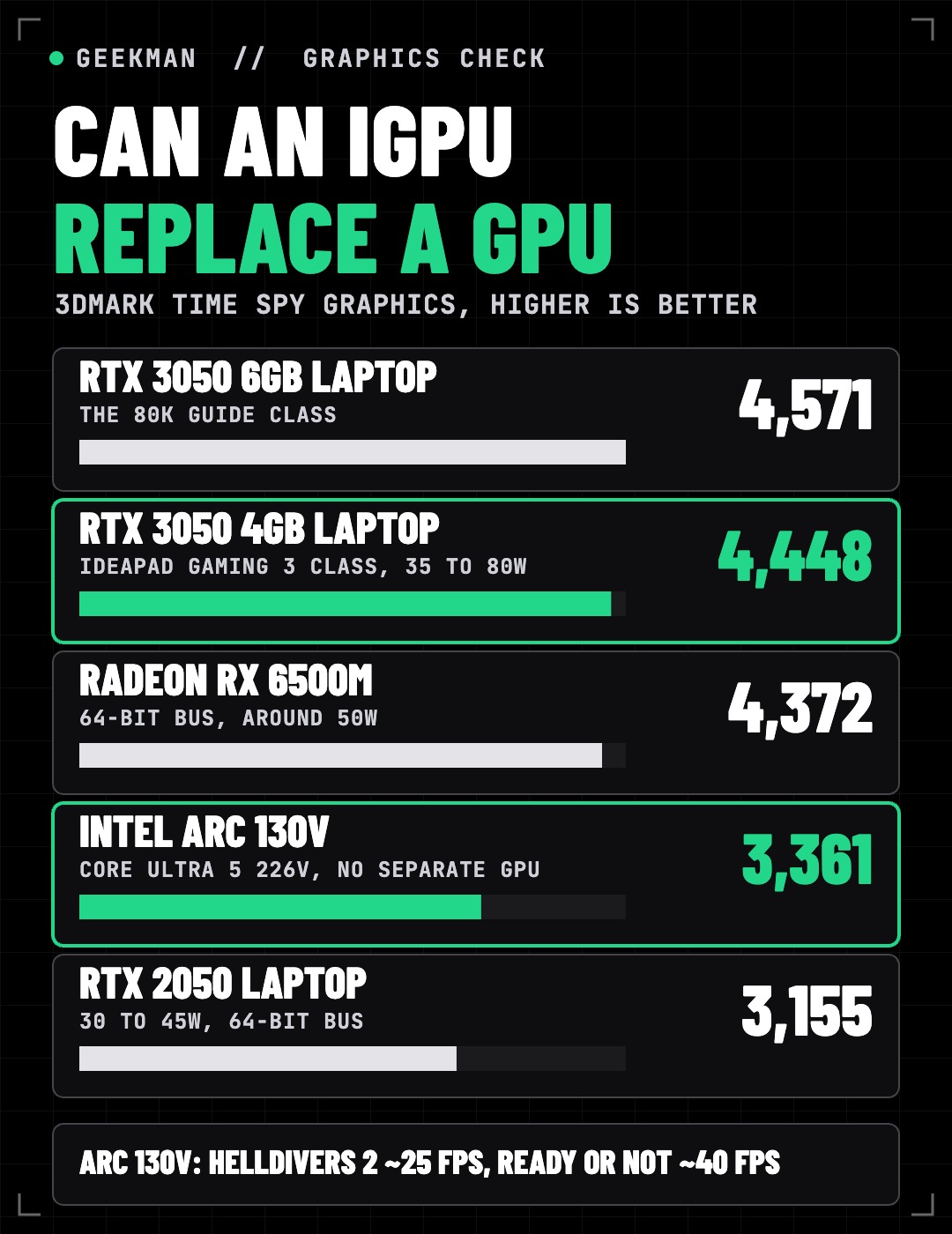
This is why I included laptops with integrated graphics. The Arc 130V in the Core Ultra 5 226V scores about 3,361 in Time Spy graphics, in the same range as a laptop RTX 2050. It will not play big new games, but for esports and older games it is closer to a gaming laptop than you would expect.
Find your gaming laptop under 50000 in 3 quick taps
Short answer: the Acer Aspire 5 AI with the Core Ultra 5 226V is the best pick for most people. Turn on JavaScript to use the Finder.
How I ranked them
The Geekman Score
Each laptop gets a score out of 10 for performance (40%), value (40%) and service (20%). Performance here means graphics first, then CPU, RAM and screen. Value is price against what you get. Service looks at warranty and how easy it is to get help.
See the scores
| # | Laptop | Perf. | Value | Service | Overall |
|---|---|---|---|---|---|
| 1 | Acer Aspire 5 AI (Core Ultra 5 226V, 16GB, 14 inch) | 7.6 | 8.0 | 7.0 | 7.6 |
| 2 | Lenovo IdeaPad Gaming 3 15IHU6 (i5-11300H, RTX 3050 4GB) | 6.2 | 6.8 | 7.4 | 6.7 |
| 3 | Acer Aspire 3 (Core i3-1315U, 16GB, 15.6 inch) | 4.6 | 7.2 | 7.0 | 6.1 |
Scores weigh performance 40%, value 40% and service 20%. They come from official specs, independent test data, listed warranty terms and live prices on 22 October 2026.
Quick picks
| Pick | Laptop | Best for |
|---|---|---|
| Best iGPU Pick | Acer Aspire 5 AI (Core Ultra 5 226V, 16GB, 14 inch) | Stretch pick: costs well above this budget. Light games on a 1.2 kg laptop with the best integrated graphics here |
| Only Real GPU | Lenovo IdeaPad Gaming 3 15IHU6 (i5-11300H, RTX 3050 4GB) | Stretch pick: costs well above this budget. The only dedicated graphics gaming laptop I found near this budget |
| Best Under 50k | Acer Aspire 3 (Core i3-1315U, 16GB, 15.6 inch) | A 16GB laptop for study and light games under this budget |
Tap a name to jump to its review. Live prices are in the buy box under each review. Prices are as seen on 22 October 2026 and bank offers can change them.
The reviews
Best gaming laptops under 50000 in India: 3 picks
Best iGPU Pick
1. Acer Aspire 5 AI (Core Ultra 5 226V, 16GB, 14 inch)

7.6Geekman Score
7.6 Performance
8.0 Value
7.0 Service


Core Ultra 5 226V · Arc 130V iGPU · 16GB LPDDR5X · 1.2 kg · 53.8Wh
Best for
✓ College students who want a light 14 inch laptop for classes, coding and the odd Valorant or GTA V session
✓ Working professionals who travel and want USB-C charging and a 1080p webcam
✓ Light creators editing 1080p reels and Photoshop thumbnails
Skip if
• You want a real gaming laptop (an RTX 3050 or 4050 machine is much faster in games)
• You need a colour-accurate or bright screen for editing
• You want to add RAM later (16GB is soldered)
My take: This is a good thin and light laptop that happens to have some of the best integrated graphics you can get at this level. The Core Ultra 5 226V’s Arc 130V handles esports titles and older AAA games at low to medium settings, and Lunar Lake is built for efficiency. But it is not a gaming laptop: the screen is a basic 60Hz panel, and any budget RTX laptop will beat it in demanding games.


Acer Aspire 5 AI PC,Intel Core Ultra 5 226V, 16 GB LPDDR5X RAM/512 GB SSD, 14" FHD IPS Display, Win 11Home,Office 2024 + M365 Basic,Pure Silver, 1.2 Kg, A514-55, Backlit Keyboard, Thin & Light Laptop

Up to 11% instant discount on select credit cards; cashback on Amazon Pay ICICI cards Details
- Up to 11% instant discount on select credit cards; cashback on Amazon Pay ICICI cards
Pros and cons
What I like
+ Strong Arc 130V integrated graphics
+ Light at about 1.2 kg with metal lid
+ 1080p webcam with shutter, backlit keyboard
+ USB-C charging and good ports
What I don’t like
• Basic 60Hz screen, not bright
• 16GB RAM is soldered
• Not a substitute for an RTX gaming laptop
My full review: who it suits, what it is like and how it compares
Who should buy it. A student or office user who carries the laptop every day and wants something light, quiet and quick that can also run casual games. It suits Python, web development and Android Studio coursework, Office and multitasking, and light photo and video edits. If gaming is the main reason you’re buying, even an older RTX 3050 laptop is the better tool.
Performance and gaming. The Core Ultra 5 226V is a Lunar Lake chip with 8 cores, Arc 130V graphics with 7 Xe2 cores and an NPU, which also makes this a Copilot+ PC. Memory is 16GB LPDDR5X on the chip package, so it is fast but can never be upgraded. Reviewers of the earlier Core Ultra 5 125H version of this chassis played Valorant at around 170 fps and GTA V at about 40 to 50 fps on low to normal settings, and handled 1080p editing with a few layers. The 226V’s graphics are a newer design, so expect similar or better results in games, but heavy titles like RDR2 still need low settings. Fans stayed quiet in balanced mode on the 125H model.
Display and webcam. The 14 inch WUXGA (1920×1200) IPS panel has a useful 16:10 shape and an anti-glare finish, but it is a basic 60Hz screen; one reviewer measured about 240 nits and roughly 65% sRGB on this chassis. That is fine for study and streaming, not for colour grading or bright rooms. The 1080p webcam with a privacy shutter is a clear step up from the 720p cameras common at this budget.
Keyboard, build and ports. The lid is metal and the base polycarbonate, and at about 1.2 kg and 17.5 mm it is very easy to carry. It opens to 180 degrees but not with one hand. The backlit keyboard is quiet and pleasant, with no numpad. The trackpad is small for some reviewers and clicks loudly, and there is no fingerprint reader. Ports are good for its size: two USB-C (one for charging), three USB-A, HDMI and a headphone jack. Wi-Fi 6 and Bluetooth 5.1.
Battery and warranty. The battery is 53.8Wh with a 65W USB-C charger, so you can also top up from a phone charger or power bank. Reviewers of the 125H model got 4 to 6 hours of mixed use; Lunar Lake is far more efficient, so this one should last longer, but I haven’t seen a published battery test of this exact model. Warranty is one year, and Acer’s service network is wide.
Aspire 5 AI or IdeaPad Gaming 3? Buy the Aspire 5 AI if you carry your laptop to class every day and gaming is a side thing. At about 1.2 kg with USB-C charging, a 1080p webcam and Arc 130V graphics that handle esports and older games, it is the better daily laptop. Pick the IdeaPad Gaming 3 only if games come first: its RTX 3050 and 120Hz screen are far faster in AAA titles, but it weighs about 2.25 kg and its 45Wh battery barely leaves the desk.
Aspire 5 AI or Aspire 3? The Aspire 5 AI is the clear upgrade: much stronger Arc 130V graphics, a backlit keyboard, a 1080p webcam, a metal lid and far less weight. The Aspire 3 makes sense only if you want a bigger 15.6 inch screen, a number pad, Ethernet and RAM you can upgrade to 32GB, and you do not plan to game beyond Valorant on low.
Key specs
| CPU | Intel Core Ultra 5 226V, 8 cores, up to 4.5GHz |
| Graphics | Intel Arc 130V (7 Xe2 cores), shared memory |
| Memory | 16GB LPDDR5X, on package (not upgradable) |
| Display | 14 inch WUXGA 1920×1200 IPS |
| Storage | 512GB PCIe Gen4 SSD |
| Battery | 53.8Wh |
| Weight | About 1.2 kg |
| Warranty | 1 year |
| Ports | 2 USB-C (one for charging), 3 USB-A, HDMI, 3.5mm |
| Model number | A514-55 |
Only Real GPU
2. Lenovo IdeaPad Gaming 3 15IHU6 (i5-11300H, RTX 3050 4GB)

6.7Geekman Score
6.2 Performance
6.8 Value
7.4 Service


i5-11300H · RTX 3050 4GB · 16GB DDR4 · 120Hz · 2.25 kg
Best for
✓ Budget gamers who want a dedicated NVIDIA GPU at the lowest price
✓ Esports players (Valorant, CS2) who will use its 120Hz screen
✓ Students who want CUDA for light Blender or Premiere work on a tight budget
Skip if
• You need battery life away from a desk (45Wh lasts only a couple of hours)
• You want a CPU for heavy multitasking (the i5-11300H has just 4 cores)
• A newer RTX 3050 or 4050 laptop is within reach (it will be faster and better supported)
My take: This 15IHU6 model is an old design with an 11th gen Core i5-11300H and an RTX 3050 4GB, and it still games well at 1080p on medium settings. Lenovo’s IdeaPad keyboard is excellent and the 120Hz screen helps in shooters. But the four-core CPU is weak by today’s standards, the 45Wh battery is small, and the display is dim, so buy it only if it is clearly cheaper than newer RTX laptops.
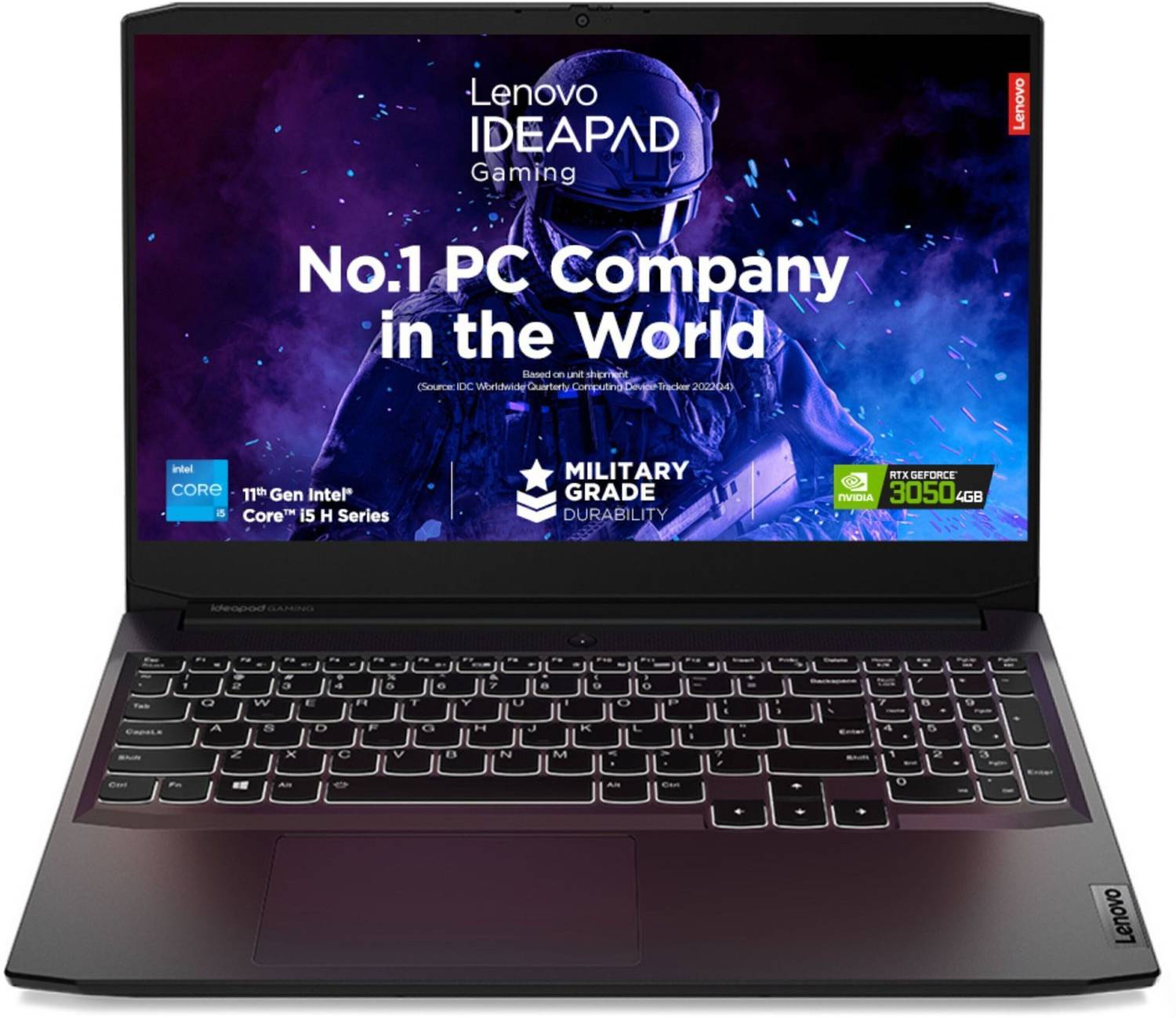
Lenovo IdeaPad Gaming 3 Intel Core i5 11th Gen 11300H - (16 GB/512 GB SSD/Windows 11 Home/4 GB Graphics/NVIDIA GeForce RTX 3050) 15IHU6 | 15IHU6D1 Gaming Laptop

Up to 5% cashback on Flipkart Axis & Flipkart SBI credit cards Details
- Up to 5% cashback on Flipkart Axis & Flipkart SBI credit cards
Pros and cons
What I like
+ Dedicated RTX 3050 at a low price
+ 120Hz screen for esports
+ Excellent full-size keyboard
+ Easy RAM and SSD upgrades
What I don’t like
• Old 4-core i5-11300H
• Small 45Wh battery, heavy 170W charger
• Dim, low-colour screen
My full review: who it suits, what it is like and how it compares
Who should buy it. A first-time PC gamer on a tight budget who plays at a desk near a plug. It runs Valorant, CS2, GTA V and Forza at good frame rates, and the 120Hz panel makes esports smoother. It is also a cheap way to get NVIDIA’s CUDA for students learning Blender or video editing. If you can stretch to a newer RTX 3050 laptop with a 6 or 8 core CPU, or an RTX 4050, do that.
Gaming and thermals. The RTX 3050 4GB is fine for 1080p at medium settings in most games, with DLSS helping in supported titles. Ray tracing is not realistic on it. Lenovo doesn’t publish the GPU power on the product page; on the same 15IHU6 chassis Notebookcheck measured its RTX 3050 Ti at up to 90W in Performance mode and 60W in quieter modes, so always game in Performance mode via Fn+Q. Reviewers of IdeaPad Gaming 3 models saw CPU temperatures in the 80s and up to 90 Celsius in hot rooms without throttling; a cooling pad helps in Indian summers. Most units ship with one RAM stick, and adding a second for dual channel gives a clear fps boost.
Display. The 15.6 inch full HD IPS panel runs at 120Hz but is rated at about 250 nits and roughly 45% NTSC, so colours look muted and it is dim near a window. It is fine for games and movies indoors and poor for colour work. Notebookcheck called the display the biggest weakness of this generation.
Keyboard, build and ports. The full-size keyboard with numpad has 1.5 mm travel and is one of the best typing experiences at this budget; it has a white backlight, with 4-zone RGB on some units. The plastic chassis flexes a little and the lid wobbles. Ports: Gigabit Ethernet, HDMI 2.0, one USB-C (data only, no charging or display), two USB-A and a headphone jack. No card reader. The 720p webcam has a privacy shutter but poor image quality.
Battery and upgrades. The 45Wh battery is the weak point: on a sibling model with the same battery, a reviewer got about 1.5 hours of light use, so treat this as a desktop replacement. The 170W charger is large and heavy. RAM is DDR4-3200 in two slots, and storage is an M.2 PCIe SSD, so upgrades are easy. Warranty is one year with Lenovo’s wide service network.
IdeaPad Gaming 3 or Aspire 5 AI? If you play AAA games at a desk, take the IdeaPad Gaming 3. Its RTX 3050 and 120Hz panel are in a different league from any integrated graphics. If you carry the laptop all day and game only now and then, the Aspire 5 AI’s light body and better battery make more sense.
IdeaPad Gaming 3 or Aspire 3? For gaming there is no contest: the IdeaPad has a dedicated RTX 3050, a 120Hz screen and an excellent keyboard, while the Aspire 3 runs GTA V at only 25 to 30 fps. The Aspire 3 is the better pick for pure study and office work, since its newer 13th gen chip runs cool, its 54Wh battery lasts much longer and it is lighter to carry.
Key specs
| CPU | Intel Core i5-11300H |
| GPU | NVIDIA RTX 3050 4GB GDDR6, TGP not on the product page (this chassis runs its GPU at up to 90W in Performance mode, 60W in quiet modes) |
| Memory | 16GB DDR4-3200, two SODIMM slots (check for single channel) |
| Display | 15.6 inch FHD, 120Hz, about 250 nits, about 45% NTSC |
| Battery | 45Wh |
| Weight | About 2.25 kg |
| Warranty | 1 year |
| Charger | 170W barrel adapter |
Best Under 50k
3. Acer Aspire 3 (Core i3-1315U, 16GB, 15.6 inch)

6.1Geekman Score
4.6 Performance
7.2 Value
7.0 Service


Core i3-1315U · 16GB DDR4 · 512GB SSD · 15.6 inch FHD IPS
Best for
✓ College students who need Windows for Office, coding in Python or C++ and online exams
✓ Work-from-home users and traders running browsers, Excel and Zoom all day
✓ Buyers who want a big 15.6 inch screen with a numpad and Ethernet port
Skip if
• You type at night (there is no keyboard backlight; the Ryzen version of the Aspire 3 has one)
• You want to game (integrated graphics only; GTA V runs at about 25 to 30 fps)
• You want great speakers or a sharp webcam
My take: This is the plain, reliable kind of laptop most people need. A 13th gen Core i3 with 16GB DDR4 and a PCIe Gen4 SSD keeps Office, 15 to 20 browser tabs and coding tools running smoothly, the 15.6 inch full HD IPS screen has good angles, and it is light for its size. The catches are small: no backlit keyboard, a basic screen in terms of brightness and colour, and weak speakers.

Acer Aspire 3,Intel Core i3-1315U, 16GB DDR4 RAM/512GB SSD, 39.62 cm /15.6" FHD IPS Display, Win 11Home, Silver, 1.7 Kg, A325-53, BL Keyboard, Thin & Light Laptop
Up to 11% instant discount on select credit cards; cashback on Amazon Pay ICICI cards Details
- Up to 11% instant discount on select credit cards; cashback on Amazon Pay ICICI cards
Pros and cons
What I like
+ 16GB RAM and a fast PCIe SSD
+ 15.6 inch full HD IPS anti-glare screen
+ Ethernet, HDMI and microSD on board
+ Runs cool with long battery life on the 54Wh model
What I don’t like
• No backlit keyboard
• Basic, dim screen and quiet speakers
• Only one SSD slot
My full review: who it suits, what it is like and how it compares
Who should buy it. A student or office user who wants Windows, a big screen and enough RAM that it won’t feel slow in two years. Reviewers ran 15 to 20 tabs, Photoshop thumbnails, basic 1080p reels in Premiere Pro and Android Studio without major lag. It is not for gaming, 4K editing or anything that needs a dedicated GPU.
Performance. The 13th gen Core i3 U-series chip has a mix of performance and efficiency cores and runs at low power, so it stays cool: reviewers saw temperatures in the low 70s Celsius under load with no heating issues. The 16GB DDR4 RAM is plenty for multitasking. Reviewers found a PCIe Gen4 SSD with over 5000 MB/s reads on the Aspire 3, which makes boot and app loading quick. Light games work: Valorant at about 100 fps on low, GTA V at 25 to 30 fps on normal.
Display. The 15.6 inch full HD IPS panel has an anti-glare coating, about 250 nits and about 45% NTSC colour. Viewing angles are good with no colour shift, and text is sharp. It is a basic panel: fine for study, office work and online video indoors, not for colour-critical photo work or bright rooms.
Keyboard, build and ports. The plastic body has a little lid and keyboard flex and the screen wobbles slightly, but it is light at about 1.5 to 1.7 kg and the hinge goes to 180 degrees. The full-size keyboard with numpad has good travel, but no backlight. The large trackpad only clicks along the bottom edge. Ports are generous: USB-C (data on the unit reviewers checked), HDMI, three USB-A, Gigabit Ethernet, microSD, 3.5mm and a lock slot. The 720p webcam has a privacy shutter. Speakers are quiet; the Realtek audio console’s EQ helps a bit.
Battery and upgrades. The 13th gen Aspire 3 (A325-53) has a 54Wh battery, and a reviewer got about 7 hours of continuous movie playback online, and about 4 hours under heavy work. The 65W charger fills it in under 90 minutes. One RAM slot is free on 8GB units for up to 32GB, but there is only one SSD slot, so you upgrade storage by replacing the drive. Acer’s standard warranty is one year, with a wide service network. Some 16GB variants include MS Office Home and Student 2021.
Aspire 3 or Aspire 5 AI? The Aspire 5 AI is lighter, has a backlit keyboard, a better webcam and much stronger graphics. Choose the Aspire 3 only if you want the bigger screen with a number pad, an Ethernet port and upgradable RAM.
Aspire 3 or IdeaPad Gaming 3? Buy the Aspire 3 if games are not a real priority and you want long battery life and a cool, light machine for Office and coding. If you want to play modern games at all, the IdeaPad Gaming 3’s RTX 3050 is the only real gaming option in this list.
Key specs
| CPU | Intel Core i3-1315U |
| Graphics | Intel UHD Graphics (integrated) |
| Memory | 16GB DDR4 |
| Display | 15.6 inch Full HD IPS, anti-glare, about 250 nits, about 45% NTSC, 60Hz |
| Storage | 512GB SSD |
| Warranty | 1 year (Acer standard) |
| Battery | 54 Wh on Aspire 3 A325-53 (the similar Aspire Lite AL15-53 with i3-1315U has only 36 Wh) |
For gamers
What can these laptops actually play?
| Game | Studio’s GPU tiers | My read for this budget |
|---|---|---|
| Valorant, CS2, Fortnite, Minecraft | Light requirements | Fine on every laptop here at low to medium settings |
| Gears of War: E-Day, 6 Oct 2026 | Min: RTX 2060, RTX 5050, RX 6600. 8GB VRAM advised | Below the minimum on all of them. Lowest settings at best on the IdeaPad |
| Call of Duty: Modern Warfare 4, 23 Oct 2026 | Min: GTX 1060. Rec: RTX 3060 Ti | Only the IdeaPad is in minimum territory, with low settings |
| Phantom Blade Zero, 29 Oct 2026 | Min: GTX 1660 6GB. Rec: RTX 3060 Ti | The IdeaPad’s 4GB card is short on memory |
| Path of Exile 2 (1.0), 11 Dec 2026 | Min: GTX 960 | Playable at low settings on the IdeaPad |
| GTA 6, 19 Nov 2026 (PS5, Xbox only) | No PC version announced | Nothing to test yet |
Requirements are the studios’ published figures, collected in October 2026. The last column is my reading of where these laptops sit against them, not a benchmark result. We did not run these games ourselves.
What this means for your buying decision
You play Valorant, CS2, Fortnite, Minecraft: any laptop here works, so buy on weight and screen. The Aspire 5 AI (226V) is the best of them.
You want the best frame rates for the money: the IdeaPad Gaming 3 has a real graphics card, but only 4GB of memory.
You want new AAA games at good settings: nothing here does that. Save for the 80,000 to 1 lakh range, or buy a console.
You are buying for GTA 6: wait. It is console only and has no PC date.
You mostly study or work: pick the lightest laptop and treat gaming as a bonus.
How to check any game before you buy
📄
Open the Steam page
Read the minimum and recommended lines.
🎯
Match the GPU
Compare the card named there with the one in the laptop.
💾
Check VRAM
A 4GB card means lowered textures in new games.
⚙️
Turn on upscaling
DLSS or FSR gives the biggest free boost.
Compare the laptops at a glance
| Laptop | Graphics | RAM | Screen | Weight | Price |
|---|---|---|---|---|---|
| Acer Aspire 5 AI (226V) | Arc 130V (integrated) | 16GB LPDDR5X, soldered | 14 inch 1920×1200 IPS | About 1.2 kg | Check price |
| Lenovo IdeaPad Gaming 3 | RTX 3050 4GB | 16GB DDR4 | 15.6 inch FHD 120Hz | About 2.25 kg | Check price |
| Acer Aspire 3 (i3-1315U) | Intel (integrated) | 16GB DDR4 | 15.6 inch FHD IPS | Not stated | Check price |
Specs are from official pages. Prices move daily. Verify the exact variant before you buy.
The buying guide
How to choose when gaming laptops are this scarce
🎮
Be honest about your games
Esports and older games run on anything here.
💾
Look at video memory
4GB is the floor for gaming and it is tight.
⚖️
Weight
Gaming laptops weigh 2.2 kg or more, these Acers about 1.2 kg.
🏷️
Several sellers
Prices can differ a lot between sellers, so compare the buy boxes.
1 · Integrated graphics versus a gaming card
A separate GPU has its own memory and more power. Integrated graphics share system memory. The Arc 130V is the best integrated chip here, but a card like the RTX 3050 4GB still scores about 32% higher in Time Spy graphics.
2 · Why RAM type matters
LPDDR5X and onboard memory are usually soldered, so you cannot add more later. The Aspire 5 AI laptops have 16GB onboard, while the IdeaPad uses DDR4 that is normally upgradable. Decide your RAM need on day one.
3 · Screen size and weight
A 14 inch laptop is easier to carry but smaller to game on. The IdeaPad has a 15.6 inch screen and weighs about 2.25 kg. The Aspire 5 AI weighs about 1.2 kg.
4 · Battery reality
Gaming on battery lasts under an hour on laptops like the IdeaPad. Light use lasts longer on the Acer laptops, but I did not find measured battery hours for all of them, so I will not quote numbers.
5 · Crossed out prices
Some offers show big crossed out prices. Ignore them and look at the real price, then check which bank offer applies at checkout.
6 · Check the exact model
Sellers offer many versions of the same laptop with different chips and RAM. Match the model code, for example A514-55 for the 226V Aspire 5, before you pay.
7 · Warranty and service
Acer and Lenovo list one year on laptops in this range. Keep the invoice, register the laptop on day one and note the nearest service centre.
Other laptops I looked at
Acer Aspire One Ryzen 5. 8GB RAM and a 1366×768 screen, so I skipped it.
Lenovo V14 with Core i5-13420H. It has 8GB of RAM and Windows 11 Pro, which is a business laptop, not a gaming one.
Lenovo ThinkBook 16 with Ryzen 5 7535HS. 8GB of RAM at its price is too little for me to recommend.
HP Victus with Radeon RX 6500M. It has 4GB of memory and 8GB of RAM, and costs well above this budget.
Acer ALG i7 with RTX 3050 6GB. The best real gaming laptop just above this budget. See my under 80000 guide.
The verdict
Which laptop should you buy under 50000?
Best overall: Acer Aspire 5 AI (226V), for the best integrated graphics and 1.2 kg. Check price
Only real GPU: Lenovo IdeaPad Gaming 3, for RTX 3050 4GB graphics. Check price
Best under 50k: Acer Aspire 3 (i3), for 16GB RAM under this budget. Check price
Not sure? If you play esports and want a light laptop, buy the Acer Aspire 5 AI (226V). If you want a real graphics card, take the IdeaPad Gaming 3. If you can wait, spend a bit more on an RTX 3050 6GB laptop from my 80000 guide.
More buying guides from Geekman
Best gaming laptops under 1 lakh
Best gaming laptops under 80000
Best gaming laptops under 70000
Best gaming laptops under 60000
Questions other guides skip
Gaming laptop questions most guides skip
Buyers keep asking these and the top guides rarely answer them. I checked each against the makers’ own spec pages (last checked 22 October 2026).
1 · Does the RTX wattage matter more than the card name?
Yes, it can. The same RTX chip runs at different power limits in different laptops. Lenovo lists the RTX 4050 at 65W in the LOQ Essential and 105W in the LOQ i7 model, and the RTX 5050 at 100W in the LOQ 2025 and 115W in the Legion 5. Some makers, like ASUS on the Gaming V16, do not publish it at all. Compare the wattage line when it is listed, and treat a missing number as a question mark.
2 · Will the screen show true colours if I also edit videos or photos?
Check the panel before you buy. Several gaming laptops quote only about 62.5% of sRGB, which looks muted, and I left the HP Victus R7 260 and the Alienware 15 out of my editing guides for that reason. Look for 100% sRGB in the specs, and read the maker’s page rather than the product title.
3 · Is a single 16GB RAM stick a problem?
It can be. Many laptops here ship with one 16GB stick, which runs in single channel and gives less memory speed than two sticks. The specs I checked show room for a second stick on the LOQ 2025 and Legion 5, but the LOQ Essential has a 16GB maximum. Check the maximum before you plan an upgrade.
4 · Can I play GTA 6 on a gaming laptop?
Not yet. GTA 6 has only been announced for PlayStation 5 and Xbox Series consoles, and I found no announced PC version on 22 October 2026. Do not pay extra for a laptop just for that game.
Popular gaming laptops I’d skip under 50,000
Gaming laptops at this budget sell on the RTX sticker. These are the ones I’d avoid, and a pick on this list is the better place for your money.
Lenovo IdeaPad Gaming 3 with RTX 2050 or GTX 1650. The same IdeaPad Gaming 3 is sold with weaker graphics, and the boxes look almost identical. The RTX 2050 has only 4GB of memory and sits at the very bottom of NVIDIA’s RTX range, and the GTX 1650 is older still. Hunt for the RTX 3050 version of the Lenovo IdeaPad Gaming 3, which is the one on this list.
ASUS TUF Gaming F15 FX506HF (RTX 2050). The TUF name sells it, but under the badge you get an 11th gen Core i5-11260H, an RTX 2050 with 4GB and a 144Hz screen rated at only 250 nits with 45% NTSC colour, which looks dull. The Lenovo IdeaPad Gaming 3 with RTX 3050 is the better gaming buy at this money.
MSI Thin 15 with RTX 2050. It is light for a gaming laptop, but its RTX 2050 is capped at 45W with Dynamic Boost, the screen covers just 45% NTSC, and reviewers saw temperatures as high as 85 degrees under load with some flex in the deck. The Lenovo IdeaPad Gaming 3 with RTX 3050 is the safer pick for games.
Gaming laptop under 50000 FAQ
Is there a gaming laptop under 50000 in India in 2026?
No. When I checked live prices I did not find a laptop with a separate gaming graphics card under 50,000. The cheapest one was the Lenovo IdeaPad Gaming 3 (RTX 3050 4GB), and it costs well above this budget.
Why are gaming laptops so expensive in 2026?
Memory and graphics chips have become pricier as AI demand takes a big share of supply, and laptop makers have passed that on. Laptops that were around 55,000 to 60,000 a while ago now sit near 72,000 and above.
Can an integrated graphics laptop play games?
Light ones, yes. The Intel Arc 130V in the Core Ultra 5 226V scores about 3,361 in Time Spy graphics, close to a laptop RTX 2050, and Notebookcheck measured about 40 fps in Ready or Not and about 25 fps in Helldivers 2 at medium settings and 1080p. That works for esports and older games, not for big new releases.
Is the RTX 3050 4GB in the IdeaPad Gaming 3 still good enough?
For esports and older games, yes. It averages about 4,448 in Time Spy graphics, about 32% above the Arc 130V. The 4GB of video memory is the weak point, so new games need low textures.
Will new games like Gears of War: E-Day run on these laptops?
Gears of War: E-Day lists an RTX 2060, RTX 5050 or RX 6600 as its minimum and recommends 8GB of video memory. None of the laptops here reach that, so expect lowest settings on the IdeaPad and no real hope on the integrated graphics models.
Will GTA 6 run on a laptop at this price?
GTA 6 launches on 19 November 2026 for PlayStation 5 and Xbox Series consoles only. No PC version has been announced, so no laptop can run it yet.
Should I buy a console or cloud gaming instead?
If you only want modern AAA games, a console is cheaper at this budget. A laptop makes sense when you also need it for study or work and want to play esports and older games.
Should I wait and spend 80,000 instead?
If you can stretch, yes. My best gaming laptops under 80000 guide covers laptops with an RTX 3050 6GB, which have more video memory than the IdeaPad.
Is the Acer Aspire 5 AI worth the extra money?
The 226V model often sells for much less than Acer’s own price, so compare live prices. It is light at about 1.2 kg and has the best integrated graphics I found, but the RAM is soldered.
Can I play Valorant and CS2 on an integrated graphics laptop?
At low settings, generally yes on the 226V. I did not find published fps for the other laptops in this guide, so I will not promise numbers.






Bro I don’t have any budget the thing is that I will use it just for casual browsing preparing XL sheet YouTube etc but my brother wants to play GTA V that’s why i was willing to take any laptop which can run GTA V on lowest settings please suggest me a laptop accordingly aur bhai meko Thora battery backup accha chaheye tha bhai kam se kam m jo ho wo bata de plz